

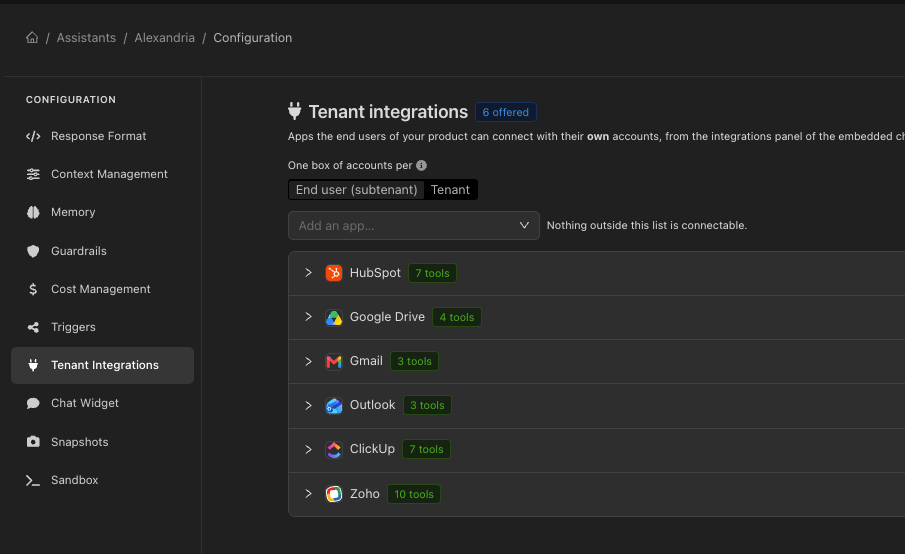
What you decide, and what they decide
You define the catalogue: which apps are offered, and which tools of each app the assistant may call. Your users decide whether to connect, and with which account.Where the catalogue is configured
On the assistant, in its Tenant integrations section — or on the environment it is connected to, when a whole product line should offer the same apps. What the assistant actually offers is the result of merging both, which is what the API reports and what the widget shows.Who owns a connection
connectionScope decides whether a connected account belongs to a whole customer organisation or to one person inside it:
subtenant (default)
Each end user connects their own accounts. The finest separation.
tenant
One connection serves the customer’s whole organisation.
Proving who is asking
This is the part worth reading twice. Calls to the per-tenant integrations API say which tenant they are for. How that claim is established is a per-assistant choice:open exists because it needs nothing new to work with, and it is fine while you are building. For anything real, use signed: the whole point of per-user integrations is that one customer’s mailbox is not another’s, and only a signed session actually proves which customer is calling.In the widget
The embedded chat can show a panel where the user connects their apps: what is offered, what they have connected, and a button to add or remove one. It is rendered by@devicai/ui inside your own product, not in the Devic console.
Apps that authenticate with an API key are connected without leaving the page; OAuth apps open a popup and post the result back when the user is done. See Embedding in your product.
Through the API
The tenant is resolved server-side on every one of these calls and never taken from the path — which is what makes this subtree safe to grant to a key that ships in a browser bundle, unlike the workspace integrations API.