> ## Documentation Index
> Fetch the complete documentation index at: https://docs.devic.ai/llms.txt
> Use this file to discover all available pages before exploring further.
# Projects
> The unit of visibility in Devic: who sees which agents, assistants, tools and knowledge — and what each one costs.
A **project** is how work is divided in Devic — and, above everything else, **it is how you decide who sees what**.
Agents, assistants, tool servers, knowledge documents, folders and environments each belong to a project. Access is then granted per project and per person: give somebody the *Support* project and they see its agents, its assistants, its tools and its knowledge — and nothing else in the account. There is no separate permission system to learn beside this one; the project *is* the unit of visibility.
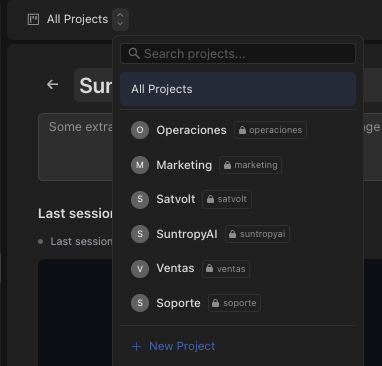 Everything else a project gives you — cost per project, threads filtered per project, a tidier interface — follows from the same grouping. But if you only take one thing from this page: **a project is the boundary between one user and another user's work.**
***
## Why they exist
The reason projects exist. Access is granted per project and per user, and a user reaches exactly the entities of the projects they were given.
Every run is attributed to a project, so "what does the support automation cost us" is a question with an answer.
Choosing a project filters the interface to it. Fewer things on screen, and no chance of editing the wrong agent.
Threads and conversations are listed per project, whichever agent produced them.
***
## Who sees a project
A project is either **public** — visible to everyone in the account — or **private**, visible only to those explicitly given access. Administrators see everything either way.
Everything else a project gives you — cost per project, threads filtered per project, a tidier interface — follows from the same grouping. But if you only take one thing from this page: **a project is the boundary between one user and another user's work.**
***
## Why they exist
The reason projects exist. Access is granted per project and per user, and a user reaches exactly the entities of the projects they were given.
Every run is attributed to a project, so "what does the support automation cost us" is a question with an answer.
Choosing a project filters the interface to it. Fewer things on screen, and no chance of editing the wrong agent.
Threads and conversations are listed per project, whichever agent produced them.
***
## Who sees a project
A project is either **public** — visible to everyone in the account — or **private**, visible only to those explicitly given access. Administrators see everything either way.
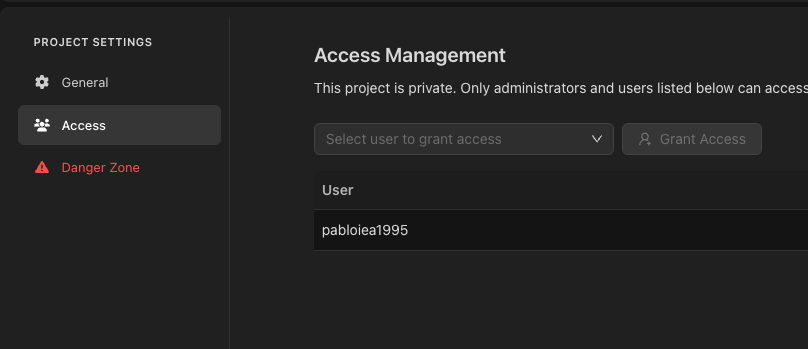 Access is granted per user from the project's settings, and each grant is one of two shapes:
| Grant | What the user reaches |
| --------------------- | ------------------------------------------------------------------------------------------------------------------------------------- |
| **Whole project** | Every entity in it: assistants, agents, tool servers, environments, knowledge folders and documents — including the ones added later. |
| **Selected entities** | Only the ones named, family by family. The same project can be shared narrowly with one person and completely with another. |
That second shape is what makes a project usable as a shared space rather than an all-or-nothing wall: a contractor can be given the two assistants they work on inside a project that also holds twenty they must not see.
Enforcement is by id, not merely by what is listed. An entity that was not granted cannot be opened by knowing its identifier — which matters, because identifiers travel in every URL a person is sent.
The role decides what someone can *do* once inside; the project decides what they can *reach*. See [Users and roles](/devic/administration/users-and-roles) for the three roles and how the two combine.
***
## What a project tells you
Access is granted per user from the project's settings, and each grant is one of two shapes:
| Grant | What the user reaches |
| --------------------- | ------------------------------------------------------------------------------------------------------------------------------------- |
| **Whole project** | Every entity in it: assistants, agents, tool servers, environments, knowledge folders and documents — including the ones added later. |
| **Selected entities** | Only the ones named, family by family. The same project can be shared narrowly with one person and completely with another. |
That second shape is what makes a project usable as a shared space rather than an all-or-nothing wall: a contractor can be given the two assistants they work on inside a project that also holds twenty they must not see.
Enforcement is by id, not merely by what is listed. An entity that was not granted cannot be opened by knowing its identifier — which matters, because identifiers travel in every URL a person is sent.
The role decides what someone can *do* once inside; the project decides what they can *reach*. See [Users and roles](/devic/administration/users-and-roles) for the three roles and how the two combine.
***
## What a project tells you
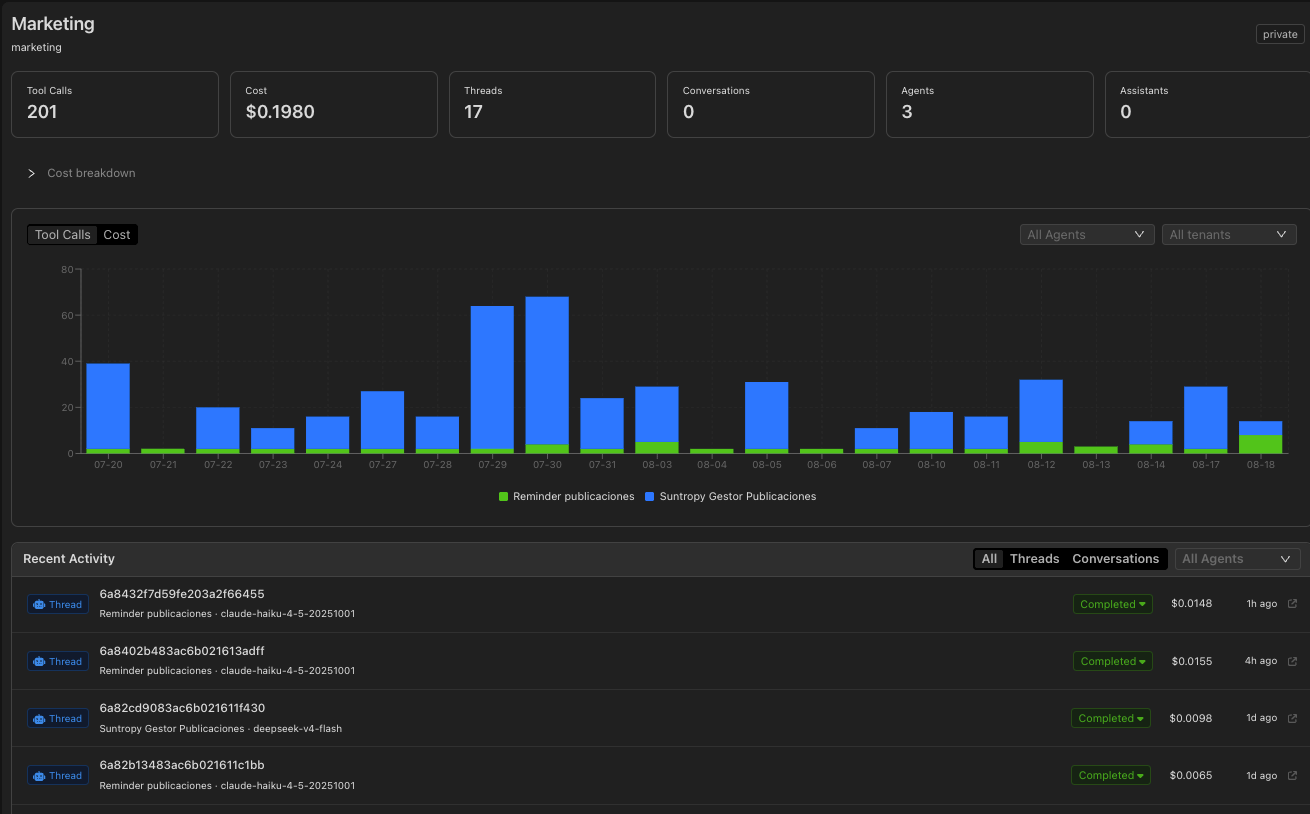 | View | What it answers |
| ----------------- | ------------------------------------------------- |
| **Stats** | How much is running here, and how much has run. |
| **Threads** | Every agent run in this project, whichever agent. |
| **Conversations** | Every assistant conversation in this project. |
| **Costs** | Daily and monthly cost, in tokens and in money. |
***
## Entities without a project
An agent can also live outside any project — "All Projects" — which makes it visible account-wide. It is the right choice for something genuinely shared, and the wrong one for anything that should be confined.
Project-less entities are treated differently depending on where you are looking. In the console, which always has a project selected, they show up in every project. Through the public API they are excluded from a non-administrator's listing, so a scoped token cannot pull the whole account by listing without a filter.
***
## Archiving
Projects are archived, not deleted. An archived project disappears from the usual lists while its history — threads, conversations, cost — stays intact and queryable.
***
## Through the API
Projects are fully available in the [public API](/api-reference/endpoint/get-api-v1-projects): create them, list their threads and conversations, and pull their cost series to bill or report on them.
| View | What it answers |
| ----------------- | ------------------------------------------------- |
| **Stats** | How much is running here, and how much has run. |
| **Threads** | Every agent run in this project, whichever agent. |
| **Conversations** | Every assistant conversation in this project. |
| **Costs** | Daily and monthly cost, in tokens and in money. |
***
## Entities without a project
An agent can also live outside any project — "All Projects" — which makes it visible account-wide. It is the right choice for something genuinely shared, and the wrong one for anything that should be confined.
Project-less entities are treated differently depending on where you are looking. In the console, which always has a project selected, they show up in every project. Through the public API they are excluded from a non-administrator's listing, so a scoped token cannot pull the whole account by listing without a filter.
***
## Archiving
Projects are archived, not deleted. An archived project disappears from the usual lists while its history — threads, conversations, cost — stays intact and queryable.
***
## Through the API
Projects are fully available in the [public API](/api-reference/endpoint/get-api-v1-projects): create them, list their threads and conversations, and pull their cost series to bill or report on them.