> ## Documentation Index
> Fetch the complete documentation index at: https://docs.devic.ai/llms.txt
> Use this file to discover all available pages before exploring further.
# Usage limits and plans
> Ceilings on what each customer can consume, enforced before the model is called.
A tenant on your free plan should not be able to spend your monthly budget in an afternoon. Usage limits stop that, and they stop it **before** the model is called rather than after the bill arrives.
 ***
## A rule is four things
| Part | Options |
| ---------- | ---------------------------------------------------------------------- |
| **Metric** | `tokens` or `cost` |
| **Window** | Every N hours, days, weeks or months |
| **Limit** | The ceiling for that window |
| **Scope** | The whole tenant, every subtenant individually, or one named subtenant |
Rules combine. *200k tokens every 3 hours* and *€50 a month* can both apply; every applicable rule is evaluated and **the most restrictive one blocks**.
The scope choice is worth pausing on:
One pool for the whole customer organisation.
The same ceiling applied to *each* subtenant separately.
An override for a specific user — the trial account that needs more, or less.
***
## Plans (tiers)
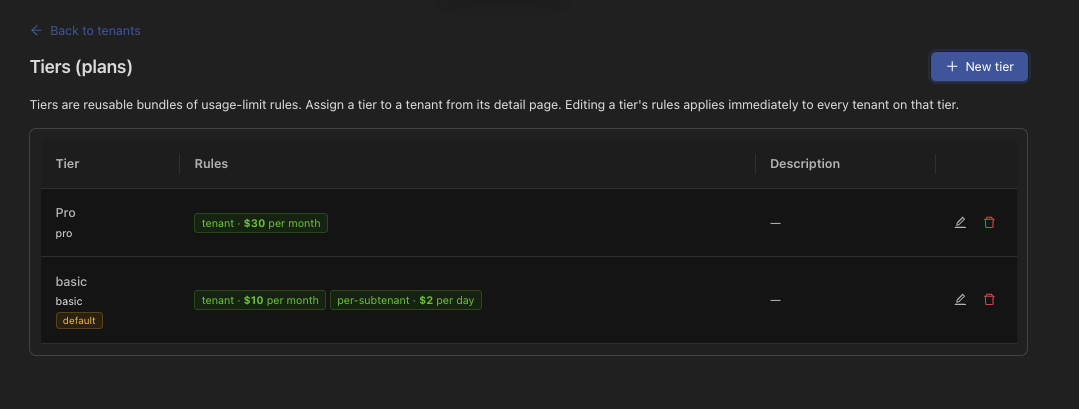
A **tier** is a named set of rules — *Free*, *Pro*, *Enterprise* — assigned to tenants.
Tiers are assigned by **live reference**, not by copy. A tenant stores which tier it is on; editing the tier propagates to every tenant on it immediately. Raising the Pro limit is one edit, not a migration.
One tier can be marked as the default, which is what a newly seen tenant gets without anyone assigning anything.
A tenant's own page shows the plan it is on, what it has consumed against each applicable rule, any ad-hoc override, and the history window by window:
***
## A rule is four things
| Part | Options |
| ---------- | ---------------------------------------------------------------------- |
| **Metric** | `tokens` or `cost` |
| **Window** | Every N hours, days, weeks or months |
| **Limit** | The ceiling for that window |
| **Scope** | The whole tenant, every subtenant individually, or one named subtenant |
Rules combine. *200k tokens every 3 hours* and *€50 a month* can both apply; every applicable rule is evaluated and **the most restrictive one blocks**.
The scope choice is worth pausing on:
One pool for the whole customer organisation.
The same ceiling applied to *each* subtenant separately.
An override for a specific user — the trial account that needs more, or less.
***
## Plans (tiers)
A **tier** is a named set of rules — *Free*, *Pro*, *Enterprise* — assigned to tenants.
Tiers are assigned by **live reference**, not by copy. A tenant stores which tier it is on; editing the tier propagates to every tenant on it immediately. Raising the Pro limit is one edit, not a migration.
One tier can be marked as the default, which is what a newly seen tenant gets without anyone assigning anything.
A tenant's own page shows the plan it is on, what it has consumed against each applicable rule, any ad-hoc override, and the history window by window:
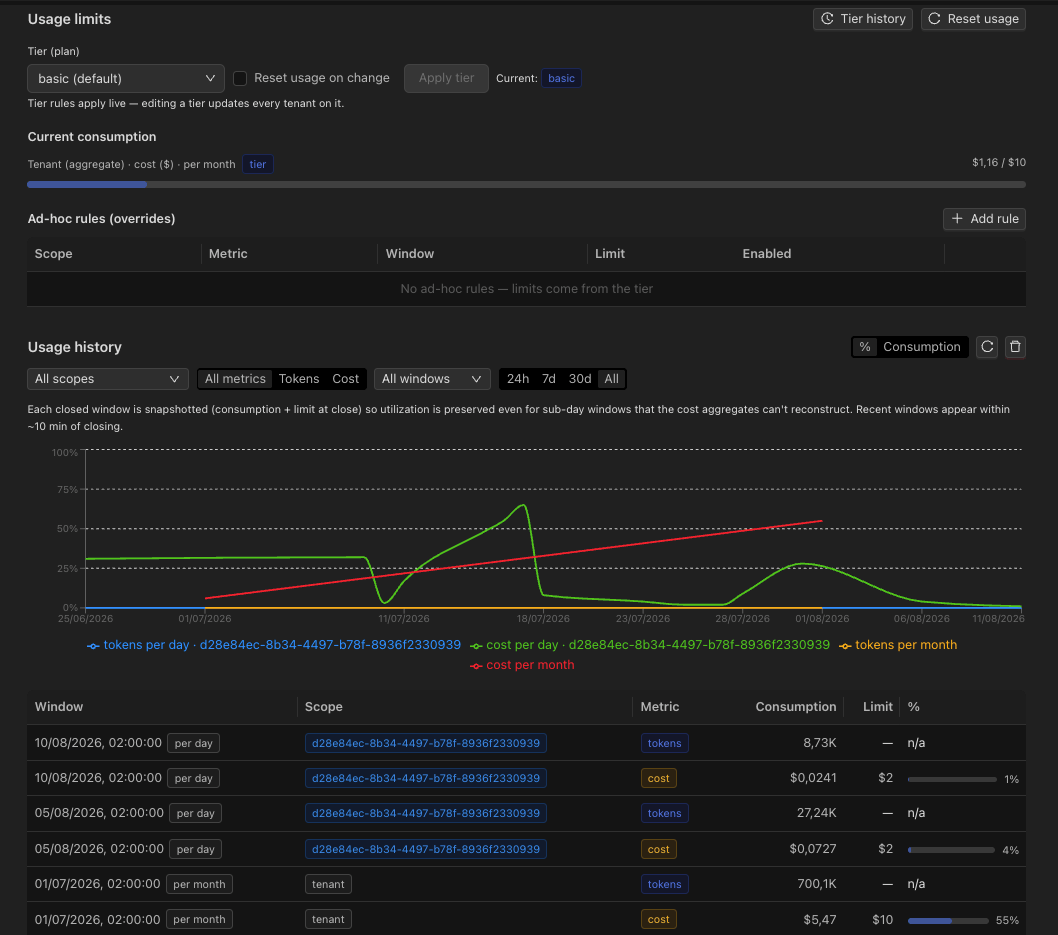 Each closed window is snapshotted with its consumption and its limit at the time, so utilisation stays meaningful even for sub-day windows that a cost aggregate could not reconstruct afterwards.
***
## What happens at the ceiling
The request is refused with `429` before any model call, and Devic leaves a visible trace so the block is explainable rather than mysterious:
* **In a conversation**, the chat is marked as paused by limit, with which rule blocked, the current value, the ceiling and when the window resets. The mark clears itself as soon as a later message goes through.
* **For an agent**, a run is recorded in a `LIMIT_EXCEEDED` state. It is terminal — the queue does not pick it up again — and repeated blocked requests within the same window collapse into one marker rather than flooding the list.
Limit checking **fails open**. If the counter store is unreachable, the request is allowed rather than refused. Denying real customers because of an infrastructure blip is the worse failure of the two — but it does mean limits are a business control, not a security boundary.
***
## Upgrading from your own checkout
The usual shape: your billing system completes a payment and calls Devic to move the tenant to the new plan.
```bash theme={null}
curl -X POST https://api.devic.ai/v1/tenant-admin/acme-corp/tier \
-H "Authorization: Bearer $DEVIC_API_KEY" \
-H "Content-Type: application/json" \
-d '{ "tierId": "pro", "resetUsage": true }'
```
The change is recorded with its source, so the history of who moved between plans and why is auditable. Counters can be reset at the same time — the natural thing when someone upgrades mid-window.
The `tenant-admin` endpoints are privileged. Keys restricted for browser use are refused at the gateway, so a key that ships in your bundle cannot promote its own tenant to Enterprise. Call these from your server.
***
## Reading consumption
The read-only side lives in its own subtree, `/v1/tenant-usage/*`, safe to grant to a browser key — which is what lets a widget show a user how much of their allowance is left:
| Call | Purpose |
| ------------------------------------------------------------------------------------------------------------- | ------------------------------------------------- |
| [`GET /v1/tenant-usage/tiers`](/api-reference/endpoint/get-api-v1-tenant-usage-tiers) | The plans available in the account. |
| [`GET /v1/tenant-usage/{tenantId}`](/api-reference/endpoint/get-api-v1-tenant-usage-tenantid) | Current consumption against the applicable rules. |
| [`GET /v1/tenant-usage/{tenantId}/history`](/api-reference/endpoint/get-api-v1-tenant-usage-tenantid-history) | Consumption window by window. |
Each closed window is snapshotted with its consumption and its limit at the time, so utilisation stays meaningful even for sub-day windows that a cost aggregate could not reconstruct afterwards.
***
## What happens at the ceiling
The request is refused with `429` before any model call, and Devic leaves a visible trace so the block is explainable rather than mysterious:
* **In a conversation**, the chat is marked as paused by limit, with which rule blocked, the current value, the ceiling and when the window resets. The mark clears itself as soon as a later message goes through.
* **For an agent**, a run is recorded in a `LIMIT_EXCEEDED` state. It is terminal — the queue does not pick it up again — and repeated blocked requests within the same window collapse into one marker rather than flooding the list.
Limit checking **fails open**. If the counter store is unreachable, the request is allowed rather than refused. Denying real customers because of an infrastructure blip is the worse failure of the two — but it does mean limits are a business control, not a security boundary.
***
## Upgrading from your own checkout
The usual shape: your billing system completes a payment and calls Devic to move the tenant to the new plan.
```bash theme={null}
curl -X POST https://api.devic.ai/v1/tenant-admin/acme-corp/tier \
-H "Authorization: Bearer $DEVIC_API_KEY" \
-H "Content-Type: application/json" \
-d '{ "tierId": "pro", "resetUsage": true }'
```
The change is recorded with its source, so the history of who moved between plans and why is auditable. Counters can be reset at the same time — the natural thing when someone upgrades mid-window.
The `tenant-admin` endpoints are privileged. Keys restricted for browser use are refused at the gateway, so a key that ships in your bundle cannot promote its own tenant to Enterprise. Call these from your server.
***
## Reading consumption
The read-only side lives in its own subtree, `/v1/tenant-usage/*`, safe to grant to a browser key — which is what lets a widget show a user how much of their allowance is left:
| Call | Purpose |
| ------------------------------------------------------------------------------------------------------------- | ------------------------------------------------- |
| [`GET /v1/tenant-usage/tiers`](/api-reference/endpoint/get-api-v1-tenant-usage-tiers) | The plans available in the account. |
| [`GET /v1/tenant-usage/{tenantId}`](/api-reference/endpoint/get-api-v1-tenant-usage-tenantid) | Current consumption against the applicable rules. |
| [`GET /v1/tenant-usage/{tenantId}/history`](/api-reference/endpoint/get-api-v1-tenant-usage-tenantid-history) | Consumption window by window. |