> ## Documentation Index
> Fetch the complete documentation index at: https://docs.devic.ai/llms.txt
> Use this file to discover all available pages before exploring further.
# Memory
> What an assistant remembers between conversations — and who it remembers it for.
Knowledge is what you write for an agent. **Memory** is what it learns by working.
When memory is on, an assistant carries facts from one conversation into the next: that this customer is on the enterprise plan, that the deployment was moved to Friday, that the contact prefers to be called Alex. Nobody has to repeat it, and nobody has to write it down.
 ***
## Two layers
A short, standing block that goes into **every** prompt: persona, standing instructions, decisions taken, profile of who you are talking to. Small on purpose — it is always there, so it must be worth its space.
Everything else, distilled from conversations into facts and the entities they connect, and retrieved only when relevant. Grows without bound; costs nothing when it is not needed.
The two are independent. An assistant can have a core block and no long-term memory, or the other way round.
***
## How it works
After each exchange, the user and assistant text is pushed to the memory service. Never the system prompt, never tool output.
In the background, the exchange is turned into **facts** — short statements with the entities they involve, and when they were true. A later fact about the same relation invalidates the earlier one, so "the budget is 50k" becomes history the moment it becomes 75k.
At the start of a new conversation, the relevant part of memory is retrieved and put in front of the model; during the conversation, the assistant can search memory itself when a question calls for it.
Recall degrades quietly. If the memory service is slow or unreachable, the conversation goes ahead without it rather than failing — an assistant with amnesia beats an assistant that will not answer.
***
## Choosing how it recalls
| Mode | Behaviour |
| -------------------- | -------------------------------------------------------------------------------------------------------------------------------------------- |
| **Both** *(default)* | Automatic recall when a conversation starts, **and** a search tool the assistant can reach for mid-conversation. |
| **Tools** | No automatic recall. The assistant looks things up only when it decides to. Cheaper, and better when most conversations do not need history. |
| **Inject** | Automatic recall only, no tool. |
There is also a choice of what gets distilled: a **knowledge graph** of facts plus the entities and relations between them — which is what makes multi-hop questions work — or **standalone facts**, semantically searchable but without entity nodes. The graph is the default.
***
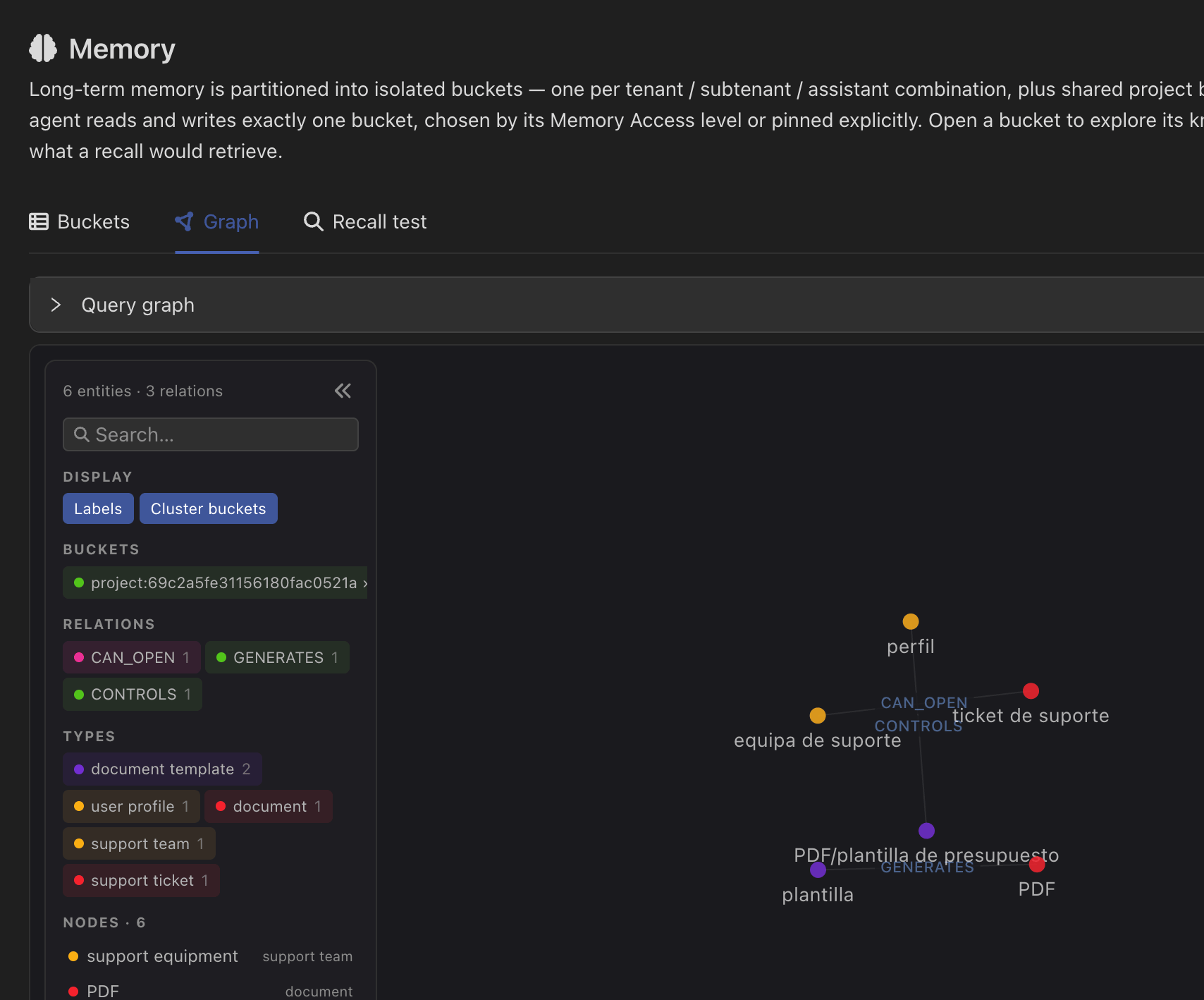
## Looking at what it knows
A memory bucket opens onto four views:
| View | What it is for |
| -------------------- | -------------------------------------------------------------------------------------------- |
| **Entities & graph** | Who and what the assistant knows about, and how they are connected. |
| **Facts** | The individual statements, with their history — including the ones a later fact invalidated. |
| **Core memory** | The standing block, editable. |
| **Recall test** | A playground: ask a question and see exactly what memory would return for it. |
Recall test is the fastest way to answer "why did it not remember that?". If the fact is in the bucket but the query does not surface it, the problem is retrieval, not storage.
***
## The part that matters most
Memory is only useful if it remembers the right things *for the right person*. An assistant serving a hundred customers must never answer one of them with another's facts.
That is decided by the bucket the assistant writes to, and it is worth understanding before switching memory on in production.
Who shares a memory with whom — by tenant, by assistant, by project, by person.
The always-present block, and how to edit it.
***
## Two layers
A short, standing block that goes into **every** prompt: persona, standing instructions, decisions taken, profile of who you are talking to. Small on purpose — it is always there, so it must be worth its space.
Everything else, distilled from conversations into facts and the entities they connect, and retrieved only when relevant. Grows without bound; costs nothing when it is not needed.
The two are independent. An assistant can have a core block and no long-term memory, or the other way round.
***
## How it works
After each exchange, the user and assistant text is pushed to the memory service. Never the system prompt, never tool output.
In the background, the exchange is turned into **facts** — short statements with the entities they involve, and when they were true. A later fact about the same relation invalidates the earlier one, so "the budget is 50k" becomes history the moment it becomes 75k.
At the start of a new conversation, the relevant part of memory is retrieved and put in front of the model; during the conversation, the assistant can search memory itself when a question calls for it.
Recall degrades quietly. If the memory service is slow or unreachable, the conversation goes ahead without it rather than failing — an assistant with amnesia beats an assistant that will not answer.
***
## Choosing how it recalls
| Mode | Behaviour |
| -------------------- | -------------------------------------------------------------------------------------------------------------------------------------------- |
| **Both** *(default)* | Automatic recall when a conversation starts, **and** a search tool the assistant can reach for mid-conversation. |
| **Tools** | No automatic recall. The assistant looks things up only when it decides to. Cheaper, and better when most conversations do not need history. |
| **Inject** | Automatic recall only, no tool. |
There is also a choice of what gets distilled: a **knowledge graph** of facts plus the entities and relations between them — which is what makes multi-hop questions work — or **standalone facts**, semantically searchable but without entity nodes. The graph is the default.
***
## Looking at what it knows
A memory bucket opens onto four views:
| View | What it is for |
| -------------------- | -------------------------------------------------------------------------------------------- |
| **Entities & graph** | Who and what the assistant knows about, and how they are connected. |
| **Facts** | The individual statements, with their history — including the ones a later fact invalidated. |
| **Core memory** | The standing block, editable. |
| **Recall test** | A playground: ask a question and see exactly what memory would return for it. |
Recall test is the fastest way to answer "why did it not remember that?". If the fact is in the bucket but the query does not surface it, the problem is retrieval, not storage.
***
## The part that matters most
Memory is only useful if it remembers the right things *for the right person*. An assistant serving a hundred customers must never answer one of them with another's facts.
That is decided by the bucket the assistant writes to, and it is worth understanding before switching memory on in production.
Who shares a memory with whom — by tenant, by assistant, by project, by person.
The always-present block, and how to edit it.