> ## Documentation Index
> Fetch the complete documentation index at: https://docs.devic.ai/llms.txt
> Use this file to discover all available pages before exploring further.
# Core memory
> The short standing block that goes into every prompt: persona, instructions, decisions and profile.
Core memory is the part of memory that is **always** present. It is not searched or retrieved — it is rendered into every prompt, before the conversation even starts.
That makes it the right place for the handful of things the assistant must never have to look up, and the wrong place for everything else.
 ***
## The four sections
| Section | What belongs here |
| ---------------- | ---------------------------------------------------------------------------------------- |
| **Persona** | Who the assistant is in this deployment: its role, its tone, what it never does. |
| **Instructions** | Standing rules. *"Always quote prices in EUR."* *"Escalate anything about refunds."* |
| **Decisions** | Things settled earlier that should not be relitigated. *"We chose the Postgres option."* |
| **Profile** | Who the assistant is talking to. Name, plan, timezone, preferences. |
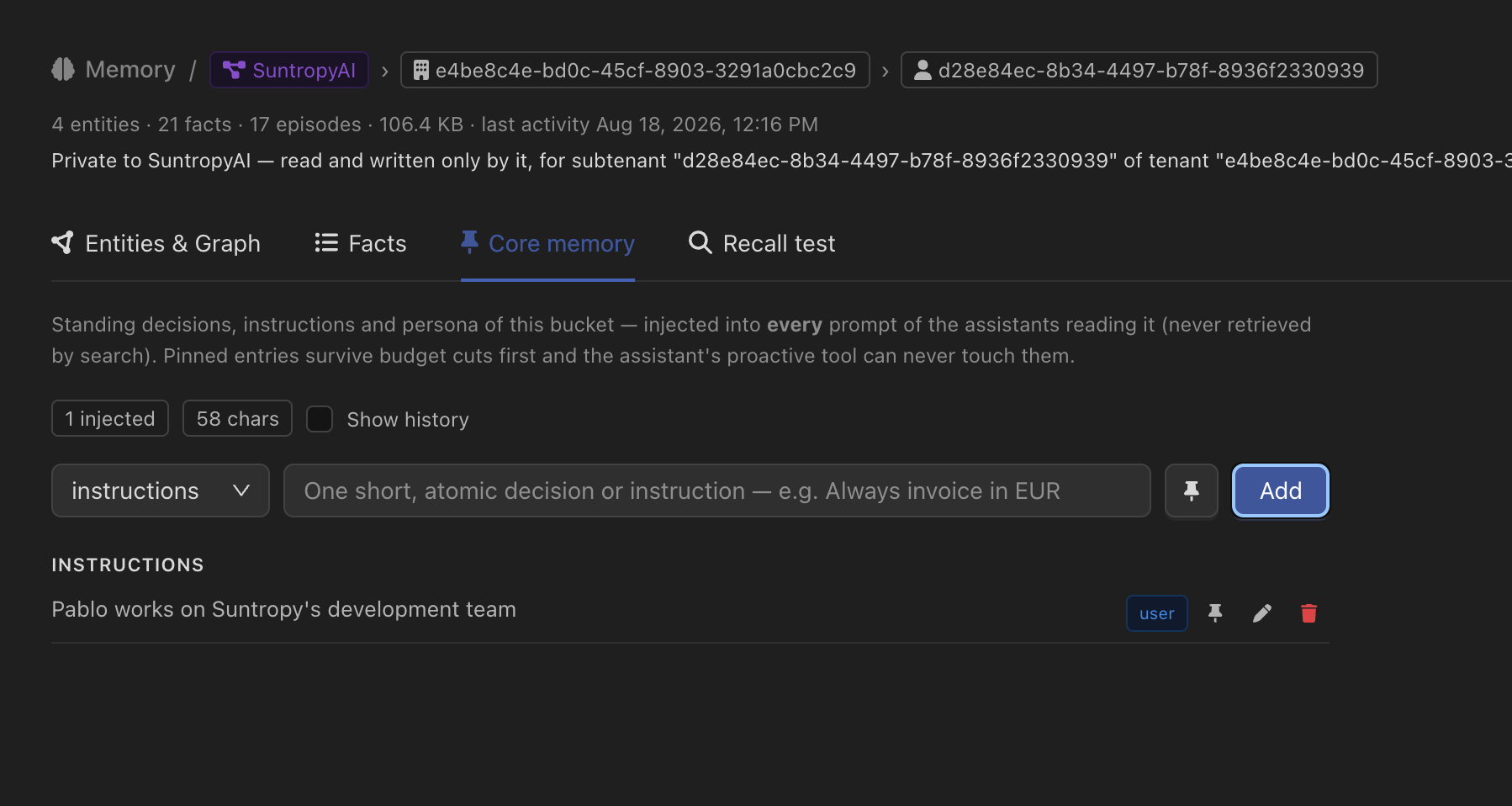
Entries can be **pinned**, and pinning does two things worth knowing. A pinned entry is the last to be dropped when the block exceeds its render budget, and **the assistant's own proactive tool can never touch it** — so a rule you set by hand cannot be quietly rewritten by the model that has to follow it.
The panel shows the budget alongside the entries — how many are being injected and how many characters they take — so you can see what the block is costing before it starts costing it.
Core memory competes with the conversation for the model's attention, and it is paid for on every single turn. Keep it to statements that change how the assistant behaves. Anything that is merely *true* belongs in long-term memory or in [Knowledge](/devic/knowledge/index).
***
## Editing it
Three things can write to core memory, and they are deliberately different:
From the console, or from the memory modal in an embedded widget.
Through the API, so a profile that already exists in your own database does not have to be retyped.
When **proactive** core memory is on, the assistant gets a tool to record a standing decision itself, mid-conversation.
Every entry is labelled with where it came from — you, the API, or the assistant — so a block you did not write is readable as such.
Edits are append-only: changing an entry writes a new one that supersedes the old, rather than overwriting it. The history stays readable, and an archived entry can still be listed when you ask for it.
An edit takes effect on the next turn — the rendered block is refreshed as soon as you write, not when a cache happens to expire.
***
## Letting the end user edit their own
In an embedded assistant, core memory is often *the user's own profile*. The [`@devicai/ui`](/devic/embed/index) chat drawer can show it and let them change it:
```jsx theme={null}
```
That renders a brain button in the drawer header, opening the core memory of the bucket **that user** resolves to — never anyone else's. What they see and edit is exactly what their assistant is given.
The same panel is available on its own as `CoreMemoryModal`, with `editable={false}` for a read-only view of what the assistant remembers about them.
Two requirements. The API key or [tenant session](/devic/multi-tenant/tenant-sessions) the page uses must be allowed to reach `/api/v1/memory/*` — see [API keys](/devic/administration/api-keys). And this is a React component: the [hosted widget](/devic/embed/index) has no equivalent control.
***
## Limits
Each deployment has a ceiling on how many entries a core block can hold and how long they can be. The current limits are returned alongside the entries, so an interface can show how much room is left rather than failing on save.
***
## Through the API
| Call | Purpose |
| --------------------------------------------------------------------------------------------------------------------------------------------- | ------------------------------------------- |
| [`GET /v1/memory/assistants/{identifier}/core`](/api-reference/endpoint/get-api-v1-memory-assistants-identifier-core) | Read the block, with the deployment limits. |
| [`POST /v1/memory/assistants/{identifier}/core`](/api-reference/endpoint/post-api-v1-memory-assistants-identifier-core) | Add an entry. |
| [`PATCH /v1/memory/assistants/{identifier}/core/{entryId}`](/api-reference/endpoint/patch-api-v1-memory-assistants-identifier-core-entryid) | Supersede an entry. |
| [`DELETE /v1/memory/assistants/{identifier}/core/{entryId}`](/api-reference/endpoint/delete-api-v1-memory-assistants-identifier-core-entryid) | Remove one. |
The bucket is resolved server-side from the assistant's configuration and the tenant you name — the same resolution the chat runtime uses, so what you read is what the assistant gets. When the assistant has no core memory tier enabled, the read returns `enabled: false` with an empty list rather than an error.
***
## The four sections
| Section | What belongs here |
| ---------------- | ---------------------------------------------------------------------------------------- |
| **Persona** | Who the assistant is in this deployment: its role, its tone, what it never does. |
| **Instructions** | Standing rules. *"Always quote prices in EUR."* *"Escalate anything about refunds."* |
| **Decisions** | Things settled earlier that should not be relitigated. *"We chose the Postgres option."* |
| **Profile** | Who the assistant is talking to. Name, plan, timezone, preferences. |
Entries can be **pinned**, and pinning does two things worth knowing. A pinned entry is the last to be dropped when the block exceeds its render budget, and **the assistant's own proactive tool can never touch it** — so a rule you set by hand cannot be quietly rewritten by the model that has to follow it.
The panel shows the budget alongside the entries — how many are being injected and how many characters they take — so you can see what the block is costing before it starts costing it.
Core memory competes with the conversation for the model's attention, and it is paid for on every single turn. Keep it to statements that change how the assistant behaves. Anything that is merely *true* belongs in long-term memory or in [Knowledge](/devic/knowledge/index).
***
## Editing it
Three things can write to core memory, and they are deliberately different:
From the console, or from the memory modal in an embedded widget.
Through the API, so a profile that already exists in your own database does not have to be retyped.
When **proactive** core memory is on, the assistant gets a tool to record a standing decision itself, mid-conversation.
Every entry is labelled with where it came from — you, the API, or the assistant — so a block you did not write is readable as such.
Edits are append-only: changing an entry writes a new one that supersedes the old, rather than overwriting it. The history stays readable, and an archived entry can still be listed when you ask for it.
An edit takes effect on the next turn — the rendered block is refreshed as soon as you write, not when a cache happens to expire.
***
## Letting the end user edit their own
In an embedded assistant, core memory is often *the user's own profile*. The [`@devicai/ui`](/devic/embed/index) chat drawer can show it and let them change it:
```jsx theme={null}
```
That renders a brain button in the drawer header, opening the core memory of the bucket **that user** resolves to — never anyone else's. What they see and edit is exactly what their assistant is given.
The same panel is available on its own as `CoreMemoryModal`, with `editable={false}` for a read-only view of what the assistant remembers about them.
Two requirements. The API key or [tenant session](/devic/multi-tenant/tenant-sessions) the page uses must be allowed to reach `/api/v1/memory/*` — see [API keys](/devic/administration/api-keys). And this is a React component: the [hosted widget](/devic/embed/index) has no equivalent control.
***
## Limits
Each deployment has a ceiling on how many entries a core block can hold and how long they can be. The current limits are returned alongside the entries, so an interface can show how much room is left rather than failing on save.
***
## Through the API
| Call | Purpose |
| --------------------------------------------------------------------------------------------------------------------------------------------- | ------------------------------------------- |
| [`GET /v1/memory/assistants/{identifier}/core`](/api-reference/endpoint/get-api-v1-memory-assistants-identifier-core) | Read the block, with the deployment limits. |
| [`POST /v1/memory/assistants/{identifier}/core`](/api-reference/endpoint/post-api-v1-memory-assistants-identifier-core) | Add an entry. |
| [`PATCH /v1/memory/assistants/{identifier}/core/{entryId}`](/api-reference/endpoint/patch-api-v1-memory-assistants-identifier-core-entryid) | Supersede an entry. |
| [`DELETE /v1/memory/assistants/{identifier}/core/{entryId}`](/api-reference/endpoint/delete-api-v1-memory-assistants-identifier-core-entryid) | Remove one. |
The bucket is resolved server-side from the assistant's configuration and the tenant you name — the same resolution the chat runtime uses, so what you read is what the assistant gets. When the assistant has no core memory tier enabled, the read returns `enabled: false` with an empty list rather than an error.