> ## Documentation Index
> Fetch the complete documentation index at: https://docs.devic.ai/llms.txt
> Use this file to discover all available pages before exploring further.
# Buckets and scope
> Who shares a memory with whom: the two settings that decide it, and the isolation they guarantee.
A memory lives in a **bucket**. Everything an assistant remembers is written to one, and read from one.
Two settings decide which. Get them right and an assistant serving a thousand customers keeps a thousand separate memories without you doing anything. Get them wrong and it mixes them up — so this is the page to read before enabling memory in production.
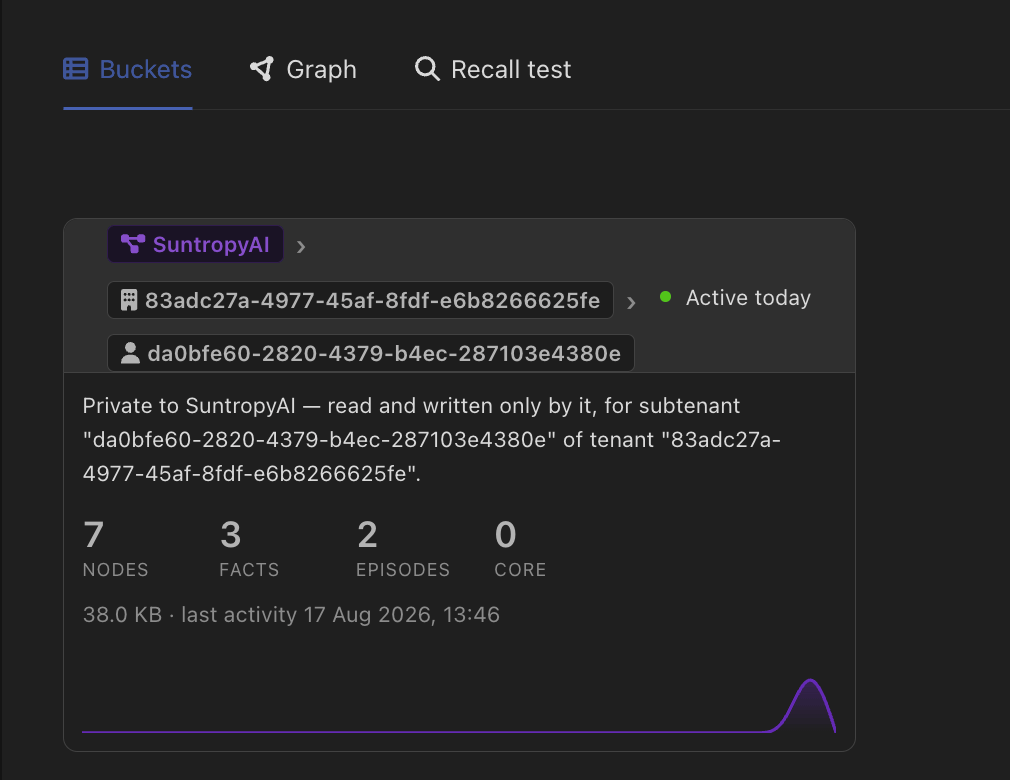 Each bucket describes itself in words — *"private to this assistant, for subtenant X of tenant Y"* — alongside what it holds. When in doubt about whether a setting does what you meant, read the bucket rather than re-reading the setting.
***
## Scope: how far the memory reaches
`scope` sets the level at which the bucket is partitioned, from the most isolated to the least:
| Scope | One memory per… | Use it when |
| ------------------------- | ------------------------ | -------------------------------------------------------------------------------------- |
| **subtenant** *(default)* | tenant **and** subtenant | Each end user, team or workspace of your customers must be sealed off from the others. |
| **tenant** | tenant | A customer's whole organisation shares one memory. |
| **assistant** | assistant | The assistant has one memory everywhere, regardless of who it talks to. |
| **client** | workspace | Every assistant set to this level shares a single memory across the account. |
Reads and writes go to the *same* bucket. When a conversation does not carry a subtenant, the default quietly degrades to the tenant level, and from there to the assistant level — it never falls sideways into someone else's bucket.
The default is the most isolated setting on purpose. Memory is never shared across tenants or subtenants unless you widen the scope yourself.
Widening can also be done for reads only: **inherit shared** lets an assistant *read* from broader levels while still writing to its own bucket. That is how a shared, organisation-wide memory can be visible to every team without any team being able to write into it.
***
## Owner: whose memory it is
`scope` says how finely the buckets are cut. `owner` says what family they belong to.
The assistant's own identity. Each assistant has its own memory family.
The project. Every agent and assistant in the project that opts in shares one family — still partitioned by tenant and subtenant. Entities with no project fall back to `self`.
The **person** holding the conversation. Memory follows them across every assistant and agent set to this owner — one memory per person.
An exact bucket, named outright. Reads and writes go there and nowhere else, ignoring scope and hierarchy. This is how several assistants deliberately share one memory.
`owner: user` gives one memory *per person*, not per person per tenant — splitting it by whatever tenant a conversation happened to carry would defeat the point. Runs with nobody behind them — cron schedules, inbound channels, API-key traffic — fall back to the entity's own bucket rather than pooling into a shared one.
***
## Putting it together
Two examples, both common:
**A SaaS with customer organisations.** Leave `scope: subtenant` and `owner: self`. Each customer, and each team inside them, gets its own memory. Nothing to configure per customer — the bucket follows the tenant the conversation carries.
**An internal assistant your staff use all day.** Set `owner: user`. Whatever anyone tells it, it remembers for them, on every assistant that shares this owner. Their colleague's memory is a different bucket.
***
## Forgetting
Memory can be deleted by subtree — one tenant, one subtenant, one session, one entity — which is what makes an erasure request answerable. Deleting a tenant's memory leaves every other tenant untouched.
***
## What the user sees
In an embedded chat, a conversation that used memory can show what it recalled: the facts and entities it brought in, and where they came from. It can be shown as-is, styled to your product, or hidden entirely. See [Embedding in your product](/devic/embed/index).
Each bucket describes itself in words — *"private to this assistant, for subtenant X of tenant Y"* — alongside what it holds. When in doubt about whether a setting does what you meant, read the bucket rather than re-reading the setting.
***
## Scope: how far the memory reaches
`scope` sets the level at which the bucket is partitioned, from the most isolated to the least:
| Scope | One memory per… | Use it when |
| ------------------------- | ------------------------ | -------------------------------------------------------------------------------------- |
| **subtenant** *(default)* | tenant **and** subtenant | Each end user, team or workspace of your customers must be sealed off from the others. |
| **tenant** | tenant | A customer's whole organisation shares one memory. |
| **assistant** | assistant | The assistant has one memory everywhere, regardless of who it talks to. |
| **client** | workspace | Every assistant set to this level shares a single memory across the account. |
Reads and writes go to the *same* bucket. When a conversation does not carry a subtenant, the default quietly degrades to the tenant level, and from there to the assistant level — it never falls sideways into someone else's bucket.
The default is the most isolated setting on purpose. Memory is never shared across tenants or subtenants unless you widen the scope yourself.
Widening can also be done for reads only: **inherit shared** lets an assistant *read* from broader levels while still writing to its own bucket. That is how a shared, organisation-wide memory can be visible to every team without any team being able to write into it.
***
## Owner: whose memory it is
`scope` says how finely the buckets are cut. `owner` says what family they belong to.
The assistant's own identity. Each assistant has its own memory family.
The project. Every agent and assistant in the project that opts in shares one family — still partitioned by tenant and subtenant. Entities with no project fall back to `self`.
The **person** holding the conversation. Memory follows them across every assistant and agent set to this owner — one memory per person.
An exact bucket, named outright. Reads and writes go there and nowhere else, ignoring scope and hierarchy. This is how several assistants deliberately share one memory.
`owner: user` gives one memory *per person*, not per person per tenant — splitting it by whatever tenant a conversation happened to carry would defeat the point. Runs with nobody behind them — cron schedules, inbound channels, API-key traffic — fall back to the entity's own bucket rather than pooling into a shared one.
***
## Putting it together
Two examples, both common:
**A SaaS with customer organisations.** Leave `scope: subtenant` and `owner: self`. Each customer, and each team inside them, gets its own memory. Nothing to configure per customer — the bucket follows the tenant the conversation carries.
**An internal assistant your staff use all day.** Set `owner: user`. Whatever anyone tells it, it remembers for them, on every assistant that shares this owner. Their colleague's memory is a different bucket.
***
## Forgetting
Memory can be deleted by subtree — one tenant, one subtenant, one session, one entity — which is what makes an erasure request answerable. Deleting a tenant's memory leaves every other tenant untouched.
***
## What the user sees
In an embedded chat, a conversation that used memory can show what it recalled: the facts and entities it brought in, and where they came from. It can be shown as-is, styled to your product, or hidden entirely. See [Embedding in your product](/devic/embed/index).