> ## Documentation Index
> Fetch the complete documentation index at: https://docs.devic.ai/llms.txt
> Use this file to discover all available pages before exploring further.
# Skills
> Packaged know-how an agent loads only when it needs it: what a skill is, how to attach one, and what actually reaches the model.
A document tells an agent *what is true*. A **skill** tells it *how to do something*.
Skills are marked **Preview** in the interface. The model described here is settled — what may still move is the interface around it.
A skill is a self-contained set of instructions — a procedure, a house style, a checklist, a format to produce — written as markdown and given a name and a description. The agent is told its skills exist, and reads the full instructions only at the moment it decides one applies.
That last part is the whole point. Ten skills cost roughly ten lines of prompt until one of them is needed.
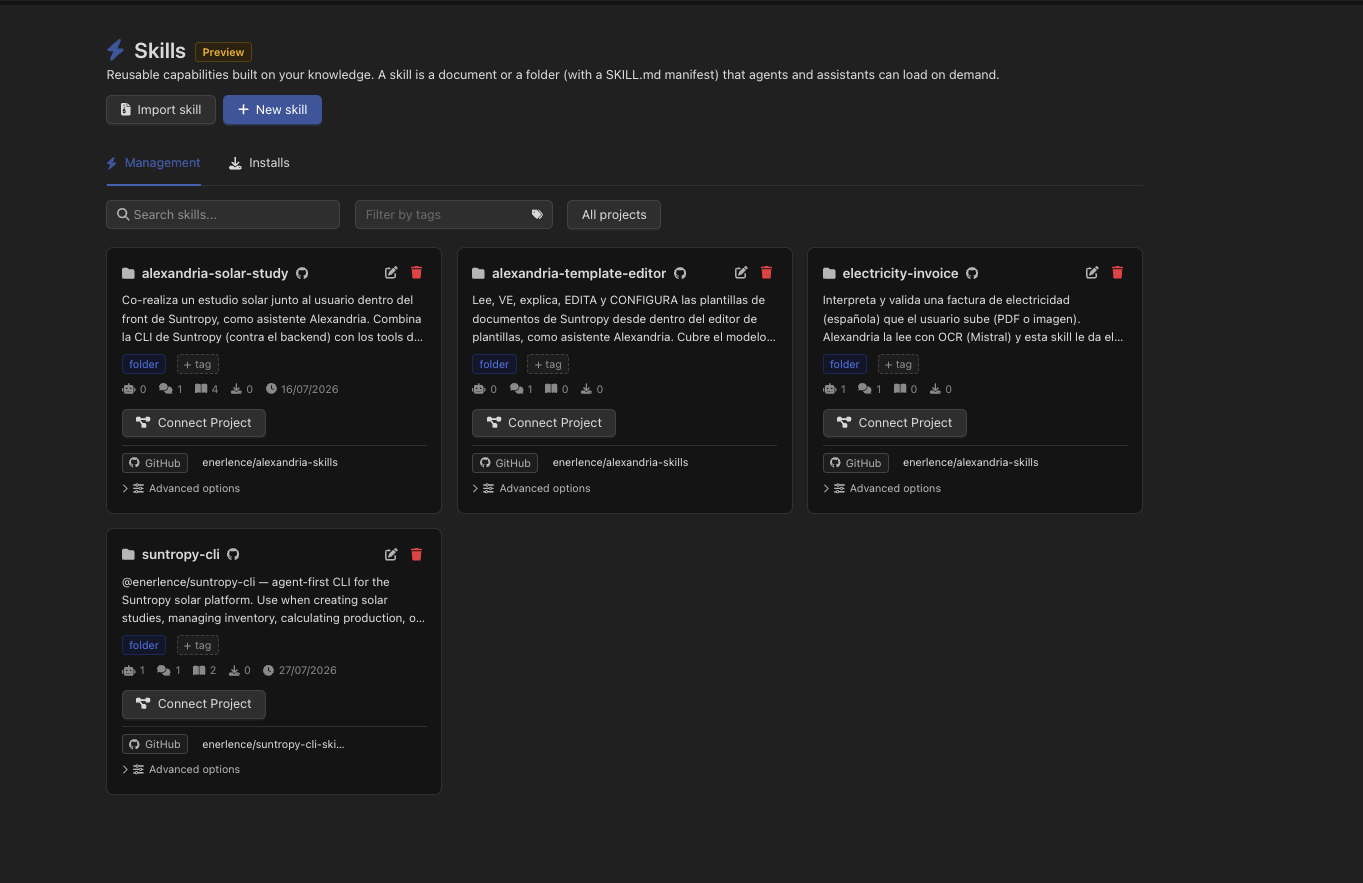 The catalogue lives under **Knowledge → Skills**, with a search box, a tag filter and a project selector. Each card carries the skill's type, how many agents and assistants it is linked to, how many times it has been read, and — through **Connect Project** — which [project](/devic/projects/index) it belongs to, which is also what decides who can see it.
***
## What a skill is made of
Skills live in Knowledge — a skill *is* a document or a folder with a flag on it — so everything on the rest of this section applies: versions, the editor, folders, search.
A single markdown document. Everything the agent needs is on that one page.
A folder with a `SKILL.md` at its root and whatever else it needs beside it: reference pages, examples, scripts, templates. The manifest explains itself and points at the rest.
The **name** and **description** come from the YAML frontmatter of the document — or of the `SKILL.md`, for a folder skill:
```markdown theme={null}
---
name: Quarterly report
description: How we write the quarterly report — structure, tone, the figures to include and where they come from.
---
## Structure
Start with the headline number…
```
The description is not decoration: it is the *only* thing the model sees before deciding whether to open the skill. Write it as the answer to "when should I use this?", not as a title restated. Without frontmatter, the document's own name and its generated summary are used instead.
Folder skills follow the same layout as the Agent Skills format used elsewhere in the industry, so a skill written for Claude or published on a skills registry works here unchanged. You can import one directly — `.skill`, a `.zip`, or a lone `SKILL.md`.
***
## Attaching a skill
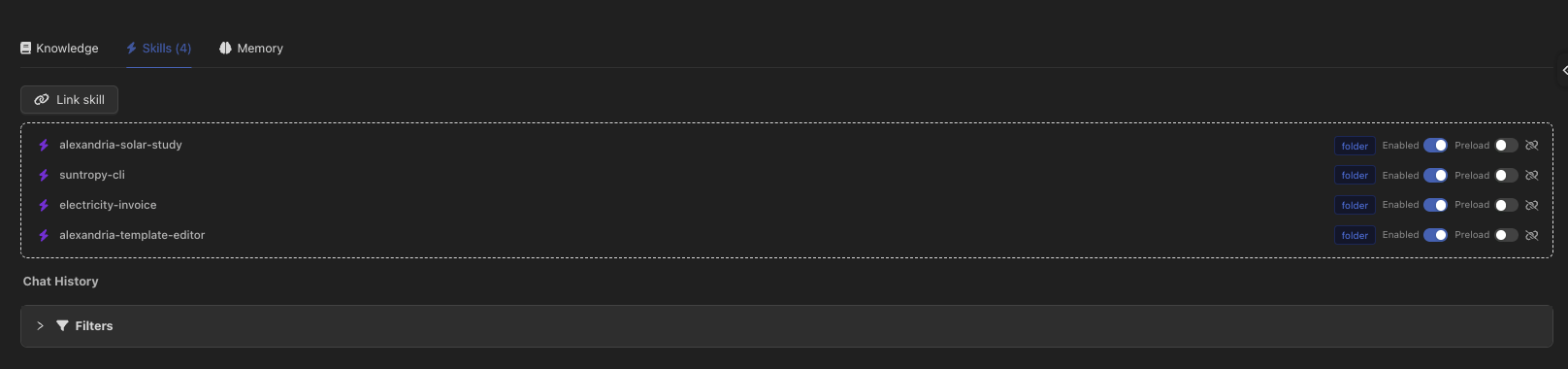
Skills are attached where knowledge is attached: an agent, an assistant and an environment each have a **Knowledge / Skills / Memory** switcher in their configuration. Open **Skills**, then **Link skill**.
The catalogue lives under **Knowledge → Skills**, with a search box, a tag filter and a project selector. Each card carries the skill's type, how many agents and assistants it is linked to, how many times it has been read, and — through **Connect Project** — which [project](/devic/projects/index) it belongs to, which is also what decides who can see it.
***
## What a skill is made of
Skills live in Knowledge — a skill *is* a document or a folder with a flag on it — so everything on the rest of this section applies: versions, the editor, folders, search.
A single markdown document. Everything the agent needs is on that one page.
A folder with a `SKILL.md` at its root and whatever else it needs beside it: reference pages, examples, scripts, templates. The manifest explains itself and points at the rest.
The **name** and **description** come from the YAML frontmatter of the document — or of the `SKILL.md`, for a folder skill:
```markdown theme={null}
---
name: Quarterly report
description: How we write the quarterly report — structure, tone, the figures to include and where they come from.
---
## Structure
Start with the headline number…
```
The description is not decoration: it is the *only* thing the model sees before deciding whether to open the skill. Write it as the answer to "when should I use this?", not as a title restated. Without frontmatter, the document's own name and its generated summary are used instead.
Folder skills follow the same layout as the Agent Skills format used elsewhere in the industry, so a skill written for Claude or published on a skills registry works here unchanged. You can import one directly — `.skill`, a `.zip`, or a lone `SKILL.md`.
***
## Attaching a skill
Skills are attached where knowledge is attached: an agent, an assistant and an environment each have a **Knowledge / Skills / Memory** switcher in their configuration. Open **Skills**, then **Link skill**.
 | Target | Effect |
| --------------- | ------------------------------------------------------------------------------------------------------ |
| **Agent** | Available on every run of that agent. |
| **Assistant** | Available in every conversation. |
| **Environment** | Inherited by every agent and assistant connected to it. See [Environments](/devic/environments/index). |
Environment skills and the entity's own skills are **merged**, not replaced: an agent connected to an environment gets both. If the same skill appears in both, the entity's own setting wins.
Each attached skill has two switches:
| Switch | What it does |
| ----------- | ----------------------------------------------------------------------------------------------------------------------------------------------------------------- |
| **Enabled** | On by default. Turning it off keeps the skill attached but leaves it out of the prompt entirely — the way to test whether a skill is what is affecting an answer. |
| **Preload** | Off by default. See below. |
***
## What reaches the model
This is worth understanding, because it is where the token bill is decided.
Devic adds a block to the system prompt, after the prompt you wrote, marked `====== SKILLS ========`. Every attached and enabled skill appears in it as an XML element:
```xml theme={null}
====== SKILLS ========
You have the following skills — specialized, self-contained instruction sets…
Quarterly report
How we write the quarterly report — structure, tone…
Refund policy check
The checks to run before approving a refund…
## Before approving
…the full document…
```
Two shapes, and the difference is ``:
Only the name and the description. Alongside them, an instruction telling the model how to fetch the rest: `read_knowledge_document` with the skill's `id` for a document skill, or with its `manifestId` for a folder skill — and then `list_knowledge_directory` and `read_knowledge_document` to walk into whatever the manifest references.
The full text inlined in ``. The model has it from the first token, with nothing to fetch — and pays for it on every single call of the conversation, whether or not the skill turns out to be relevant.
The model is told explicitly not to act on a skill from its name and description alone. When it judges one relevant, it reads it first — a tool call you can see in the run's timeline, which is also how you can tell whether a skill was actually used.
**On-demand loading needs the *Advanced Knowledge Search* tool group.** It is what provides `read_knowledge_document`, `list_knowledge_directory` and `grep_knowledge`. Without it there is no way for the model to fetch anything, so Devic inlines every skill's content instead — silently correct, and considerably more expensive. The interface forces **Preload** on and warns when the tool group is missing; if you see that warning, add the tool group rather than accepting the fallback.
Preload a skill when it applies to *every* run — a tone-of-voice guide for an assistant that only ever writes customer emails. Leave everything else on demand. A long skill that is relevant one time in twenty is the exact case progressive loading was built for.
Attaching a skill also widens what the knowledge tools may read to that document or folder, so the agent can open it without also being granted the rest of your knowledge base.
***
## Using one inside a prompt
A skill can be referenced from the prompt editor with `@`, under the **Skills** category. That inserts a reference the agent resolves by name, which is how you go from "you have skills" to "when a refund is requested, use the *Refund policy check* skill".
***
## Sharing skills
The same catalogue is reachable outside the console:
| Surface | What it does |
| ----------------------------------------------------------------- | ---------------------------------------------------------------------------------------------------------------------------------------------------------------------------------------------------------------------- |
| [Public API](/api-reference/endpoint/get-api-v1-documents-skills) | List the catalogue and [its tags](/api-reference/endpoint/get-api-v1-documents-skills-tags), filter and search, and [scaffold a new skill](/api-reference/endpoint/post-api-v1-documents-skills-scaffold) in one call. |
| [`devic skills`](/devic/cli/index) | `list`, `install`, `update`, `uninstall` — installs a skill into a local coding assistant (Claude Code, Codex, Cursor, opencode, Cline) and keeps a lockfile of what is installed. |
Installs are tracked per user and per skill, so an administrator can see who is running an outdated copy — or a copy of a skill that has since been deleted. It is on the **Installs** tab of the skills page.
***
## Where it fits
Keep a skill in a repository and let Devic read it live.
The knowledge tools a skill is loaded through.
Attaching a skill once for a whole family of agents.
The editor, frontmatter and links a skill is written with.
| Target | Effect |
| --------------- | ------------------------------------------------------------------------------------------------------ |
| **Agent** | Available on every run of that agent. |
| **Assistant** | Available in every conversation. |
| **Environment** | Inherited by every agent and assistant connected to it. See [Environments](/devic/environments/index). |
Environment skills and the entity's own skills are **merged**, not replaced: an agent connected to an environment gets both. If the same skill appears in both, the entity's own setting wins.
Each attached skill has two switches:
| Switch | What it does |
| ----------- | ----------------------------------------------------------------------------------------------------------------------------------------------------------------- |
| **Enabled** | On by default. Turning it off keeps the skill attached but leaves it out of the prompt entirely — the way to test whether a skill is what is affecting an answer. |
| **Preload** | Off by default. See below. |
***
## What reaches the model
This is worth understanding, because it is where the token bill is decided.
Devic adds a block to the system prompt, after the prompt you wrote, marked `====== SKILLS ========`. Every attached and enabled skill appears in it as an XML element:
```xml theme={null}
====== SKILLS ========
You have the following skills — specialized, self-contained instruction sets…
Quarterly report
How we write the quarterly report — structure, tone…
Refund policy check
The checks to run before approving a refund…
## Before approving
…the full document…
```
Two shapes, and the difference is ``:
Only the name and the description. Alongside them, an instruction telling the model how to fetch the rest: `read_knowledge_document` with the skill's `id` for a document skill, or with its `manifestId` for a folder skill — and then `list_knowledge_directory` and `read_knowledge_document` to walk into whatever the manifest references.
The full text inlined in ``. The model has it from the first token, with nothing to fetch — and pays for it on every single call of the conversation, whether or not the skill turns out to be relevant.
The model is told explicitly not to act on a skill from its name and description alone. When it judges one relevant, it reads it first — a tool call you can see in the run's timeline, which is also how you can tell whether a skill was actually used.
**On-demand loading needs the *Advanced Knowledge Search* tool group.** It is what provides `read_knowledge_document`, `list_knowledge_directory` and `grep_knowledge`. Without it there is no way for the model to fetch anything, so Devic inlines every skill's content instead — silently correct, and considerably more expensive. The interface forces **Preload** on and warns when the tool group is missing; if you see that warning, add the tool group rather than accepting the fallback.
Preload a skill when it applies to *every* run — a tone-of-voice guide for an assistant that only ever writes customer emails. Leave everything else on demand. A long skill that is relevant one time in twenty is the exact case progressive loading was built for.
Attaching a skill also widens what the knowledge tools may read to that document or folder, so the agent can open it without also being granted the rest of your knowledge base.
***
## Using one inside a prompt
A skill can be referenced from the prompt editor with `@`, under the **Skills** category. That inserts a reference the agent resolves by name, which is how you go from "you have skills" to "when a refund is requested, use the *Refund policy check* skill".
***
## Sharing skills
The same catalogue is reachable outside the console:
| Surface | What it does |
| ----------------------------------------------------------------- | ---------------------------------------------------------------------------------------------------------------------------------------------------------------------------------------------------------------------- |
| [Public API](/api-reference/endpoint/get-api-v1-documents-skills) | List the catalogue and [its tags](/api-reference/endpoint/get-api-v1-documents-skills-tags), filter and search, and [scaffold a new skill](/api-reference/endpoint/post-api-v1-documents-skills-scaffold) in one call. |
| [`devic skills`](/devic/cli/index) | `list`, `install`, `update`, `uninstall` — installs a skill into a local coding assistant (Claude Code, Codex, Cursor, opencode, Cline) and keeps a lockfile of what is installed. |
Installs are tracked per user and per skill, so an administrator can see who is running an outdated copy — or a copy of a skill that has since been deleted. It is on the **Installs** tab of the skills page.
***
## Where it fits
Keep a skill in a repository and let Devic read it live.
The knowledge tools a skill is loaded through.
Attaching a skill once for a whole family of agents.
The editor, frontmatter and links a skill is written with.