> ## Documentation Index
> Fetch the complete documentation index at: https://docs.devic.ai/llms.txt
> Use this file to discover all available pages before exploring further.
# Triggers
> Start an agent or an assistant when something happens in a connected app.
Everything else in Devic starts because someone or something asked: a person types, your product calls the API, a schedule fires.
A **trigger** is the other direction. A message arrives in Gmail, a deal moves in HubSpot, a file lands in Drive — and an agent starts on its own.
 ***
## Setting one up
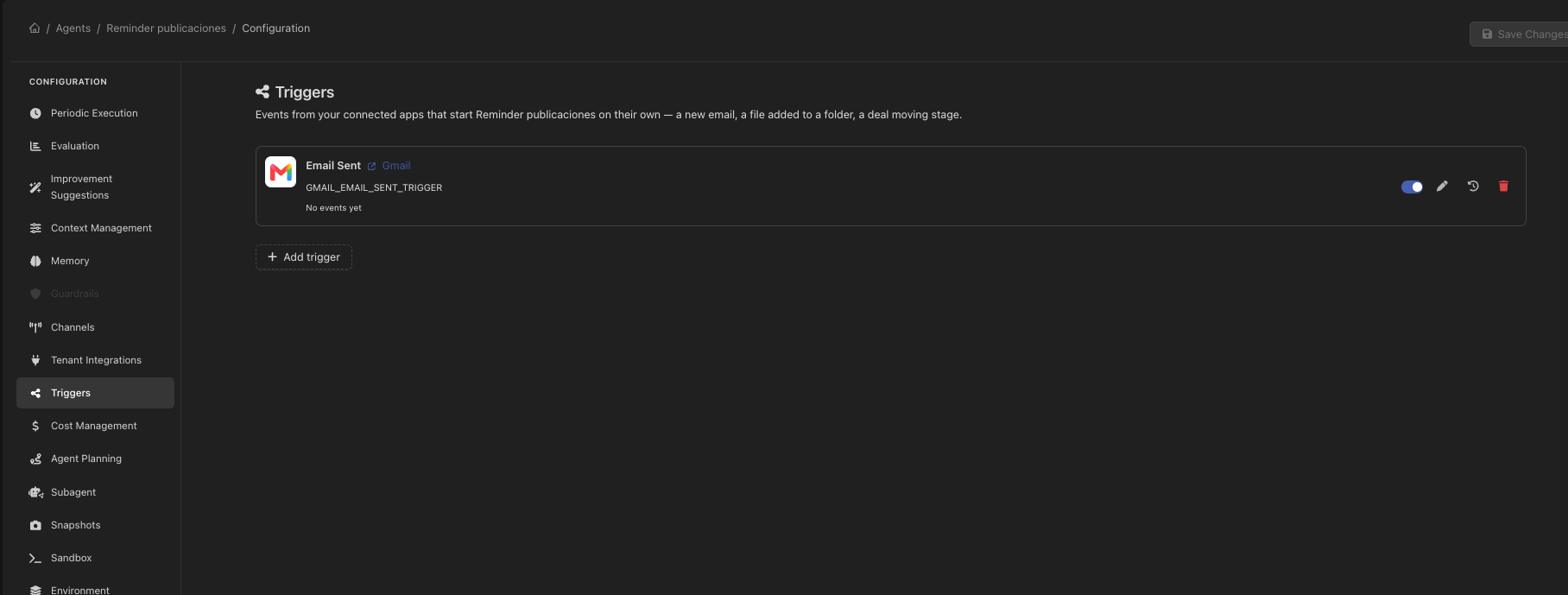
A trigger is configured in the **Triggers** section of the agent or assistant it starts. That is where it lives, and where its message template belongs.
***
## Setting one up
A trigger is configured in the **Triggers** section of the agent or assistant it starts. That is where it lives, and where its message template belongs.
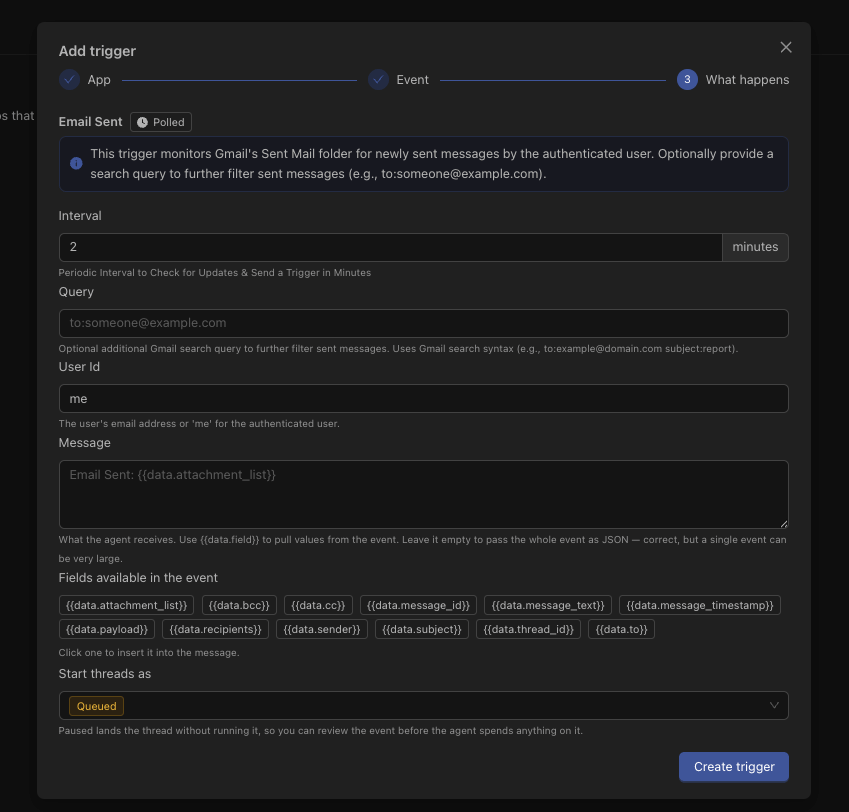 From a connected integration, choose one of its event types — a new message, a record created, a file changed.
Most event types take settings of their own: which label to watch, which folder, which pipeline.
A template turns the event into the message the agent receives. Leave it empty and the agent gets the raw event as JSON.
For an agent, whether new runs start **queued** (run immediately) or **paused** (wait for a person to release them).
***
## The message template
The template is what turns a webhook payload into an instruction. Fields from the event are referenced by name:
```
A new email arrived from {{data.from}}.
Subject: {{data.subject}}
Read it, decide whether it needs a reply, and draft one if it does.
```
Event payloads are usually **nested**. Drive's file-created event looks like `{ creator, event_type, file: { name, mimeType, … } }`, so `{{data.name}}` renders empty and `{{data.file.name}}` is what you want. The field picker in the editor lists the actual leaves of the event, which is the reliable way to get this right.
The full shape of an event type — its settings and its payload fields — is available from [the API](/api-reference/endpoint/get-api-v1-integrations-app-triggers-slug) too.
***
## Assistants: one conversation or many
An agent run is independent. An assistant conversation usually should not be: forty emails from the same customer belong in one thread, not forty.
A **chat id template** gives the conversation a stable identity built from the event — the sender's address, a ticket number — so related events land in the same conversation.
When two events arrive for a conversation that is already busy, the second is parked rather than run in parallel, and drained afterwards into a single run. Two completions writing to one conversation would otherwise overwrite each other's history.
***
## Keeping a trigger from running away
A misconfigured trigger on a busy mailbox can fire hundreds of times. Three things stand in the way:
| Guardrail | Behaviour |
| ----------------- | ----------------------------------------------------------------------------------------------------------------------------------------------------------------------- |
| **Rate limit** | A ceiling of events per minute, set per trigger. |
| **Auto-pause** | Sustained overrun disables the trigger — and disables it at the provider too, so it stops polling and stops billing. |
| **Tenant limits** | Runs a trigger starts are subject to the same [usage limits](/devic/multi-tenant/usage-limits) as everything else. Nothing bypasses them by arriving through a webhook. |
***
## Seeing what fired
Every delivery is recorded: what arrived, whether it ran, and what it ran. The same list appears in three places, all showing the same data:
* On the **agent or assistant**, for the triggers it owns.
* On the **integration**, for everything that app fires.
* In **Configuration → App Integrations**, for the whole workspace — the answer to "what runs on its own in here".
Deliveries are kept for 30 days.
An event that ran against an agent that has since been deleted keeps its row and loses only the name. That is not a gap in the log — it is precisely the case the log exists to explain.
***
## Through the API
Triggers are fully manageable through the API: [list](/api-reference/endpoint/get-api-v1-triggers), [create](/api-reference/endpoint/post-api-v1-triggers), [update](/api-reference/endpoint/patch-api-v1-triggers-id), [delete](/api-reference/endpoint/delete-api-v1-triggers-id) and [read their deliveries](/api-reference/endpoint/get-api-v1-triggers-id-events).
From a connected integration, choose one of its event types — a new message, a record created, a file changed.
Most event types take settings of their own: which label to watch, which folder, which pipeline.
A template turns the event into the message the agent receives. Leave it empty and the agent gets the raw event as JSON.
For an agent, whether new runs start **queued** (run immediately) or **paused** (wait for a person to release them).
***
## The message template
The template is what turns a webhook payload into an instruction. Fields from the event are referenced by name:
```
A new email arrived from {{data.from}}.
Subject: {{data.subject}}
Read it, decide whether it needs a reply, and draft one if it does.
```
Event payloads are usually **nested**. Drive's file-created event looks like `{ creator, event_type, file: { name, mimeType, … } }`, so `{{data.name}}` renders empty and `{{data.file.name}}` is what you want. The field picker in the editor lists the actual leaves of the event, which is the reliable way to get this right.
The full shape of an event type — its settings and its payload fields — is available from [the API](/api-reference/endpoint/get-api-v1-integrations-app-triggers-slug) too.
***
## Assistants: one conversation or many
An agent run is independent. An assistant conversation usually should not be: forty emails from the same customer belong in one thread, not forty.
A **chat id template** gives the conversation a stable identity built from the event — the sender's address, a ticket number — so related events land in the same conversation.
When two events arrive for a conversation that is already busy, the second is parked rather than run in parallel, and drained afterwards into a single run. Two completions writing to one conversation would otherwise overwrite each other's history.
***
## Keeping a trigger from running away
A misconfigured trigger on a busy mailbox can fire hundreds of times. Three things stand in the way:
| Guardrail | Behaviour |
| ----------------- | ----------------------------------------------------------------------------------------------------------------------------------------------------------------------- |
| **Rate limit** | A ceiling of events per minute, set per trigger. |
| **Auto-pause** | Sustained overrun disables the trigger — and disables it at the provider too, so it stops polling and stops billing. |
| **Tenant limits** | Runs a trigger starts are subject to the same [usage limits](/devic/multi-tenant/usage-limits) as everything else. Nothing bypasses them by arriving through a webhook. |
***
## Seeing what fired
Every delivery is recorded: what arrived, whether it ran, and what it ran. The same list appears in three places, all showing the same data:
* On the **agent or assistant**, for the triggers it owns.
* On the **integration**, for everything that app fires.
* In **Configuration → App Integrations**, for the whole workspace — the answer to "what runs on its own in here".
Deliveries are kept for 30 days.
An event that ran against an agent that has since been deleted keeps its row and loses only the name. That is not a gap in the log — it is precisely the case the log exists to explain.
***
## Through the API
Triggers are fully manageable through the API: [list](/api-reference/endpoint/get-api-v1-triggers), [create](/api-reference/endpoint/post-api-v1-triggers), [update](/api-reference/endpoint/patch-api-v1-triggers-id), [delete](/api-reference/endpoint/delete-api-v1-triggers-id) and [read their deliveries](/api-reference/endpoint/get-api-v1-triggers-id-events).