> ## Documentation Index
> Fetch the complete documentation index at: https://docs.devic.ai/llms.txt
> Use this file to discover all available pages before exploring further.
# Integrations for your end users
> Let each customer connect their own Gmail or CRM to your assistant, without ever seeing anyone else's.
The integrations you connect belong to your workspace. This is the other case: **your customers connecting their own accounts**, from inside your product, so the assistant acts on *their* mailbox and *their* CRM.
It is the difference between an assistant that reads your company's Gmail and an assistant that reads each user's.
 ***
## What you decide, and what they decide
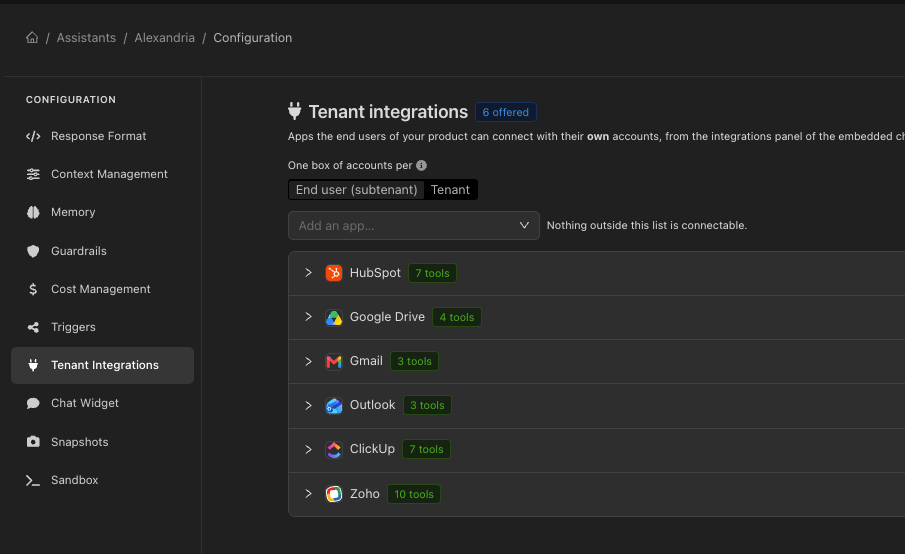
You define the catalogue: which apps are offered, and which tools of each app the assistant may call. Your users decide whether to connect, and with which account.
| You control | They control |
| ------------------------------------ | ------------------------ |
| Which apps are offered at all | Whether to connect one |
| Which tools of each app are callable | Which account to connect |
| Which event types can be switched on | When to disconnect |
Leaving the tool list of an app **empty** means *no tools*. Removing the list entirely means *all of them*. The two look similar in a form and are opposites in effect — an app with a whole toolkit enabled can add thousands of tokens to every single message.
***
## Where the catalogue is configured
On the assistant, in its **Tenant integrations** section — or on the [environment](/devic/environments/configuration) it is connected to, when a whole product line should offer the same apps. What the assistant actually offers is the result of merging both, which is what the API reports and what the widget shows.
***
## Who owns a connection
`connectionScope` decides whether a connected account belongs to a whole customer organisation or to one person inside it:
Each end user connects their own accounts. The finest separation.
One connection serves the customer's whole organisation.
***
## Proving who is asking
This is the part worth reading twice.
Calls to the per-tenant integrations API say which tenant they are for. How that claim is established is a per-assistant choice:
| Mode | How the tenant is established | Risk |
| -------------------- | ------------------------------------------------------------------------------------------------- | -------------------------------------------------------------------------------- |
| **open** *(default)* | Declared in the request, alongside the public API key. | Anyone who reads the key out of your bundle can claim to be any of your tenants. |
| **signed** | Taken from a signed [tenant session](/devic/multi-tenant/tenant-sessions) issued to your backend. | Cannot be forged. Unsigned callers are rejected outright. |
`open` exists because it needs nothing new to work with, and it is fine while you are building. For anything real, use `signed`: the whole point of per-user integrations is that one customer's mailbox is not another's, and only a signed session actually proves which customer is calling.
***
## In the widget
The embedded chat can show a panel where the user connects their apps: what is offered, what they have connected, and a button to add or remove one. It is rendered by `@devicai/ui` inside your own product, not in the Devic console.
Apps that authenticate with an API key are connected without leaving the page; OAuth apps open a popup and post the result back when the user is done. See [Embedding in your product](/devic/embed/index).
***
## Through the API
| Call | Purpose |
| ------------------------------------------------------------------------------------------------------------------------------------- | ------------------------------------------------------------- |
| [`GET /v1/tenant-integrations`](/api-reference/endpoint/get-api-v1-tenant-integrations) | The apps this assistant offers me, and what I have connected. |
| [`GET /v1/tenant-integrations/{app}/auth`](/api-reference/endpoint/get-api-v1-tenant-integrations-app-auth) | What connecting this app asks of me. |
| [`POST /v1/tenant-integrations/{app}/connect`](/api-reference/endpoint/post-api-v1-tenant-integrations-app-connect) | Connect one of my accounts. |
| [`DELETE /v1/tenant-integrations/accounts/{accountId}`](/api-reference/endpoint/delete-api-v1-tenant-integrations-accounts-accountid) | Disconnect it. |
The tenant is resolved server-side on every one of these calls and never taken from the path — which is what makes this subtree safe to grant to a key that ships in a browser bundle, unlike the workspace integrations API.
***
## What you decide, and what they decide
You define the catalogue: which apps are offered, and which tools of each app the assistant may call. Your users decide whether to connect, and with which account.
| You control | They control |
| ------------------------------------ | ------------------------ |
| Which apps are offered at all | Whether to connect one |
| Which tools of each app are callable | Which account to connect |
| Which event types can be switched on | When to disconnect |
Leaving the tool list of an app **empty** means *no tools*. Removing the list entirely means *all of them*. The two look similar in a form and are opposites in effect — an app with a whole toolkit enabled can add thousands of tokens to every single message.
***
## Where the catalogue is configured
On the assistant, in its **Tenant integrations** section — or on the [environment](/devic/environments/configuration) it is connected to, when a whole product line should offer the same apps. What the assistant actually offers is the result of merging both, which is what the API reports and what the widget shows.
***
## Who owns a connection
`connectionScope` decides whether a connected account belongs to a whole customer organisation or to one person inside it:
Each end user connects their own accounts. The finest separation.
One connection serves the customer's whole organisation.
***
## Proving who is asking
This is the part worth reading twice.
Calls to the per-tenant integrations API say which tenant they are for. How that claim is established is a per-assistant choice:
| Mode | How the tenant is established | Risk |
| -------------------- | ------------------------------------------------------------------------------------------------- | -------------------------------------------------------------------------------- |
| **open** *(default)* | Declared in the request, alongside the public API key. | Anyone who reads the key out of your bundle can claim to be any of your tenants. |
| **signed** | Taken from a signed [tenant session](/devic/multi-tenant/tenant-sessions) issued to your backend. | Cannot be forged. Unsigned callers are rejected outright. |
`open` exists because it needs nothing new to work with, and it is fine while you are building. For anything real, use `signed`: the whole point of per-user integrations is that one customer's mailbox is not another's, and only a signed session actually proves which customer is calling.
***
## In the widget
The embedded chat can show a panel where the user connects their apps: what is offered, what they have connected, and a button to add or remove one. It is rendered by `@devicai/ui` inside your own product, not in the Devic console.
Apps that authenticate with an API key are connected without leaving the page; OAuth apps open a popup and post the result back when the user is done. See [Embedding in your product](/devic/embed/index).
***
## Through the API
| Call | Purpose |
| ------------------------------------------------------------------------------------------------------------------------------------- | ------------------------------------------------------------- |
| [`GET /v1/tenant-integrations`](/api-reference/endpoint/get-api-v1-tenant-integrations) | The apps this assistant offers me, and what I have connected. |
| [`GET /v1/tenant-integrations/{app}/auth`](/api-reference/endpoint/get-api-v1-tenant-integrations-app-auth) | What connecting this app asks of me. |
| [`POST /v1/tenant-integrations/{app}/connect`](/api-reference/endpoint/post-api-v1-tenant-integrations-app-connect) | Connect one of my accounts. |
| [`DELETE /v1/tenant-integrations/accounts/{accountId}`](/api-reference/endpoint/delete-api-v1-tenant-integrations-accounts-accountid) | Disconnect it. |
The tenant is resolved server-side on every one of these calls and never taken from the path — which is what makes this subtree safe to grant to a key that ships in a browser bundle, unlike the workspace integrations API.