> ## Documentation Index
> Fetch the complete documentation index at: https://docs.devic.ai/llms.txt
> Use this file to discover all available pages before exploring further.
# Sandbox and snapshots
> A real Linux machine your agents can work on, and the snapshot that gives it a memory of its own.
The sandbox is a genuine isolated Linux machine. An agent connected to an environment can run commands on it, write files, install packages, start a server — the things you would do yourself at a terminal.
***
## Configuring it
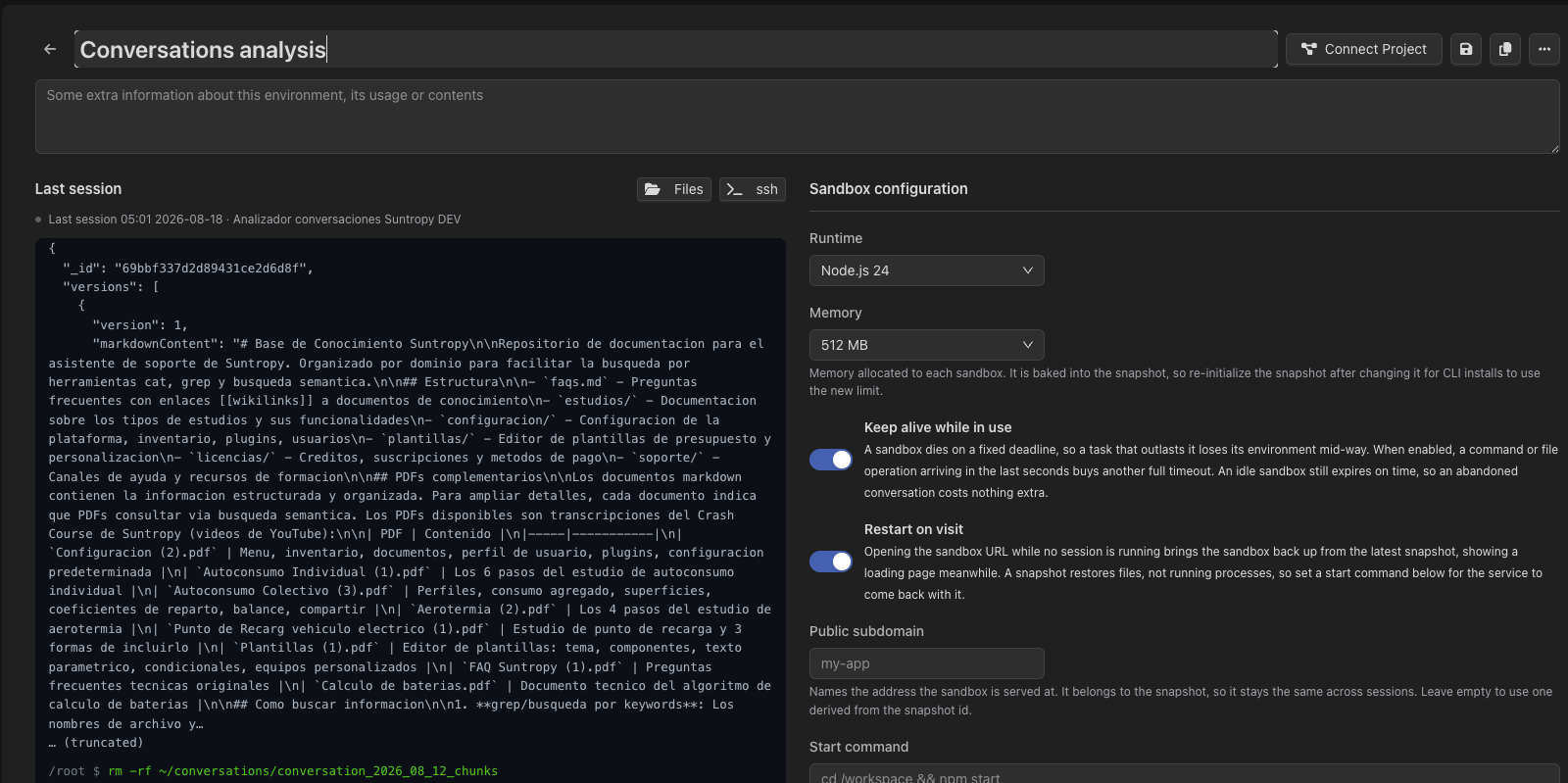 | Setting | What it does |
| ------------------------- | --------------------------------------------------------------------------------------------------------------------------- |
| **Runtime** | The base image: `node24` (default), `node22` or `python3.13`. |
| **Memory** | How much RAM sandboxes of this environment get. Baked into the snapshot and inherited on every restore. |
| **Init script** | A shell script run when a **new** sandbox is created. Skipped when restoring a snapshot — by then the work is already done. |
| **Environment variables** | Injected into the machine, encrypted at rest. |
***
## Snapshots: giving the machine a memory
By default, a sandbox is thrown away when the session ends. Enable snapshots and the filesystem is saved instead, so the next session starts where the last one left off — dependencies already installed, working directory intact.
The snapshot lives on the **environment**, not on any single agent. That is what makes a team of agents work on the same material: they share one machine state.
The snapshot is replaced when a session closes, so the machine keeps everything each session did.
Sessions always start from the same saved state. Anything a session does is discarded. Use it when runs must be reproducible.
### One snapshot per tenant
For multi-tenant products, snapshots can be split **per tenant**: each customer's first session starts from the shared base snapshot and, from then on, keeps its own. Sessions with no tenant keep using the shared one. It is opt-in, and it is the setting that lets one environment serve many customers without their files ever meeting.
A sandbox snapshot is a copy of the **machine**, and it is configured here, on the environment. It has nothing to do with the *Snapshots* section of an agent or assistant, which versions that entity's **configuration** — see [Configuration snapshots](/devic/agents/environment-and-subagents#configuration-snapshots).
***
## Keeping a sandbox alive
Two options change the lifecycle, both off unless you turn them on:
* **Persist after the session closes** — the machine survives the end of the conversation.
* **Auto-extend** — an operation arriving just before the deadline buys another full timeout, so a long task does not lose its machine halfway through. Idle sandboxes still expire on schedule.
***
## Publishing what the sandbox serves
A sandbox can expose a service on a public URL — the practical way for an agent to build something and show it to a person.
The URL belongs to the **environment's snapshot**, not to a single sandbox, so it stays valid between sessions. Two settings shape it:
* **Public slug** — the subdomain, e.g. `my-app` for `my-app.sandbox.devic.ai`. Without one, an opaque but stable label is derived from the snapshot.
* **Start command** — what to run after restoring the snapshot to bring the service back up, e.g. `cd /workspace && npm start`.
The start command is not the init script. The init script says how to **prepare** a machine and runs when one is created; the start command says how to **serve** the snapshot and runs on every restore — including one triggered by a visitor arriving at the URL. Restoring brings back the filesystem, not a process someone started by hand, which is exactly why the start command exists.
By default, visiting the public URL restores the sandbox when no session is running. Turn that off for an environment whose sandbox should only ever be started from Devic.
***
## Files and terminal
From the environment you get a read-only view of the last session's commands, a terminal of your own to work on the machine directly, and a file explorer.
| Setting | What it does |
| ------------------------- | --------------------------------------------------------------------------------------------------------------------------- |
| **Runtime** | The base image: `node24` (default), `node22` or `python3.13`. |
| **Memory** | How much RAM sandboxes of this environment get. Baked into the snapshot and inherited on every restore. |
| **Init script** | A shell script run when a **new** sandbox is created. Skipped when restoring a snapshot — by then the work is already done. |
| **Environment variables** | Injected into the machine, encrypted at rest. |
***
## Snapshots: giving the machine a memory
By default, a sandbox is thrown away when the session ends. Enable snapshots and the filesystem is saved instead, so the next session starts where the last one left off — dependencies already installed, working directory intact.
The snapshot lives on the **environment**, not on any single agent. That is what makes a team of agents work on the same material: they share one machine state.
The snapshot is replaced when a session closes, so the machine keeps everything each session did.
Sessions always start from the same saved state. Anything a session does is discarded. Use it when runs must be reproducible.
### One snapshot per tenant
For multi-tenant products, snapshots can be split **per tenant**: each customer's first session starts from the shared base snapshot and, from then on, keeps its own. Sessions with no tenant keep using the shared one. It is opt-in, and it is the setting that lets one environment serve many customers without their files ever meeting.
A sandbox snapshot is a copy of the **machine**, and it is configured here, on the environment. It has nothing to do with the *Snapshots* section of an agent or assistant, which versions that entity's **configuration** — see [Configuration snapshots](/devic/agents/environment-and-subagents#configuration-snapshots).
***
## Keeping a sandbox alive
Two options change the lifecycle, both off unless you turn them on:
* **Persist after the session closes** — the machine survives the end of the conversation.
* **Auto-extend** — an operation arriving just before the deadline buys another full timeout, so a long task does not lose its machine halfway through. Idle sandboxes still expire on schedule.
***
## Publishing what the sandbox serves
A sandbox can expose a service on a public URL — the practical way for an agent to build something and show it to a person.
The URL belongs to the **environment's snapshot**, not to a single sandbox, so it stays valid between sessions. Two settings shape it:
* **Public slug** — the subdomain, e.g. `my-app` for `my-app.sandbox.devic.ai`. Without one, an opaque but stable label is derived from the snapshot.
* **Start command** — what to run after restoring the snapshot to bring the service back up, e.g. `cd /workspace && npm start`.
The start command is not the init script. The init script says how to **prepare** a machine and runs when one is created; the start command says how to **serve** the snapshot and runs on every restore — including one triggered by a visitor arriving at the URL. Restoring brings back the filesystem, not a process someone started by hand, which is exactly why the start command exists.
By default, visiting the public URL restores the sandbox when no session is running. Turn that off for an environment whose sandbox should only ever be started from Devic.
***
## Files and terminal
From the environment you get a read-only view of the last session's commands, a terminal of your own to work on the machine directly, and a file explorer.
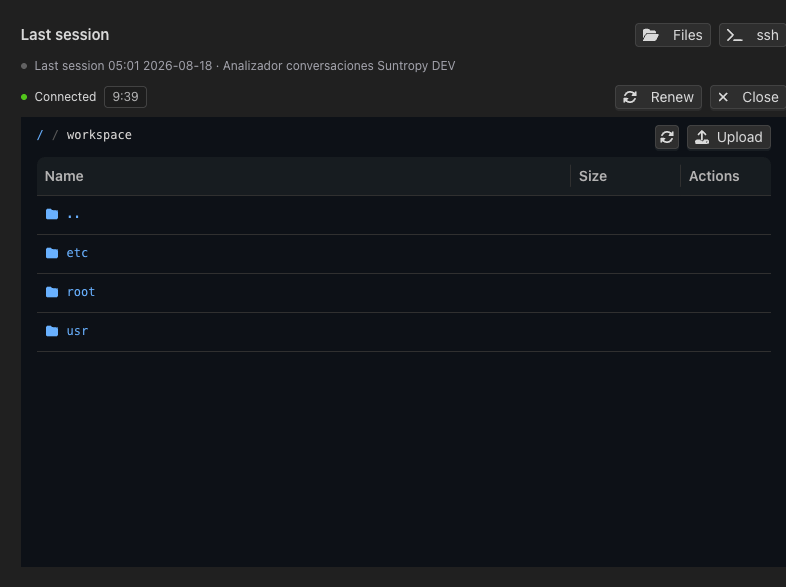 The explorer browses and edits files, uploads into the machine, and exports or imports a folder as a ZIP. While a session is live it also shows the time left and lets you renew or close it.
***
## Safety
A sandbox is real. Commands an agent runs there have real effects, and any credentials placed in environment variables are reachable from inside it. Give an environment the narrowest set of secrets its agents actually need, and use separate environments where the blast radius should differ.
The explorer browses and edits files, uploads into the machine, and exports or imports a folder as a ZIP. While a session is live it also shows the time left and lets you renew or close it.
***
## Safety
A sandbox is real. Commands an agent runs there have real effects, and any credentials placed in environment variables are reachable from inside it. Give an environment the narrowest set of secrets its agents actually need, and use separate environments where the blast radius should differ.