> ## Documentation Index
> Fetch the complete documentation index at: https://docs.devic.ai/llms.txt
> Use this file to discover all available pages before exploring further.
# Configuring an environment
> Variables and secrets, shared tools, shared knowledge and the connection to each agent.
An environment is configured once and inherited by everything connected to it. This page covers everything except the sandbox, which has [its own page](/devic/environments/sandbox).
***
## Environment variables
Variables defined here are available at runtime to every connected agent — inside the sandbox, and to the tools that need them.
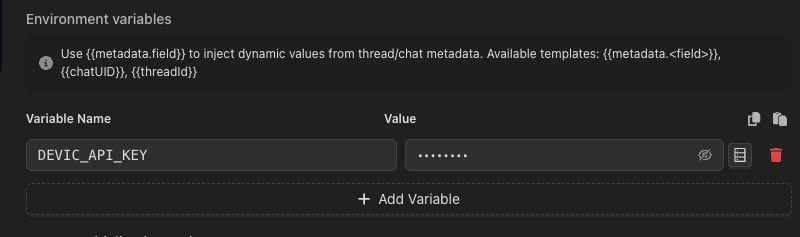 They are **encrypted at rest** and returned masked (`••••••••`) whenever they are read back. Saving a form that contains a masked value leaves the stored secret untouched, so editing an unrelated field cannot silently blank out a key.
### Values that depend on the run
A variable's value can be a template, resolved when the sandbox starts:
| Template | Resolves to |
| ---------------------- | --------------------------------------------------- |
| `{{metadata.}}` | A field of the thread's or conversation's metadata. |
| `{{chatUID}}` | The current conversation id. |
| `{{threadId}}` | The current run id. |
That is how one environment serves many customers from a single configuration: `{{metadata.tenantApiKey}}` is a different value on every run, without a variable per tenant.
### Which value wins
The same variable can be set in three places. Most specific wins:
Set for one agent's link to this environment. Use it for what genuinely differs per agent.
The shared value, used by everything connected.
The fallback, for values that only make sense inside the machine.
For credentials that already live in a corporate secret store, use the [vault](/devic/administration/vault) instead of pasting the value here. The environment then holds a reference, not the secret.
***
## Shared tools
Tool groups and MCPs added to an environment become available to every connected agent and assistant. This is the usual way to give a fleet of agents the same set of integrations without configuring each one.
The behaviour is additive: an agent keeps the tools it had, plus the environment's.
***
## Shared knowledge
Documents and folders attached to an environment reach every connected entity, exactly as if they had been attached individually. It is the right level for the material that everyone needs — the style guide, the glossary, the standard operating procedures.
See [Knowledge](/devic/knowledge/index).
***
## Per-tenant integrations
An environment can also define which third-party apps the **end users** of its assistants are offered, so the catalogue is set once for a whole product rather than per assistant. See [Integrations for your end users](/devic/integrations/for-end-users).
***
## Connecting an agent
From the agent's configuration, pick the environment. From the environment, see everything connected to it.
They are **encrypted at rest** and returned masked (`••••••••`) whenever they are read back. Saving a form that contains a masked value leaves the stored secret untouched, so editing an unrelated field cannot silently blank out a key.
### Values that depend on the run
A variable's value can be a template, resolved when the sandbox starts:
| Template | Resolves to |
| ---------------------- | --------------------------------------------------- |
| `{{metadata.}}` | A field of the thread's or conversation's metadata. |
| `{{chatUID}}` | The current conversation id. |
| `{{threadId}}` | The current run id. |
That is how one environment serves many customers from a single configuration: `{{metadata.tenantApiKey}}` is a different value on every run, without a variable per tenant.
### Which value wins
The same variable can be set in three places. Most specific wins:
Set for one agent's link to this environment. Use it for what genuinely differs per agent.
The shared value, used by everything connected.
The fallback, for values that only make sense inside the machine.
For credentials that already live in a corporate secret store, use the [vault](/devic/administration/vault) instead of pasting the value here. The environment then holds a reference, not the secret.
***
## Shared tools
Tool groups and MCPs added to an environment become available to every connected agent and assistant. This is the usual way to give a fleet of agents the same set of integrations without configuring each one.
The behaviour is additive: an agent keeps the tools it had, plus the environment's.
***
## Shared knowledge
Documents and folders attached to an environment reach every connected entity, exactly as if they had been attached individually. It is the right level for the material that everyone needs — the style guide, the glossary, the standard operating procedures.
See [Knowledge](/devic/knowledge/index).
***
## Per-tenant integrations
An environment can also define which third-party apps the **end users** of its assistants are offered, so the catalogue is set once for a whole product rather than per assistant. See [Integrations for your end users](/devic/integrations/for-end-users).
***
## Connecting an agent
From the agent's configuration, pick the environment. From the environment, see everything connected to it.
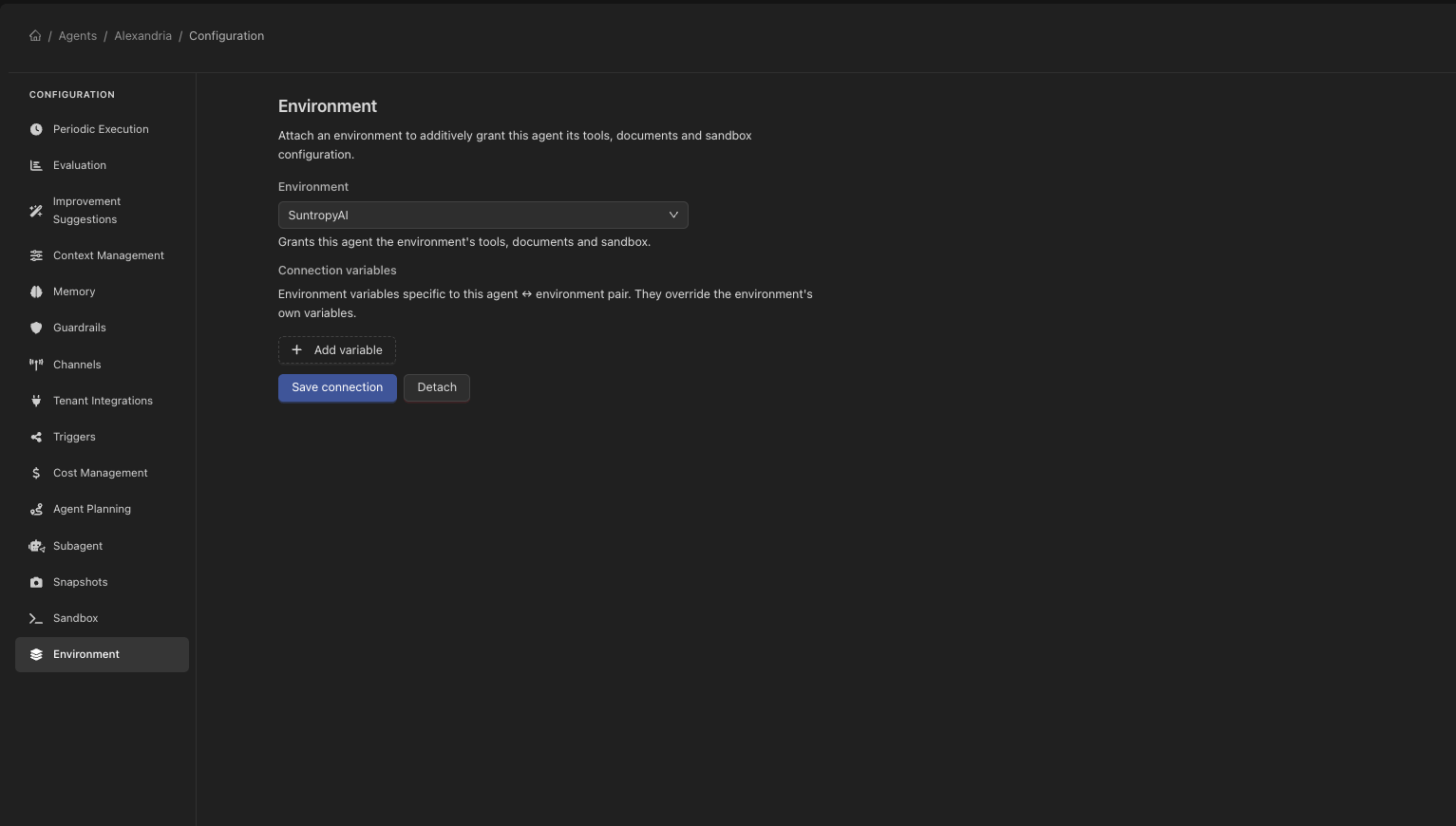 If the agent already had its own terminal sandbox configured, connecting an environment that brings a sandbox will supersede it. Devic warns you at that moment — the earlier configuration is not deleted, it simply stops being used.
***
## Projects and access
An environment belongs to a project, and inherits its access rules. A guest with access to one project sees that project's environments and no others. See [Projects](/devic/projects/index) and [Users and roles](/devic/administration/users-and-roles).
If the agent already had its own terminal sandbox configured, connecting an environment that brings a sandbox will supersede it. Devic warns you at that moment — the earlier configuration is not deleted, it simply stops being used.
***
## Projects and access
An environment belongs to a project, and inherits its access rules. A guest with access to one project sees that project's environments and no others. See [Projects](/devic/projects/index) and [Users and roles](/devic/administration/users-and-roles).