> ## Documentation Index
> Fetch the complete documentation index at: https://docs.devic.ai/llms.txt
> Use this file to discover all available pages before exploring further.
# What It Is
> Manage and explore your native databases inside Devic, fully integrated with agents, MCPs, and assistants to power intelligent AI-driven workflows.
## Overview
The **Databases** module in Devic provides a native environment for storing, querying, and managing structured information without relying on external services.\
It is designed specifically to integrate with **agents** and **MCPs**, allowing artificial intelligence to access data directly and contextually.
Each database behaves as an optimized repository for AI-driven workflows: it can be used by agents in real time, connected to custom tools, or serve as a knowledge source for assistants.
***
## Key Features
* **Unified management:** handle all your databases from a single panel.
* **Unlimited scalability:** create as many databases as you need with no extra configuration.
* **Full flexibility:** add, modify, or delete fields and records dynamically.
* **Integrated semantic search:** all tables include **Vector Search**, enabling meaning-based queries instead of exact matches.
* **Complete interoperability:** databases can be consumed by **agents** and **MCPs** without external connectors.
***
## Overview Panel
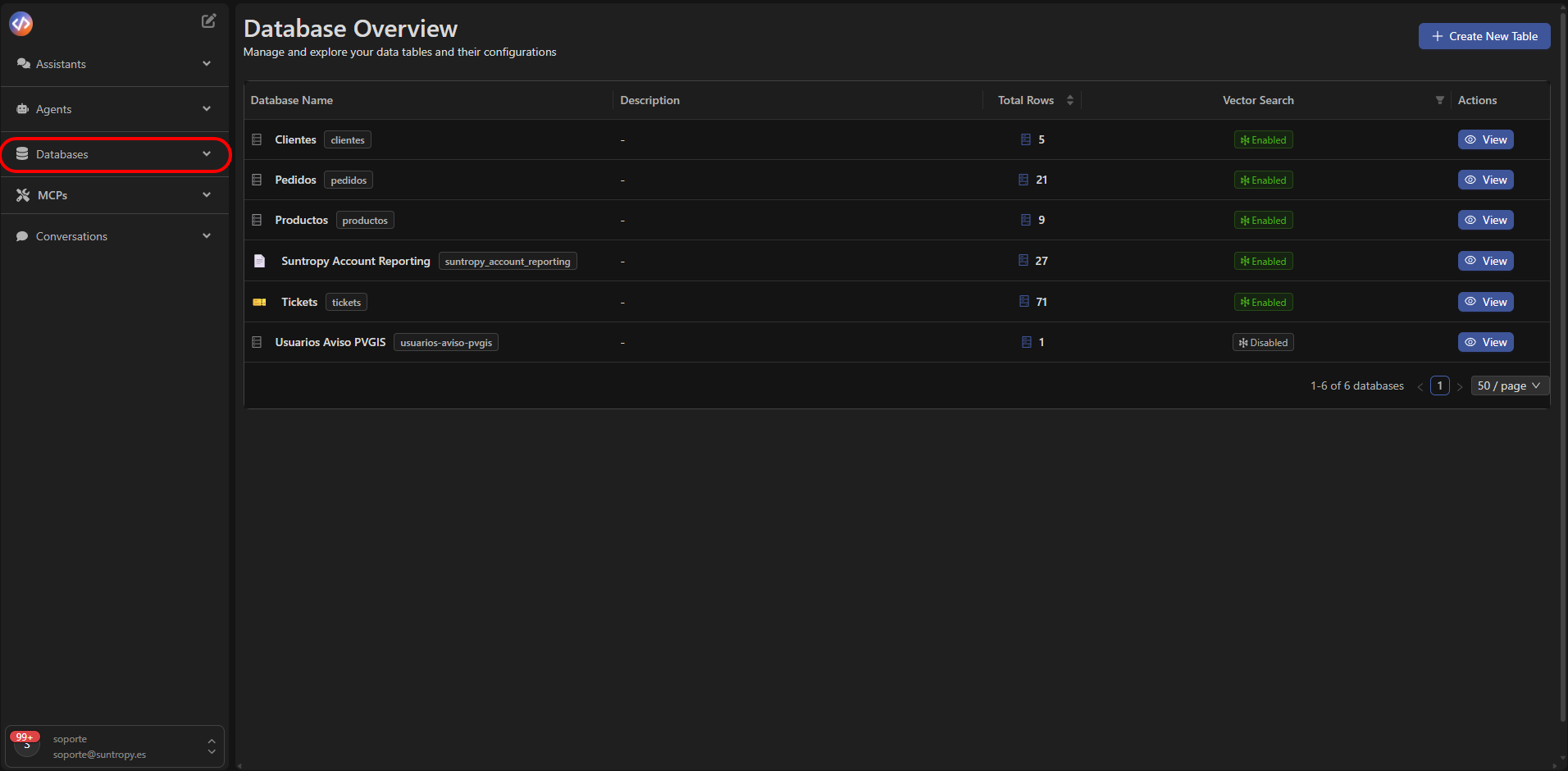
The **Databases** section displays a summary of all active databases and their current status.
At the top, four key indicators are shown:
* **Total Databases:** total number of databases created.
* **Total Rows:** total amount of stored records.
* **Custom Fields:** number of user-defined custom fields.
* **Vector Search:** indicates how many databases have semantic search enabled.
Each row in the list includes:
| Column | Description |
| ----------------- | --------------------------------------------------------------------------- |
| **Database Name** | Name of the database. |
| **Description** | Brief description or alias of the dataset. |
| **Total Rows** | Number of stored records. |
| **Custom Fields** | Number of custom columns. |
| **Vector Search** | Status of semantic search (Enabled/Disabled). |
| **Actions** | Direct access to the detailed view of the database via the **View** button. |
***
## Available Actions
From the upper-right corner of the panel, you can:
* **Create a new database** using the **+ Create New Table** button.
* **Explore an existing database** by selecting **View** in the *Actions* column.
These actions take you to their dedicated sections:\
[Create a new database](/devic/databases/create-new-database) and [View and edit a database](/devic/databases/view-and-edit-database).
***
 ***
Learn how to create your first database and define its field structure.
***
Learn how to create your first database and define its field structure.