> ## Documentation Index
> Fetch the complete documentation index at: https://docs.devic.ai/llms.txt
> Use this file to discover all available pages before exploring further.
# Devic CLI
> The whole public API from a terminal, built for scripts and for coding agents.
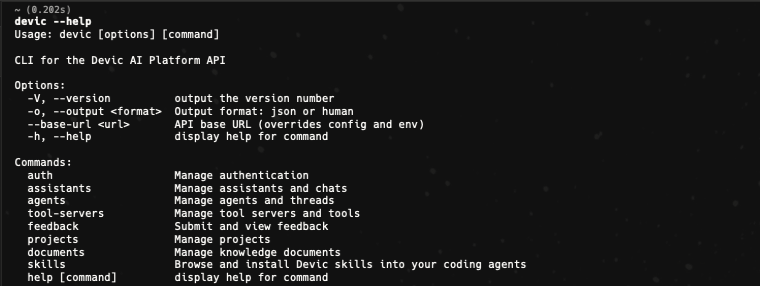
`@devicai/cli` wraps the Devic public API in a command-line tool. It is agent-first: structured JSON by default when piped, machine-readable errors, meaningful exit codes and polling that does not block forever.
```bash theme={null}
npm install -g @devicai/cli
devic auth login --api-key devic-your-key
devic assistants chat support-assistant -m "Where is my order?"
```
 ***
## Authentication
```bash theme={null}
devic auth login --api-key devic-your-key
devic auth status
# or, taking precedence over stored credentials
export DEVIC_API_KEY=devic-your-key
export DEVIC_BASE_URL=https://api.devic.ai
```
Credentials live in `~/.config/devic/config.json`. Get a key from [API keys](/devic/administration/api-keys).
***
## Output
Human-readable tables in a terminal, JSON when piped or non-interactive. Force either with `--output json` / `--output human`.
Errors always go to stderr as JSON — `{"error":"…","code":"…"}` — and the exit code says what happened: `0` success, `1` error, `2` authentication required, `3` poll timeout.
***
## What it covers
`devic assistants list | get | chat`, with conversation history and feedback.
`devic agents …` — CRUD, threads, approvals, pause and resume, evaluations, costs.
`devic tool-servers …` — MCP and custom servers, their tools, cloning.
`devic integrations …` and `devic triggers …` — connect apps, pick tools, subscribe to events.
`devic documents …`, `devic skills …` — read, write and install.
`devic projects …` — and `--project` on most listings.
***
## Following a long run
`--wait` blocks until a run finishes, which is fine at a keyboard and wrong for an agent driving the CLI from a sandbox, where commands are killed after about 45 seconds.
`watch` is the incremental alternative. It looks for a short window, reports **only what changed since the previous call**, and says whether watching further is worth it:
```bash theme={null}
devic agents threads watch --wait 5 --window 35 --interval 3
devic assistants chats watch --assistant --window 35
```
The exit code is the decision:
| Code | Meaning |
| ---- | -------------------------------------------------------------------------------- |
| `0` | Finished. |
| `10` | A human has to approve or reject — nothing moves until then. |
| `11` | Blocked on something external: waiting for a response, paused, out of allowance. |
| `12` | Still running. Call again with the returned cursor. |
| `13` | Nothing changed across several checks. |
Alongside them, `advice` carries a recommended cadence and `diagnostics` explains *why* a run is not moving — a disabled agent, one at its concurrency limit, a queue delay, a pending approval, a scheduled resume.
This is what makes the CLI usable as a tool for a coding agent: it can start work, come back, and be told exactly what changed and what to do next, without holding a process open.
***
## Server-side SDK
For Node backends, [`@devicai/sdk`](https://www.npmjs.com/package/@devicai/sdk) offers the same API as a typed client — including minting [tenant sessions](/devic/multi-tenant/tenant-sessions):
```ts theme={null}
import { Devic } from '@devicai/sdk';
const devic = new Devic({ apiKey: process.env.DEVIC_API_KEY });
const session = await devic.auth(organisationId, userId).session();
```
***
## Skills for coding assistants
If you work with an AI coding assistant, install the Devic skills so it knows these APIs properly:
```bash theme={null}
npx skills add devicai/skills
```
See [Skills](/devic/skills/overview).
***
## Authentication
```bash theme={null}
devic auth login --api-key devic-your-key
devic auth status
# or, taking precedence over stored credentials
export DEVIC_API_KEY=devic-your-key
export DEVIC_BASE_URL=https://api.devic.ai
```
Credentials live in `~/.config/devic/config.json`. Get a key from [API keys](/devic/administration/api-keys).
***
## Output
Human-readable tables in a terminal, JSON when piped or non-interactive. Force either with `--output json` / `--output human`.
Errors always go to stderr as JSON — `{"error":"…","code":"…"}` — and the exit code says what happened: `0` success, `1` error, `2` authentication required, `3` poll timeout.
***
## What it covers
`devic assistants list | get | chat`, with conversation history and feedback.
`devic agents …` — CRUD, threads, approvals, pause and resume, evaluations, costs.
`devic tool-servers …` — MCP and custom servers, their tools, cloning.
`devic integrations …` and `devic triggers …` — connect apps, pick tools, subscribe to events.
`devic documents …`, `devic skills …` — read, write and install.
`devic projects …` — and `--project` on most listings.
***
## Following a long run
`--wait` blocks until a run finishes, which is fine at a keyboard and wrong for an agent driving the CLI from a sandbox, where commands are killed after about 45 seconds.
`watch` is the incremental alternative. It looks for a short window, reports **only what changed since the previous call**, and says whether watching further is worth it:
```bash theme={null}
devic agents threads watch --wait 5 --window 35 --interval 3
devic assistants chats watch --assistant --window 35
```
The exit code is the decision:
| Code | Meaning |
| ---- | -------------------------------------------------------------------------------- |
| `0` | Finished. |
| `10` | A human has to approve or reject — nothing moves until then. |
| `11` | Blocked on something external: waiting for a response, paused, out of allowance. |
| `12` | Still running. Call again with the returned cursor. |
| `13` | Nothing changed across several checks. |
Alongside them, `advice` carries a recommended cadence and `diagnostics` explains *why* a run is not moving — a disabled agent, one at its concurrency limit, a queue delay, a pending approval, a scheduled resume.
This is what makes the CLI usable as a tool for a coding agent: it can start work, come back, and be told exactly what changed and what to do next, without holding a process open.
***
## Server-side SDK
For Node backends, [`@devicai/sdk`](https://www.npmjs.com/package/@devicai/sdk) offers the same API as a typed client — including minting [tenant sessions](/devic/multi-tenant/tenant-sessions):
```ts theme={null}
import { Devic } from '@devicai/sdk';
const devic = new Devic({ apiKey: process.env.DEVIC_API_KEY });
const session = await devic.auth(organisationId, userId).session();
```
***
## Skills for coding assistants
If you work with an AI coding assistant, install the Devic skills so it knows these APIs properly:
```bash theme={null}
npx skills add devicai/skills
```
See [Skills](/devic/skills/overview).