> ## Documentation Index
> Fetch the complete documentation index at: https://docs.devic.ai/llms.txt
> Use this file to discover all available pages before exploring further.
# Other Options
> Discover the available ways to offer your Devic assistants to end users: web widgets, external integrations, and advanced configuration controls.
In addition to running inside the **internal conversation console**, **Devic assistants** can be made available to end users through several delivery methods.\
These options let you integrate the assistant into web applications, customer portals, or corporate systems while maintaining full control over its behavior and style.
***
## Deployment Options
The main alternatives for exposing an assistant are:
| Option | Description | Ideal for... |
| --------------------------------- | ---------------------------------------------------------------------------------------------- | ------------------------------------------ |
| **Embedded Widget (Chat Widget)** | Integrates the assistant directly into a webpage through a JavaScript snippet. | Websites, customer portals, private areas. |
| **API Execution** | Invokes the assistant via HTTP requests to the Devic API, ideal for programmatic integrations. | Internal apps or backend systems. |
| **Conversation Console** | Internal environment for testing and debugging assistant behavior. | Technical teams and developers. |
***
## Chat Widget Configuration
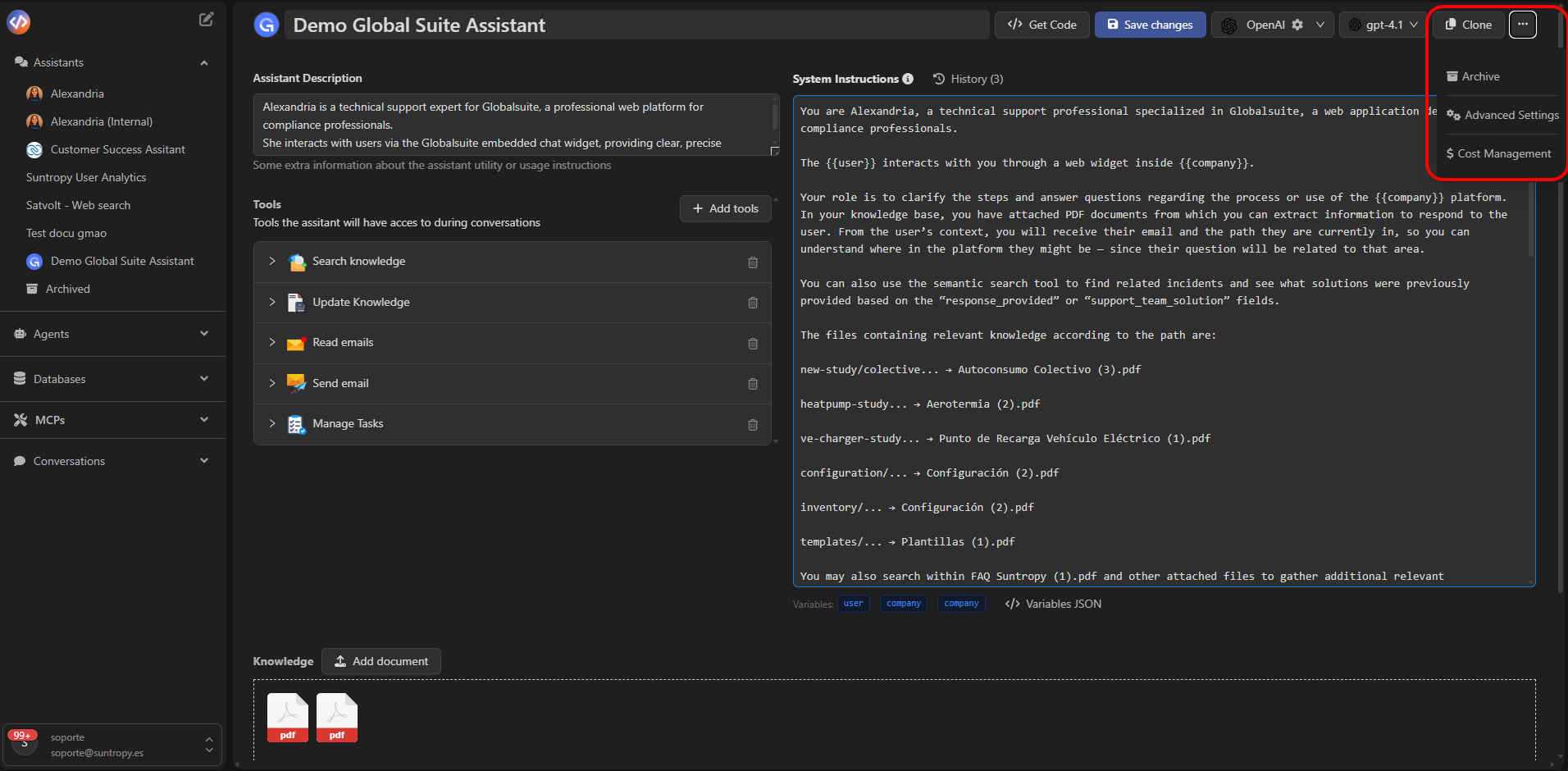
The **Chat Widget** is the fastest way to offer your assistant to end users.\
It is configured from the assistant’s options menu, under **Advanced Settings → Chat Widget**.
 ##
##
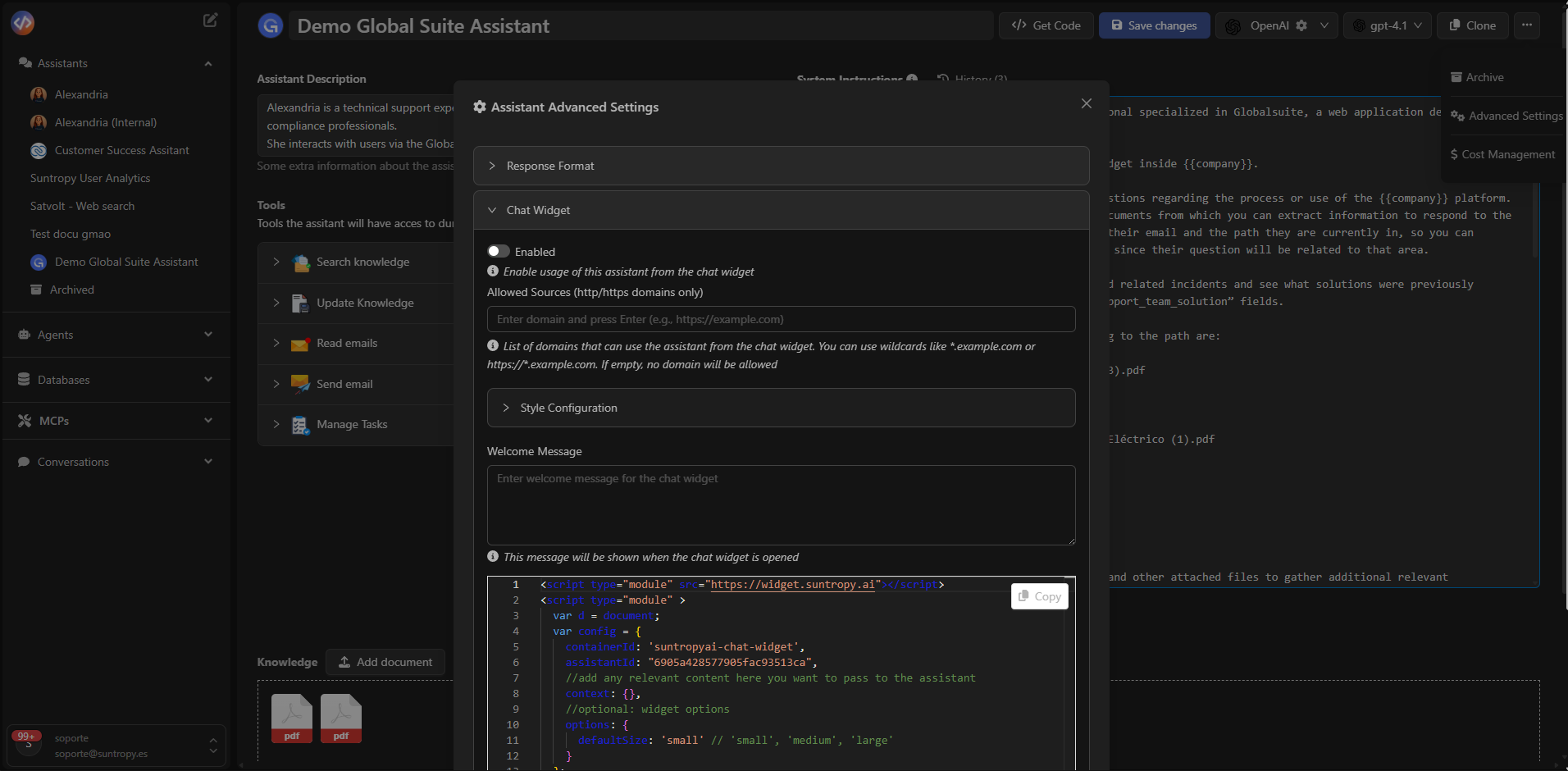 There you can enable it and define the allowed domains from which it can be used
### Main Fields
| Field | Description |
| ----------------------- | ------------------------------------------------------------------------------ |
| **Enabled** | Activates the assistant for use through the widget. |
| **Allowed Sources** | List of domains (using `http` or `https`) from which the widget can be loaded. |
| **Welcome Message** | Initial message displayed when the chat is opened. |
| **Style Configuration** | Customize widget size, color, and visual appearance. |
***
## Embedding the Widget on Your Website
Once enabled, Devic automatically generates the **JavaScript snippet** you can copy and paste into your website.\
This snippet initializes the assistant and defines its behavior on the page.
Due to Markdown compatibility, actual `, omitted here for Markdown compatibility)
```
***
## Customization and Access Control
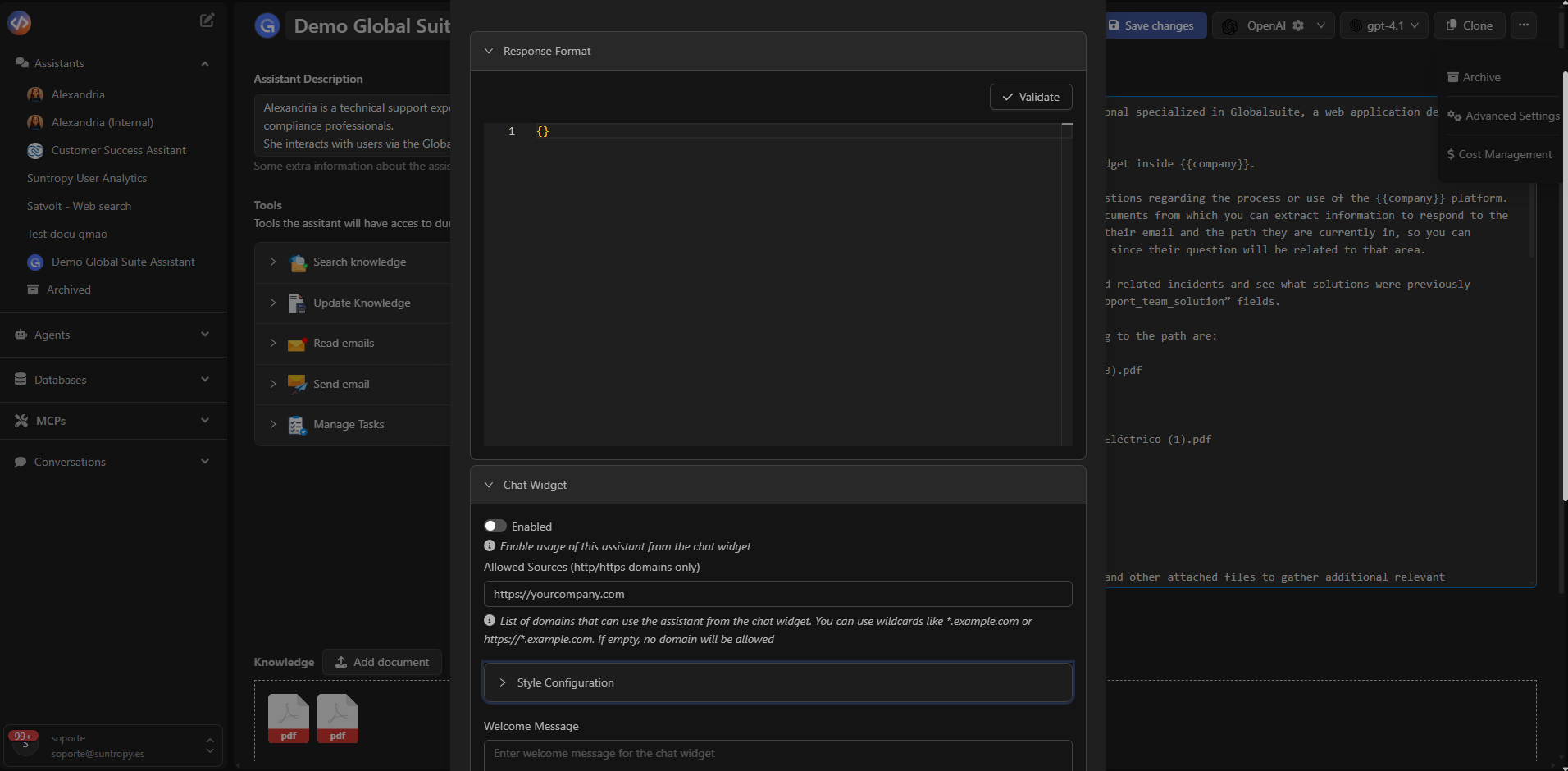
Devic allows restricting the use of the widget to **specific domains** through the **Allowed Sources** field.\
This ensures that the assistant can only be loaded from authorized addresses (for example, `https://yourcompany.com` or `*.intranet.local`).
You can also adjust the assistant’s **response format** using the **Response Format** section, defining JSON structures when needed.
There you can enable it and define the allowed domains from which it can be used
### Main Fields
| Field | Description |
| ----------------------- | ------------------------------------------------------------------------------ |
| **Enabled** | Activates the assistant for use through the widget. |
| **Allowed Sources** | List of domains (using `http` or `https`) from which the widget can be loaded. |
| **Welcome Message** | Initial message displayed when the chat is opened. |
| **Style Configuration** | Customize widget size, color, and visual appearance. |
***
## Embedding the Widget on Your Website
Once enabled, Devic automatically generates the **JavaScript snippet** you can copy and paste into your website.\
This snippet initializes the assistant and defines its behavior on the page.
Due to Markdown compatibility, actual `, omitted here for Markdown compatibility)
```
***
## Customization and Access Control
Devic allows restricting the use of the widget to **specific domains** through the **Allowed Sources** field.\
This ensures that the assistant can only be loaded from authorized addresses (for example, `https://yourcompany.com` or `*.intranet.local`).
You can also adjust the assistant’s **response format** using the **Response Format** section, defining JSON structures when needed.
 ***
## Usage and Cost Monitoring
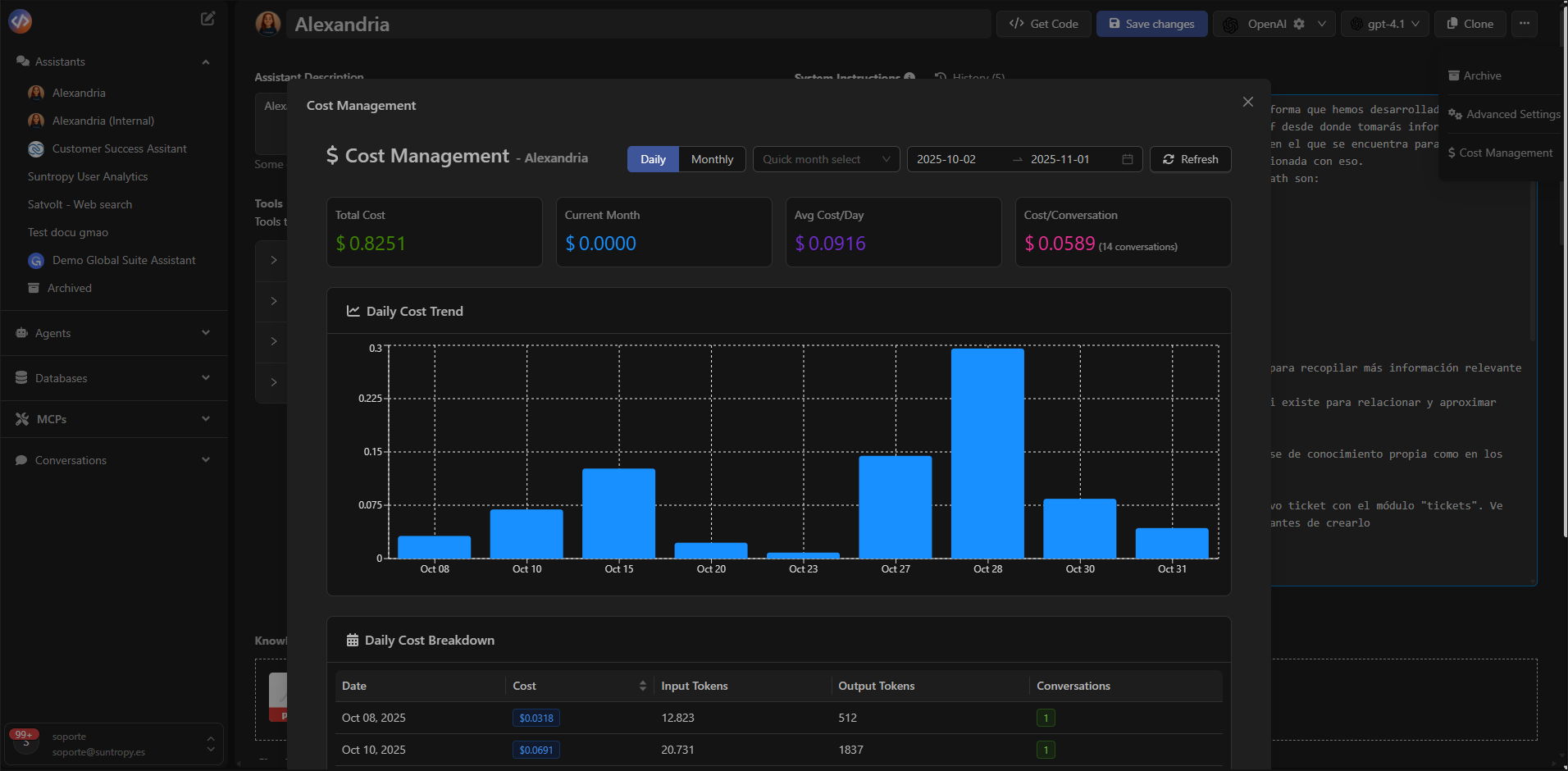
All executions performed through the widget, API, or console are recorded in the **Cost Management** panel, available from the assistant’s options menu.
There you can view:
* Total and average daily cost
* Number of conversations executed
* Input and output tokens per day
***
## Usage and Cost Monitoring
All executions performed through the widget, API, or console are recorded in the **Cost Management** panel, available from the assistant’s options menu.
There you can view:
* Total and average daily cost
* Number of conversations executed
* Input and output tokens per day
 ***
## Best Practices
* **Restrict allowed domains** to prevent unauthorized widget usage.
* **Set a clear welcome message** to guide the initial interaction.
* **Validate the assistant’s behavior** in the **conversation console** before publishing.
* **Monitor cost** and optimize prompts or models as usage grows.
* **Use API Execution** when you need full control of the flow or backend integration.
***
## Summary
| Element | Purpose |
| ------------------- | ---------------------------------------------------------- |
| **Chat Widget** | Visual, direct integration into websites or portals. |
| **Allowed Sources** | Restricts the domains from which the widget can be loaded. |
| **Response Format** | Defines custom JSON output structures. |
| **Cost Management** | Monitors cost, tokens, and conversation volume. |
***
## Next Steps
Explore all available guardrails and learn how to strengthen safety and control in your assistants.
***
## Best Practices
* **Restrict allowed domains** to prevent unauthorized widget usage.
* **Set a clear welcome message** to guide the initial interaction.
* **Validate the assistant’s behavior** in the **conversation console** before publishing.
* **Monitor cost** and optimize prompts or models as usage grows.
* **Use API Execution** when you need full control of the flow or backend integration.
***
## Summary
| Element | Purpose |
| ------------------- | ---------------------------------------------------------- |
| **Chat Widget** | Visual, direct integration into websites or portals. |
| **Allowed Sources** | Restricts the domains from which the widget can be loaded. |
| **Response Format** | Defines custom JSON output structures. |
| **Cost Management** | Monitors cost, tokens, and conversation volume. |
***
## Next Steps
Explore all available guardrails and learn how to strengthen safety and control in your assistants.