> ## Documentation Index
> Fetch the complete documentation index at: https://docs.devic.ai/llms.txt
> Use this file to discover all available pages before exploring further.
# Off Topic Prompts
> Prevent assistants from responding outside the defined scope using Devic’s Off Topic Prompts guardrail.
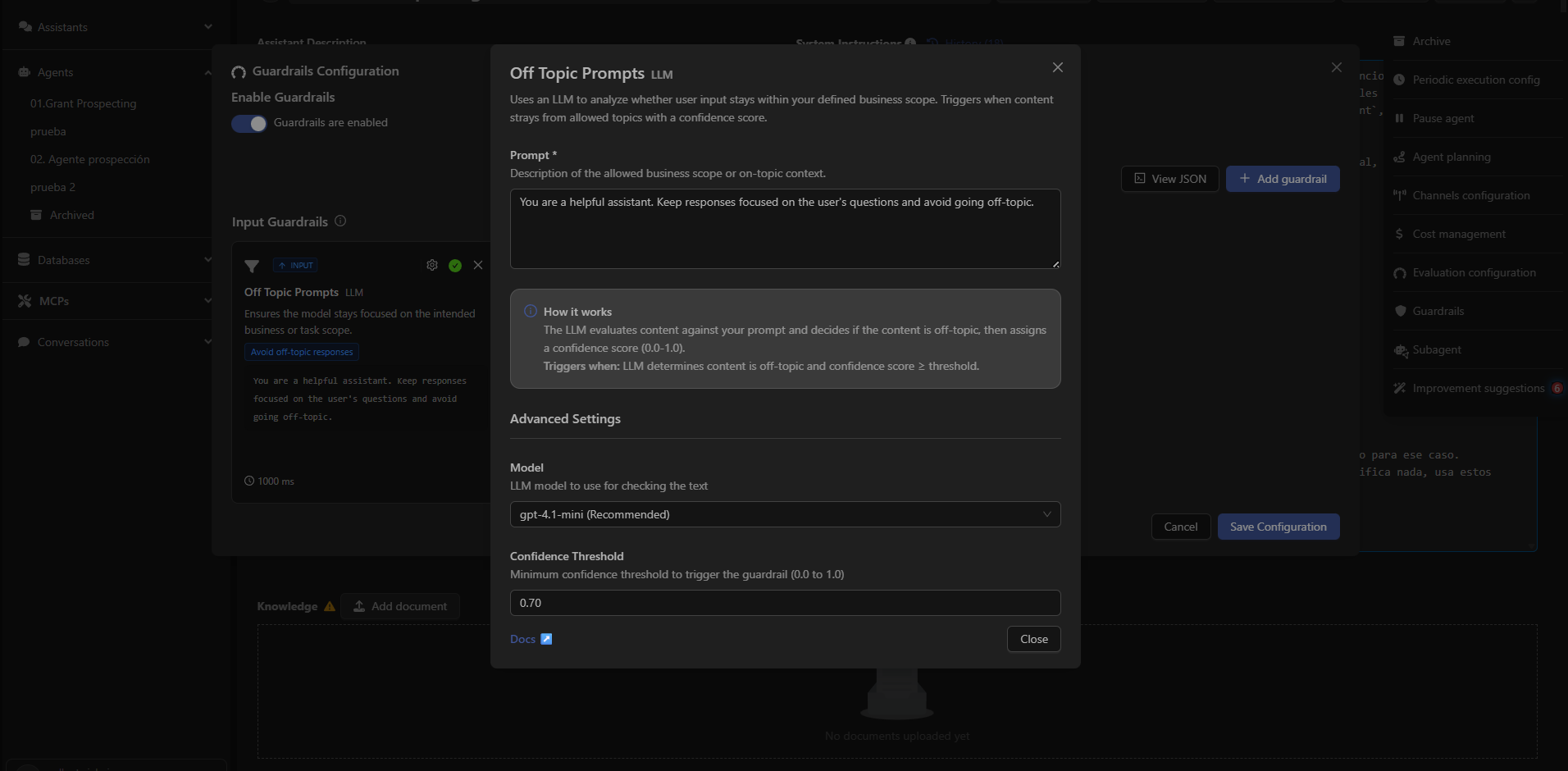
The **Off Topic Prompts** guardrail analyzes whether the user's input stays within the assistant’s allowed context or scope.\
When it detects that a message is *off-topic* with a confidence level above the configured threshold, the instruction is blocked before it reaches the model.
 ***
## What Off Topic Prompts Detects
It evaluates whether the user’s message aligns with the thematic scope defined by the assistant’s administrator.
Example use cases:
* Keeping a support assistant within the technical domain.
* Preventing responses to topics unrelated to the business.
* Blocking instructions that steer the assistant toward personal or inappropriate conversations.
***
## How It Works
The LLM compares the user message with the description of the allowed scope.\
The system assigns a **confidence score** (0.0 – 1.0).\
The guardrail activates when:
* The content is considered *out of context*, **and**
* The confidence level ≥ configured threshold.
***
## Configurable Parameters
### Allowed Prompt
Text that defines the valid thematic scope for the assistant.\
Example:
You are a helpful assistant. Keep responses focused on the user's questions and avoid going off-topic.
### Model
The LLM used to evaluate whether the content is off-topic.
### Confidence Threshold
Minimum threshold (0.0 – 1.0) required to activate the guardrail.\
Typical values: `0.70 – 0.85`
***
Learn how to define custom rules to validate or block user instructions.
***
## What Off Topic Prompts Detects
It evaluates whether the user’s message aligns with the thematic scope defined by the assistant’s administrator.
Example use cases:
* Keeping a support assistant within the technical domain.
* Preventing responses to topics unrelated to the business.
* Blocking instructions that steer the assistant toward personal or inappropriate conversations.
***
## How It Works
The LLM compares the user message with the description of the allowed scope.\
The system assigns a **confidence score** (0.0 – 1.0).\
The guardrail activates when:
* The content is considered *out of context*, **and**
* The confidence level ≥ configured threshold.
***
## Configurable Parameters
### Allowed Prompt
Text that defines the valid thematic scope for the assistant.\
Example:
You are a helpful assistant. Keep responses focused on the user's questions and avoid going off-topic.
### Model
The LLM used to evaluate whether the content is off-topic.
### Confidence Threshold
Minimum threshold (0.0 – 1.0) required to activate the guardrail.\
Typical values: `0.70 – 0.85`
***
Learn how to define custom rules to validate or block user instructions.