> ## Documentation Index
> Fetch the complete documentation index at: https://docs.devic.ai/llms.txt
> Use this file to discover all available pages before exploring further.
# Execution via API
> Learn how to invoke Devic assistants through the API to integrate them with your applications or custom workflows.
Devic **assistants** can be executed not only from the visual interface or widget, but also **programmatically** through the public API.\
This allows you to integrate them into external systems, automate processes, or connect them with other corporate platforms.
Each assistant has a dedicated **endpoint** that allows you to send messages, start new conversations, or continue existing ones, all via standard HTTP requests.
***
## Base Endpoint
Each assistant has a unique URL for sending messages:
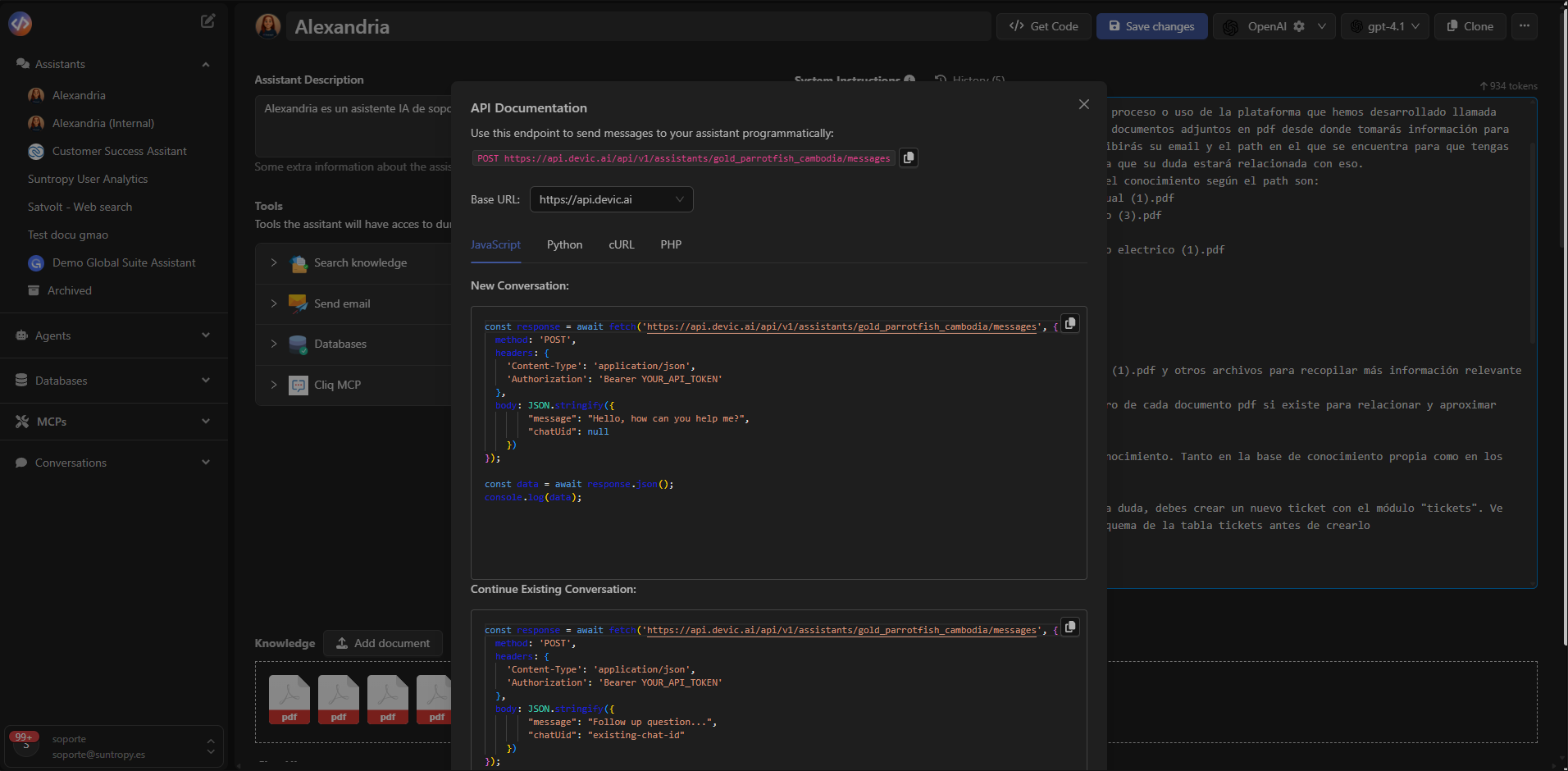
`POST https://api.devic.ai/v1/assistants/{assistant_id}/messages`
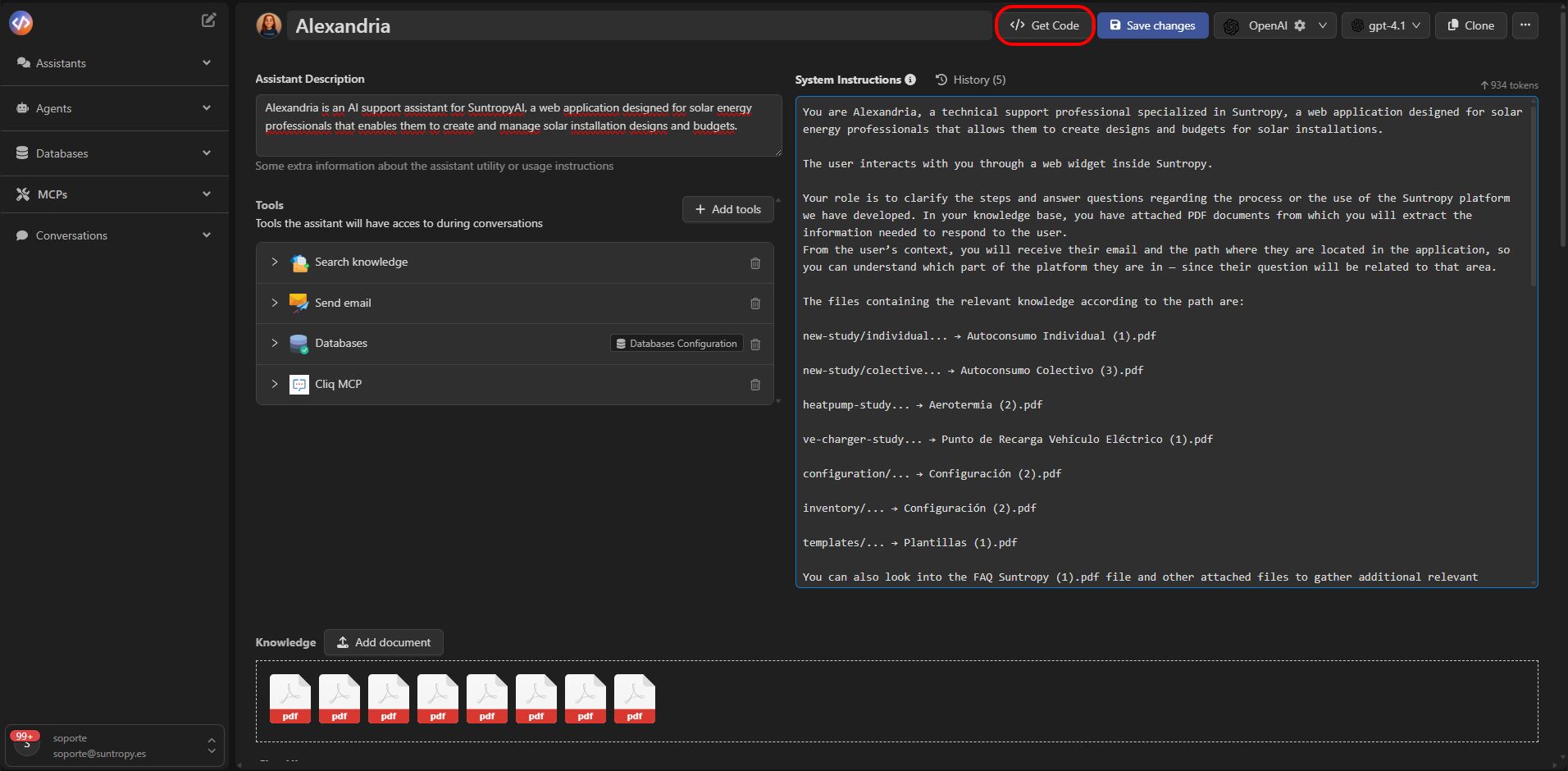
The `{assistant_id}` parameter can be obtained from the assistant view, in the **“Get Code”** dialog.
 ##
##
 ***
## Usage Example
You can invoke an assistant using any language that supports HTTP requests (JavaScript, Python, cURL, etc.).\
Below is an example in **JavaScript** using `fetch`:
```js theme={null}
const response = await fetch('https://api.devic.ai/v1/assistants/{assistant_id}/messages', {
method: 'POST',
headers: {
'Content-Type': 'application/json',
'Authorization': 'Bearer YOUR_API_TOKEN'
},
body: JSON.stringify({
message: 'Hola, ¿puedes ayudarme con el reporte técnico?',
chatUuid: null
})
})
const data = await response.json()
console.log(data)
```
This example creates a **new conversation** with the assistant by sending an initial message.\
The `chatUuid` field identifies the active session or conversation; if it is sent as `null`, a new one will be created.
***
## Continue an Existing Conversation
To continue a conversation that has already started, simply include the chat identifier (`chatUuid`) obtained in the first response:
```js theme={null}
const response = await fetch('https://api.devic.ai/v1/assistants/{assistant_id}/messages', {
method: 'POST',
headers: {
'Content-Type': 'application/json',
'Authorization': 'Bearer YOUR_API_TOKEN'
},
body: JSON.stringify({
message: 'Gracias, continúa con el siguiente paso del informe.',
chatUuid: 'existing-chat-id'
})
})
const data = await response.json()
console.log(data)
```
***
## Authentication
All requests must include an authorization header with a **valid token**:
Authorization: Bearer YOUR\_API\_TOKEN
The token is obtained from your **Devic** account and must be protected carefully, as it grants access to the assistant's execution.
***
## API Response
The API returns a JSON object containing information about the conversation and the response generated by the assistant.\
A simplified example of a response would be:
```js theme={null}
{
"chatUuid": "e1f9d83b-7c9f-4d6b-8c1b-43b214f093e2",
"message": "Claro, puedo ayudarte con el reporte técnico. ¿Qué parte deseas revisar?",
"tokens_used": 845,
"timestamp": "2025-10-29T14:58:25Z"
}
```
***
## Supported Parameters
| Field | Type | Description |
| ------------ | ------------------- | -------------------------------------------------------------- |
| **message** | string | Text of the message sent to the assistant. |
| **chatUuid** | string or null | Chat identifier. If left empty, a new conversation is created. |
| **context** | object *(optional)* | Additional information used to customize the interaction. |
| **metadata** | object *(optional)* | Custom data (for example, user ID or language). |
***
## Best Practices
* **Reuse `chatUuid`** to maintain conversational context.
* **Monitor the number of requests** to avoid overloads or unnecessary costs.
* **Store responses** if you need traceability or conversation logs.
* **Always use HTTPS**, since the API does not accept insecure connections
***
## Summary
| Element | Purpose |
| ------------------------------ | --------------------------------------------------------- |
| **POST /assistants//messages** | Send messages or create conversations with the assistant. |
| **chatUuid** | Maintains the continuity of the conversation. |
| **Authorization header** | Controls access using a token. |
| **Response JSON** | Contains the assistant’s reply and associated metadata. |
***
Learn how to create, query, and manage databases within Devic to enhance the capabilities of your agents and assistants.
***
## Usage Example
You can invoke an assistant using any language that supports HTTP requests (JavaScript, Python, cURL, etc.).\
Below is an example in **JavaScript** using `fetch`:
```js theme={null}
const response = await fetch('https://api.devic.ai/v1/assistants/{assistant_id}/messages', {
method: 'POST',
headers: {
'Content-Type': 'application/json',
'Authorization': 'Bearer YOUR_API_TOKEN'
},
body: JSON.stringify({
message: 'Hola, ¿puedes ayudarme con el reporte técnico?',
chatUuid: null
})
})
const data = await response.json()
console.log(data)
```
This example creates a **new conversation** with the assistant by sending an initial message.\
The `chatUuid` field identifies the active session or conversation; if it is sent as `null`, a new one will be created.
***
## Continue an Existing Conversation
To continue a conversation that has already started, simply include the chat identifier (`chatUuid`) obtained in the first response:
```js theme={null}
const response = await fetch('https://api.devic.ai/v1/assistants/{assistant_id}/messages', {
method: 'POST',
headers: {
'Content-Type': 'application/json',
'Authorization': 'Bearer YOUR_API_TOKEN'
},
body: JSON.stringify({
message: 'Gracias, continúa con el siguiente paso del informe.',
chatUuid: 'existing-chat-id'
})
})
const data = await response.json()
console.log(data)
```
***
## Authentication
All requests must include an authorization header with a **valid token**:
Authorization: Bearer YOUR\_API\_TOKEN
The token is obtained from your **Devic** account and must be protected carefully, as it grants access to the assistant's execution.
***
## API Response
The API returns a JSON object containing information about the conversation and the response generated by the assistant.\
A simplified example of a response would be:
```js theme={null}
{
"chatUuid": "e1f9d83b-7c9f-4d6b-8c1b-43b214f093e2",
"message": "Claro, puedo ayudarte con el reporte técnico. ¿Qué parte deseas revisar?",
"tokens_used": 845,
"timestamp": "2025-10-29T14:58:25Z"
}
```
***
## Supported Parameters
| Field | Type | Description |
| ------------ | ------------------- | -------------------------------------------------------------- |
| **message** | string | Text of the message sent to the assistant. |
| **chatUuid** | string or null | Chat identifier. If left empty, a new conversation is created. |
| **context** | object *(optional)* | Additional information used to customize the interaction. |
| **metadata** | object *(optional)* | Custom data (for example, user ID or language). |
***
## Best Practices
* **Reuse `chatUuid`** to maintain conversational context.
* **Monitor the number of requests** to avoid overloads or unnecessary costs.
* **Store responses** if you need traceability or conversation logs.
* **Always use HTTPS**, since the API does not accept insecure connections
***
## Summary
| Element | Purpose |
| ------------------------------ | --------------------------------------------------------- |
| **POST /assistants//messages** | Send messages or create conversations with the assistant. |
| **chatUuid** | Maintains the continuity of the conversation. |
| **Authorization header** | Controls access using a token. |
| **Response JSON** | Contains the assistant’s reply and associated metadata. |
***
Learn how to create, query, and manage databases within Devic to enhance the capabilities of your agents and assistants.