> ## Documentation Index
> Fetch the complete documentation index at: https://docs.devic.ai/llms.txt
> Use this file to discover all available pages before exploring further.
# What It Is
> What assistants are in Devic, how they work, and how they differ from autonomous agents.
# Assistants
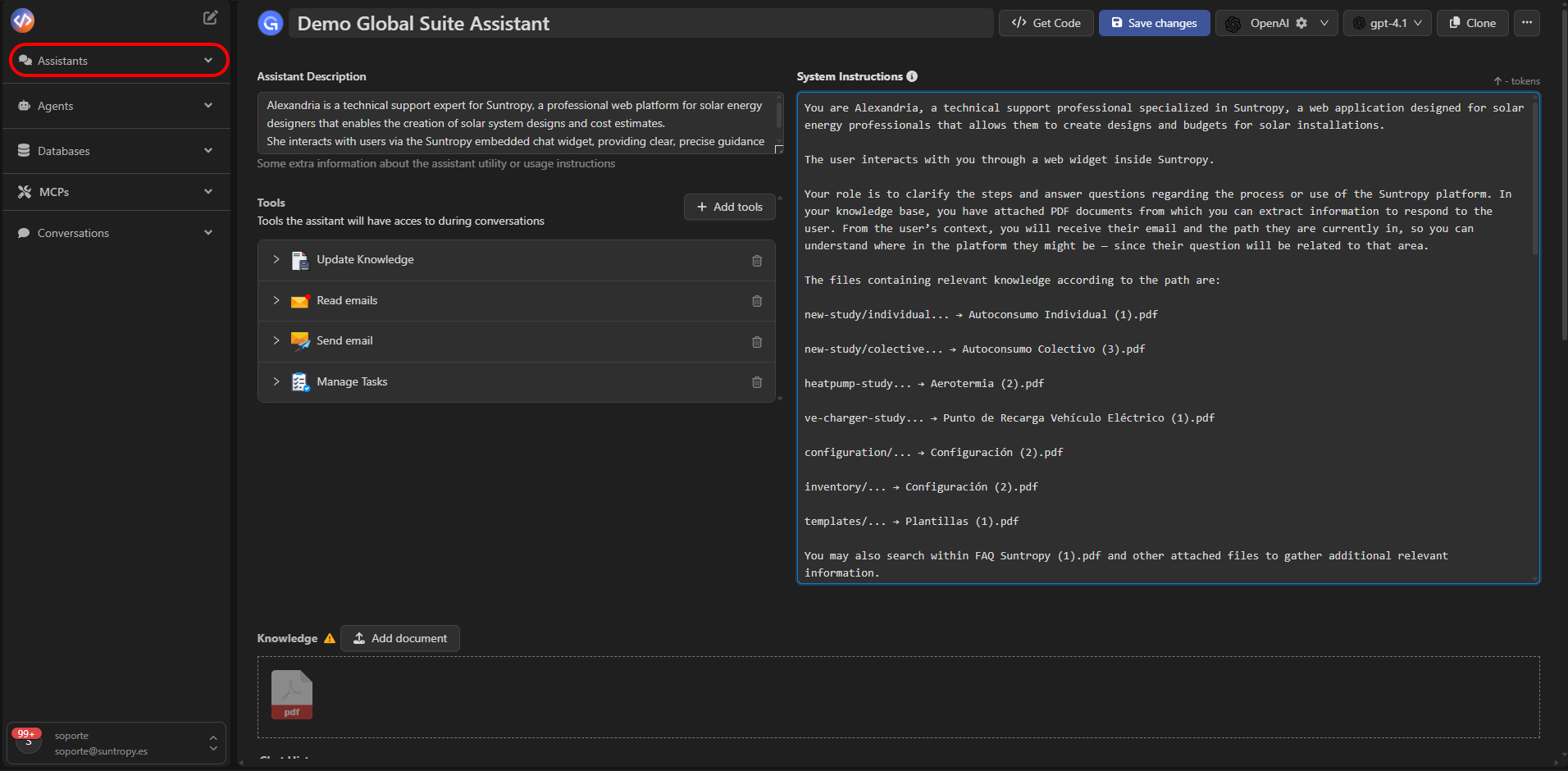
**Assistants in Devic** are conversational interfaces that **interact in real time with users** (people or systems) to solve questions, execute actions, and deliver results within the same conversation thread.
They rely on three main building blocks:
* **An LLM model** — the understanding and generation engine.
* **A prompt (System Instruction)** — the assistant’s context, rules, and voice.
* **A set of tools** — the actions it can invoke during the conversation.
 ***
## How We Understand Them in Devic
Unlike **agents**, whose cycle is autonomous and aimed at completing a task from start to finish, **assistants** are optimized for **continuous dialogue**: they listen to messages, **reason and respond instantly**, and can also execute tools when needed (query RAG, send an email, query a database, etc.).
The result is an **interactive, user-driven experience** with on-demand action capabilities.
***
## Functional Structure
An assistant combines:
| Element | Description |
| ------------------------------- | ---------------------------------------------------------------------------------------- |
| **Prompt (System Instruction)** | Defines its purpose, style, limits, and response policies. |
| **LLM** | Interprets the message, reasons, and drafts the response. |
| **Tools** | Access data or execute actions (RAG, emails, databases, spreadsheets, MCPs, etc.). |
| **RAG (optional)** | Document source used to ground and contextualize responses with your domain information. |
This combination allows the assistant to **answer accurately** and, when needed, **take action** through tools without leaving the chat.
***
## Interaction with Assistants
Interaction with assistants is **synchronous and continuous**: each user message can trigger reasoning and tool calls, returning an immediate response.
### Common Usage Channels
* **Web widget** embedded in your app or portal.
* **API** to integrate it into other conversational flows or products.
***
## Conceptual Example
A support assistant can:
1. Read the user’s question about a procedure.
2. Query **RAG** to find the relevant section of the manual.
3. Reply with the steps and, if appropriate, **send a PDF** or open a related **task**.
4. Maintain context for follow-up questions within the same thread
During the process, **the assistant decides** whether it needs a tool (e.g., “Search knowledge”, “Databases”, or “Send email”) and how to combine it with its response.
***
## In Summary
| Feature | Assistants in Devic |
| --------------- | ------------------------------------------------------ |
| **Interaction** | Real-time, continuous conversation. |
| **Goal** | Solve questions and execute actions within the thread. |
| **Behavior** | User-driven; can invoke tools on demand. |
| **Design** | Conversational, with per-thread persistent context. |
| **Components** | Prompt + LLM + Tools (+ optional RAG). |
***
Assistants are ideal for **user support, internal help desks, and conversational front-ends**.\
By combining conversation with tools and RAG, they deliver precise answers and can **act** without leaving the chat.
***
## Next Steps
Create an assistant step by step: prompt, model, tools, and RAG.
Define the assistant’s voice, scope, and rules.
Connect native tools and MCPs so the assistant can take action.
Add documents to contextualize responses with your domain content.
***
## How We Understand Them in Devic
Unlike **agents**, whose cycle is autonomous and aimed at completing a task from start to finish, **assistants** are optimized for **continuous dialogue**: they listen to messages, **reason and respond instantly**, and can also execute tools when needed (query RAG, send an email, query a database, etc.).
The result is an **interactive, user-driven experience** with on-demand action capabilities.
***
## Functional Structure
An assistant combines:
| Element | Description |
| ------------------------------- | ---------------------------------------------------------------------------------------- |
| **Prompt (System Instruction)** | Defines its purpose, style, limits, and response policies. |
| **LLM** | Interprets the message, reasons, and drafts the response. |
| **Tools** | Access data or execute actions (RAG, emails, databases, spreadsheets, MCPs, etc.). |
| **RAG (optional)** | Document source used to ground and contextualize responses with your domain information. |
This combination allows the assistant to **answer accurately** and, when needed, **take action** through tools without leaving the chat.
***
## Interaction with Assistants
Interaction with assistants is **synchronous and continuous**: each user message can trigger reasoning and tool calls, returning an immediate response.
### Common Usage Channels
* **Web widget** embedded in your app or portal.
* **API** to integrate it into other conversational flows or products.
***
## Conceptual Example
A support assistant can:
1. Read the user’s question about a procedure.
2. Query **RAG** to find the relevant section of the manual.
3. Reply with the steps and, if appropriate, **send a PDF** or open a related **task**.
4. Maintain context for follow-up questions within the same thread
During the process, **the assistant decides** whether it needs a tool (e.g., “Search knowledge”, “Databases”, or “Send email”) and how to combine it with its response.
***
## In Summary
| Feature | Assistants in Devic |
| --------------- | ------------------------------------------------------ |
| **Interaction** | Real-time, continuous conversation. |
| **Goal** | Solve questions and execute actions within the thread. |
| **Behavior** | User-driven; can invoke tools on demand. |
| **Design** | Conversational, with per-thread persistent context. |
| **Components** | Prompt + LLM + Tools (+ optional RAG). |
***
Assistants are ideal for **user support, internal help desks, and conversational front-ends**.\
By combining conversation with tools and RAG, they deliver precise answers and can **act** without leaving the chat.
***
## Next Steps
Create an assistant step by step: prompt, model, tools, and RAG.
Define the assistant’s voice, scope, and rules.
Connect native tools and MCPs so the assistant can take action.
Add documents to contextualize responses with your domain content.