> ## Documentation Index
> Fetch the complete documentation index at: https://docs.devic.ai/llms.txt
> Use this file to discover all available pages before exploring further.
# Tools
> Configure and manage the tools available for your agents in Devic: Built-in Tools, My MCPs, Code Snippets, and Sub-Agents.
**Tools** define the capabilities an agent can use during execution.\
They act as **action interfaces**, enabling the model to interact with internal systems, external services, or resources within the Devic platform.
Each Tool expands the agent’s reach, allowing it to perform real operations such as sending emails, querying databases, processing documents, or connecting APIs through MCPs.
***
## Overview of the Tools Panel
In each agent’s configuration, the **Tools** section displays all available tools for conversations or automated executions.
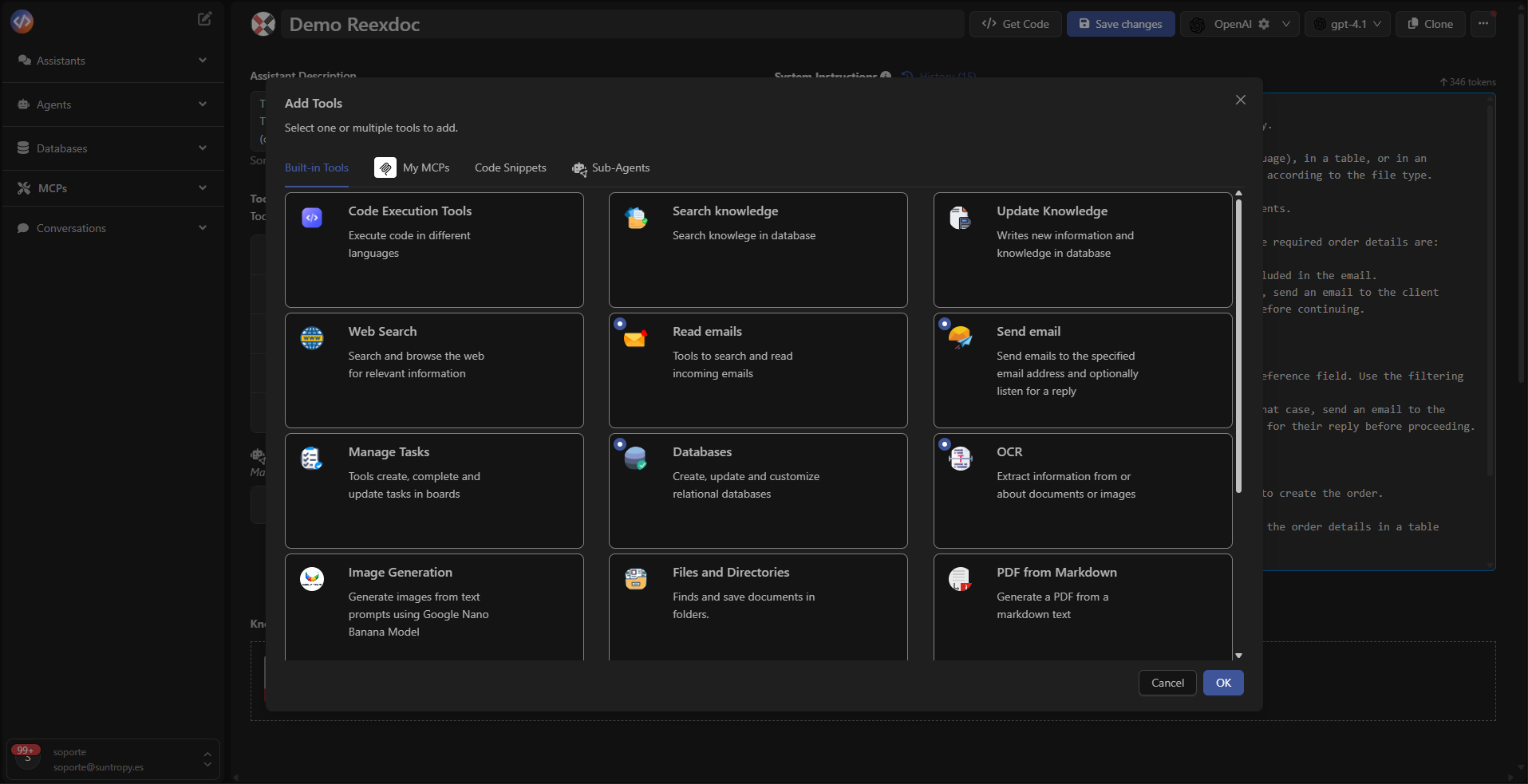 From this panel you can:
* **Add new Tools** using the **Add tools** button.
* **Configure** parameters and authentication for each Tool.
* **Remove** unnecessary tools.
* **Manage sub-agents** as extensions of the main agent.
***
## Add New Tools
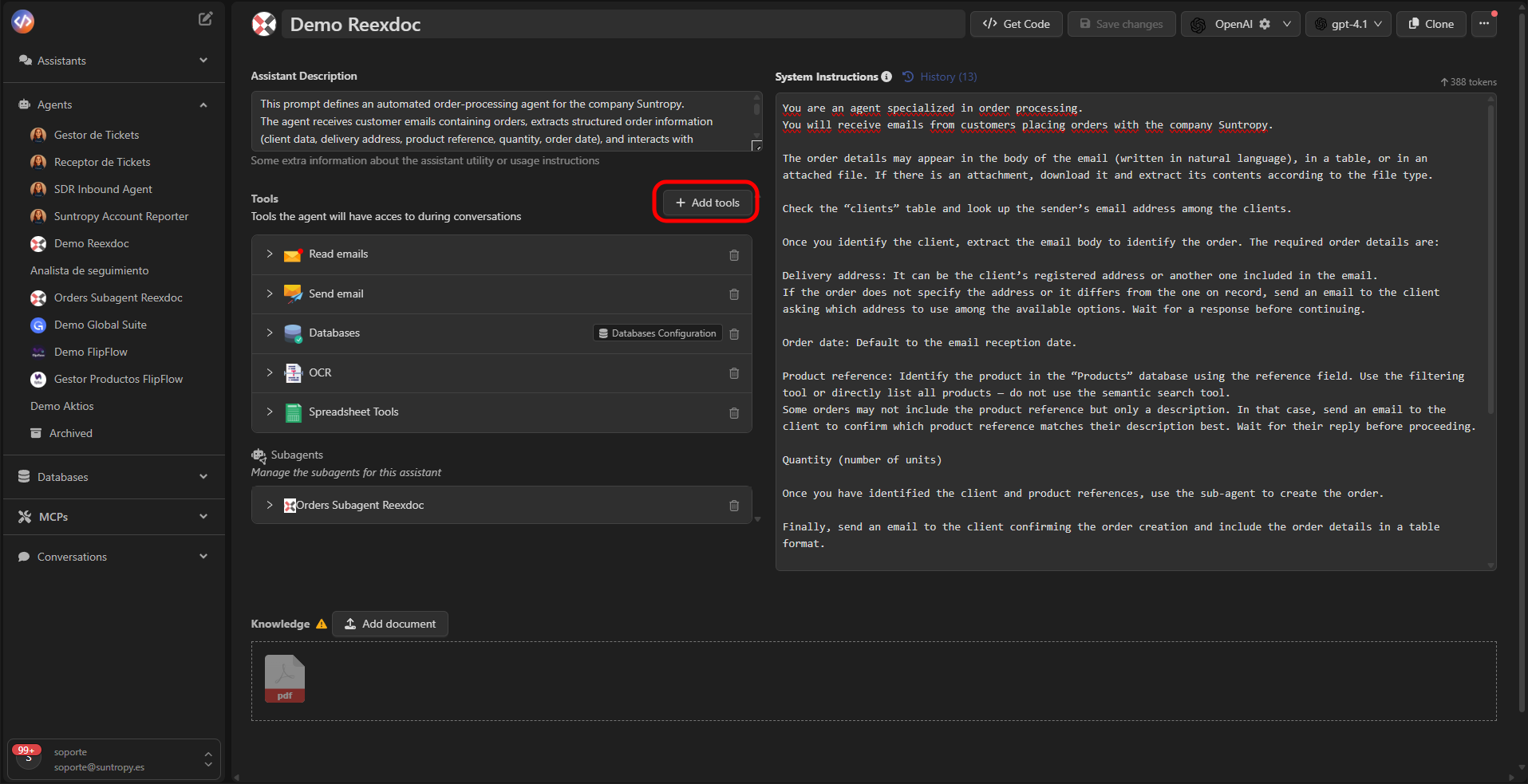
When selecting **Add tools**, the main selector opens, grouping all available tool sources.\
Here you can choose between **Built-in Tools**, **My MCPs**, **Code Snippets**, or **Sub-Agents**.
From this panel you can:
* **Add new Tools** using the **Add tools** button.
* **Configure** parameters and authentication for each Tool.
* **Remove** unnecessary tools.
* **Manage sub-agents** as extensions of the main agent.
***
## Add New Tools
When selecting **Add tools**, the main selector opens, grouping all available tool sources.\
Here you can choose between **Built-in Tools**, **My MCPs**, **Code Snippets**, or **Sub-Agents**.
 ##
##
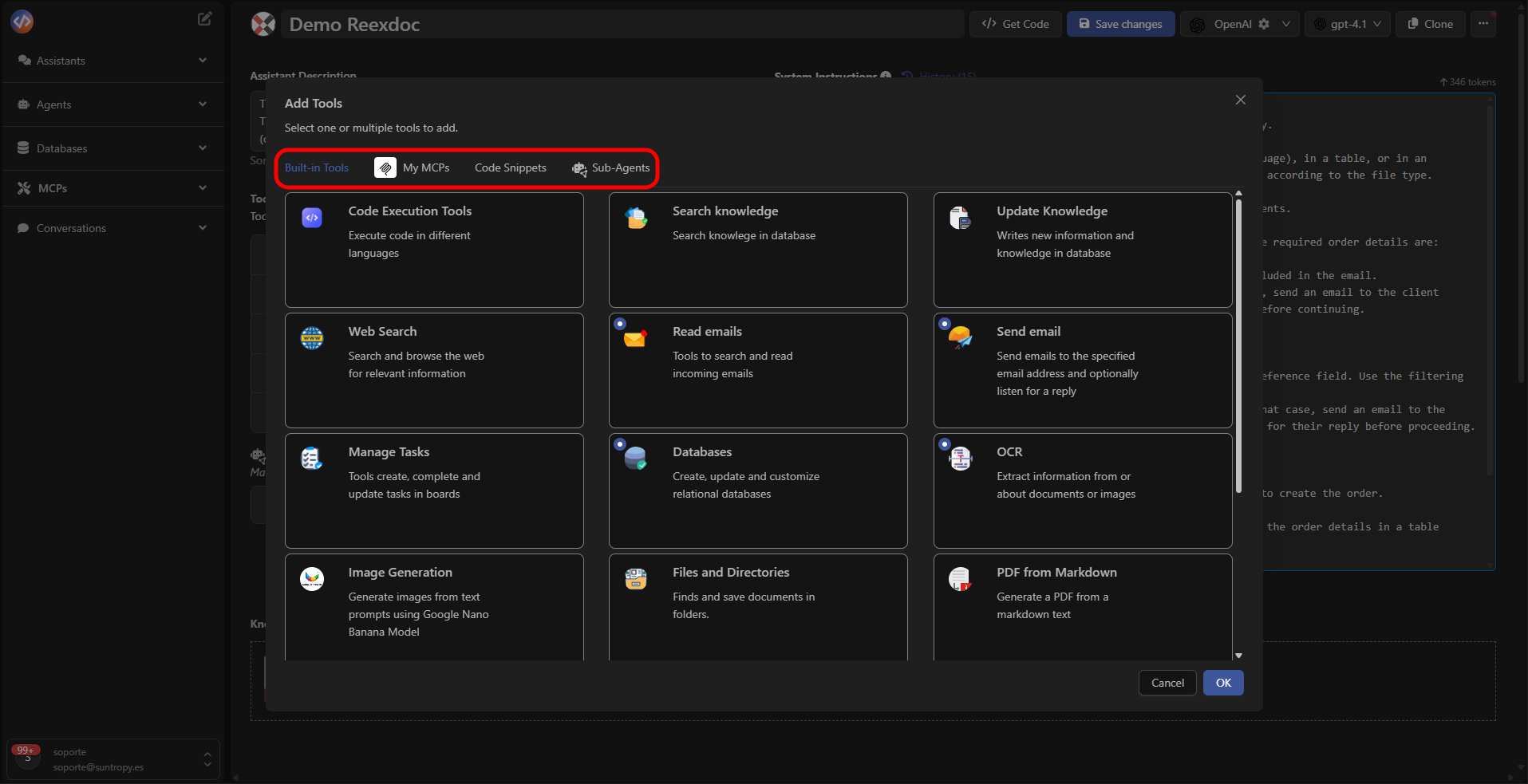 ***
## Built-in Tools
**Built-in Tools** are Devic’s native tools, ready to use without additional configuration.\
They enable common operations such as:
* **Search Knowledge:** query internal knowledge bases (RAG).
* **Web Search:** search for up-to-date information online.
* **Spreadsheet Tools:** read and manage spreadsheets.
* **Databases:** create and query relational tables.
* **Send Email / Read Emails:** send or receive emails.
* **OCR:** extract text from documents or images.
* **PDF from HTML / Markdown:** generate PDFs.
* **Manage Tasks, Files and Directories, Chart Images**, among others.
***
## Built-in Tools
**Built-in Tools** are Devic’s native tools, ready to use without additional configuration.\
They enable common operations such as:
* **Search Knowledge:** query internal knowledge bases (RAG).
* **Web Search:** search for up-to-date information online.
* **Spreadsheet Tools:** read and manage spreadsheets.
* **Databases:** create and query relational tables.
* **Send Email / Read Emails:** send or receive emails.
* **OCR:** extract text from documents or images.
* **PDF from HTML / Markdown:** generate PDFs.
* **Manage Tasks, Files and Directories, Chart Images**, among others.
.png?fit=max&auto=format&n=RFA6NM5UIZstNWqH&q=85&s=7ebe4f7317a5eaa77a4660140541d5bc) These tools are natively integrated into Devic and updated automatically.\
View full documentation here:\
[**List of Built-in Tools**](../mcps/built-in-tools/tools-list)
***
## My MCPs
The **My MCPs** tab lists the MCP servers created within your organization.\
Each MCP represents a set of tools derived from your own APIs or internal services, exposed via the **Model Context Protocol** standard.
These tools are natively integrated into Devic and updated automatically.\
View full documentation here:\
[**List of Built-in Tools**](../mcps/built-in-tools/tools-list)
***
## My MCPs
The **My MCPs** tab lists the MCP servers created within your organization.\
Each MCP represents a set of tools derived from your own APIs or internal services, exposed via the **Model Context Protocol** standard.
 From this view you can:
* Add tools created from your **corporate APIs**.
* Include external integrations imported from public MCPs.
* Configure authentication, endpoints, and parameters.
Example: An agent that generates reports may use a **Google Drive API MCP** to create and store spreadsheets.
Learn how to create and configure custom MCPs in:\
[**My MCPs**](../mcps/my-mcps/what-it-is)
***
## Code Snippets
**Code Snippets** are reusable code blocks that act as mini custom tools.\
They allow you to execute specific logic without needing to develop a full MCP.
From this view you can:
* Add tools created from your **corporate APIs**.
* Include external integrations imported from public MCPs.
* Configure authentication, endpoints, and parameters.
Example: An agent that generates reports may use a **Google Drive API MCP** to create and store spreadsheets.
Learn how to create and configure custom MCPs in:\
[**My MCPs**](../mcps/my-mcps/what-it-is)
***
## Code Snippets
**Code Snippets** are reusable code blocks that act as mini custom tools.\
They allow you to execute specific logic without needing to develop a full MCP.
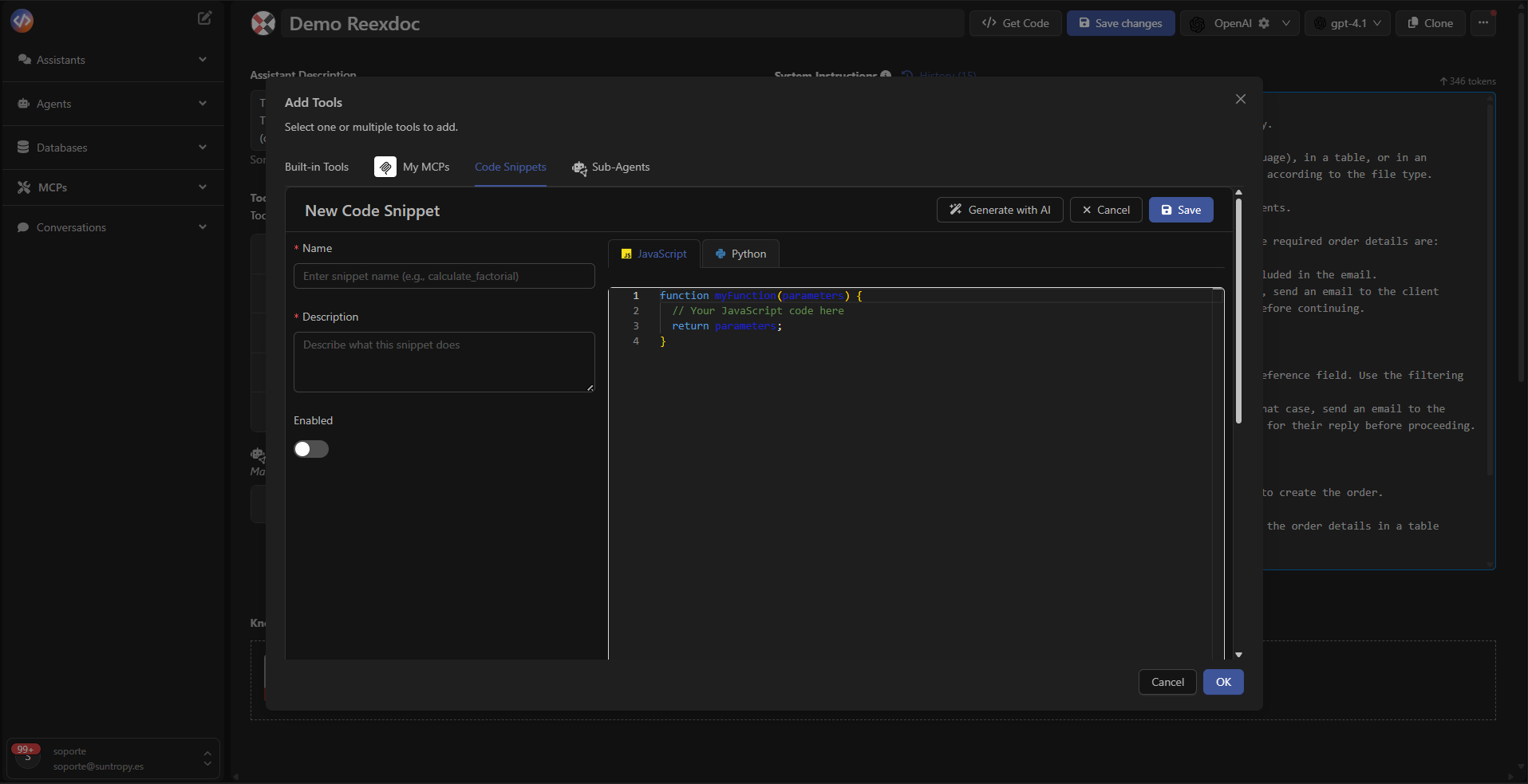 Each snippet can contain:
* Code in **Python** or other supported languages.
* Manually defined input parameters.
* Reusable custom functionality across agents.
You can create them using **Create First Snippet** or **New Snippet**, and add them to the agent just like any other Tool.
***
## Sub-Agents
**Sub-Agents** are auxiliary agents that the main agent can invoke during execution.\
They operate as autonomous tools capable of solving specialized subtasks, sharing the same environment and available tools.
Each snippet can contain:
* Code in **Python** or other supported languages.
* Manually defined input parameters.
* Reusable custom functionality across agents.
You can create them using **Create First Snippet** or **New Snippet**, and add them to the agent just like any other Tool.
***
## Sub-Agents
**Sub-Agents** are auxiliary agents that the main agent can invoke during execution.\
They operate as autonomous tools capable of solving specialized subtasks, sharing the same environment and available tools.
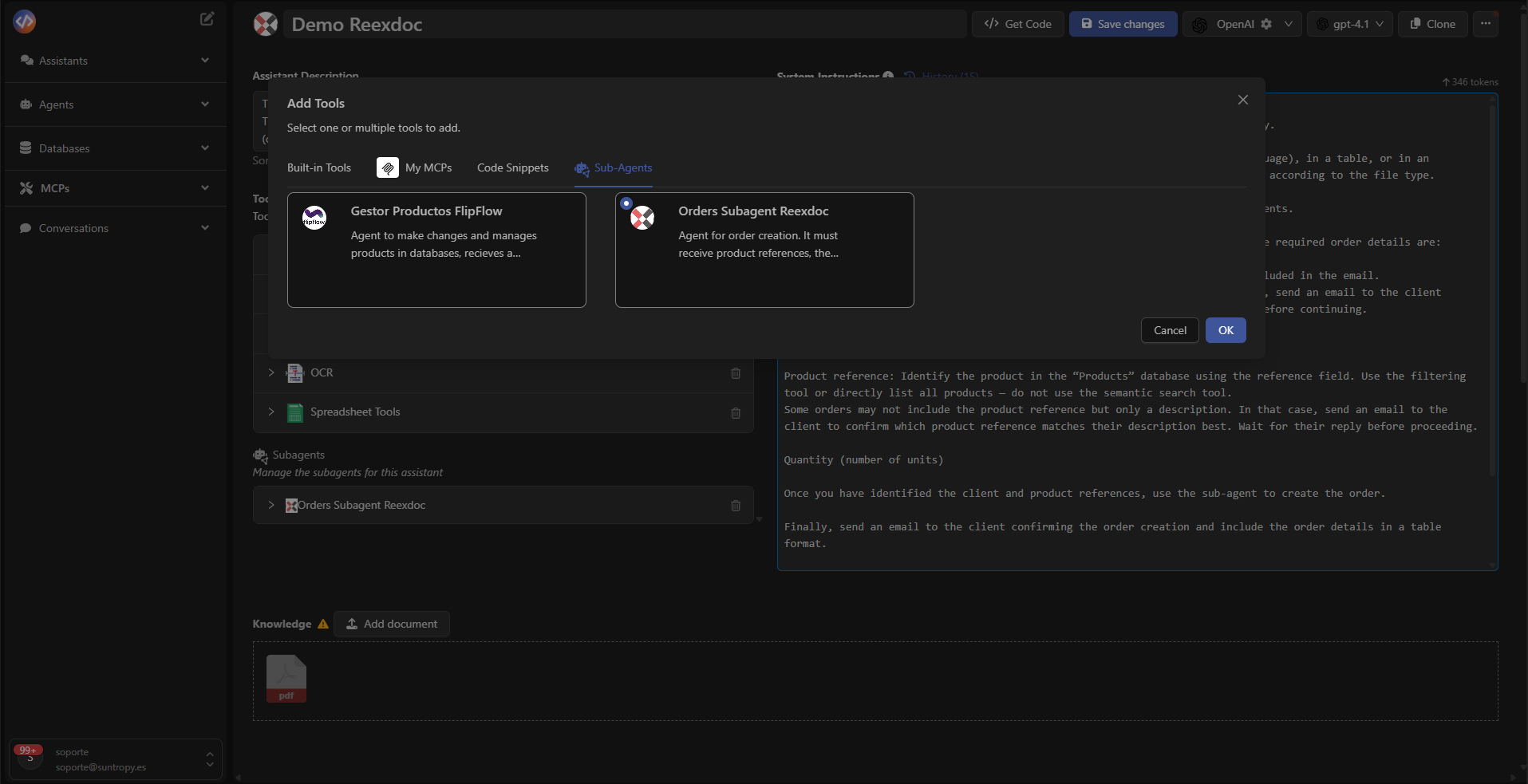 Example:\
A support agent may have a sub-agent specializing in **technical incident analysis**, called whenever it needs to classify a complex ticket.
Learn more in [**Subagents**](../agents/other-options).
***
## Real Use Example
In this example, the **Grant Prospecting** agent uses a combination of Built-in Tools and custom MCPs to extract and structure data from resolutions stored in the RAG:
* **Search Knowledge** → retrieves the base information.
* **Web Search** → expands results with public context.
* **Spreadsheet Tools** → creates the report in Google Sheets.
* **Google Drive API (MCP)** → saves the final file to Drive.
Example:\
A support agent may have a sub-agent specializing in **technical incident analysis**, called whenever it needs to classify a complex ticket.
Learn more in [**Subagents**](../agents/other-options).
***
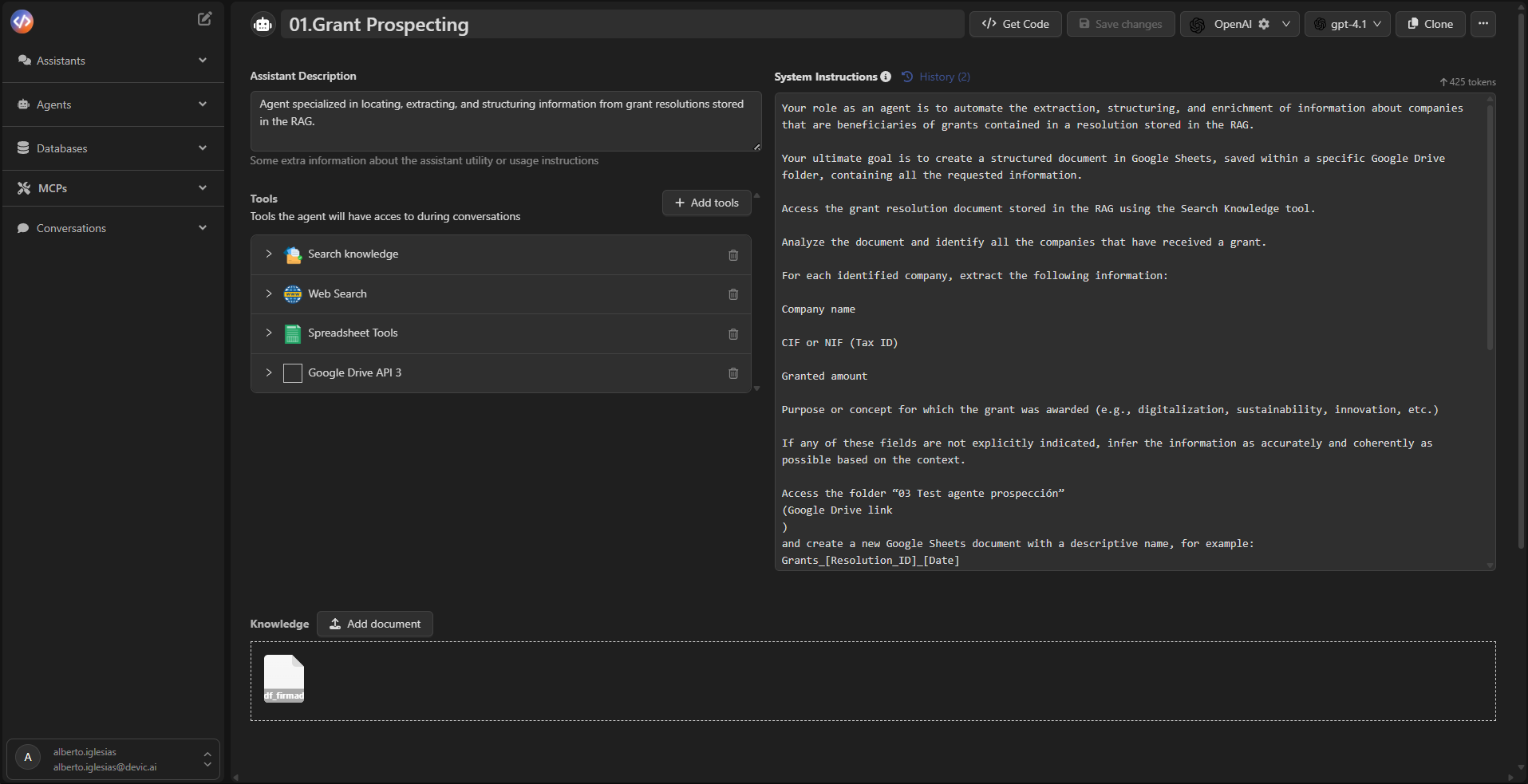
## Real Use Example
In this example, the **Grant Prospecting** agent uses a combination of Built-in Tools and custom MCPs to extract and structure data from resolutions stored in the RAG:
* **Search Knowledge** → retrieves the base information.
* **Web Search** → expands results with public context.
* **Spreadsheet Tools** → creates the report in Google Sheets.
* **Google Drive API (MCP)** → saves the final file to Drive.
 ***
## Best Practices
* Add only the tools needed for the agent’s objective.
* Keep MCPs synchronized with their source APIs.
* Review authentication settings before publishing each MCP.
* Use clear names and descriptions for every Tool.
* Leverage Code Snippets for small automation tasks.
* Use Sub-Agents to modularize complex agents.
***
## Next Steps
Learn how to integrate knowledge bases and semantic search using Devic’s native RAG system for grounded responses.
Improve your agents' performance through automatic evaluations, human feedback, and iterative analysis.
Explore advanced configurations such as subagents, scheduled executions, or contextual control strategies.
Learn how to launch and manage your agents’ executions directly through Devic’s public API.
***
## Best Practices
* Add only the tools needed for the agent’s objective.
* Keep MCPs synchronized with their source APIs.
* Review authentication settings before publishing each MCP.
* Use clear names and descriptions for every Tool.
* Leverage Code Snippets for small automation tasks.
* Use Sub-Agents to modularize complex agents.
***
## Next Steps
Learn how to integrate knowledge bases and semantic search using Devic’s native RAG system for grounded responses.
Improve your agents' performance through automatic evaluations, human feedback, and iterative analysis.
Explore advanced configurations such as subagents, scheduled executions, or contextual control strategies.
Learn how to launch and manage your agents’ executions directly through Devic’s public API.