> ## Documentation Index
> Fetch the complete documentation index at: https://docs.devic.ai/llms.txt
> Use this file to discover all available pages before exploring further.
# RAG
> Enhance your agents in Devic by using RAG to retrieve external information and contextualize their responses.
**RAG (Retrieval Augmented Generation)** is the system that enables agents in **Devic** to access external information—such as documents, manuals, policies, or catalogs—and use it during execution to generate more precise and contextualized responses.
Thanks to RAG, agents can work with up-to-date or domain-specific data without relying solely on the model’s pretrained knowledge.
***
## How It Works
The platform includes a fully integrated **RAG system** that allows users to directly upload documents to enrich the model's context.
The process is **entirely automatic**:
1. The platform analyzes the uploaded documents and **splits them into sections or “chunks”** for better indexing and retrieval.
2. It generates **automatic descriptions** for each fragment, helping the agent better contextualize the information.
3. During execution, the agent decides **when and how to query** these fragments, integrating them dynamically into its operational context.
This approach removes the need for additional training or external integrations, allowing agents to work with **updated and specific knowledge** without added technical complexity.
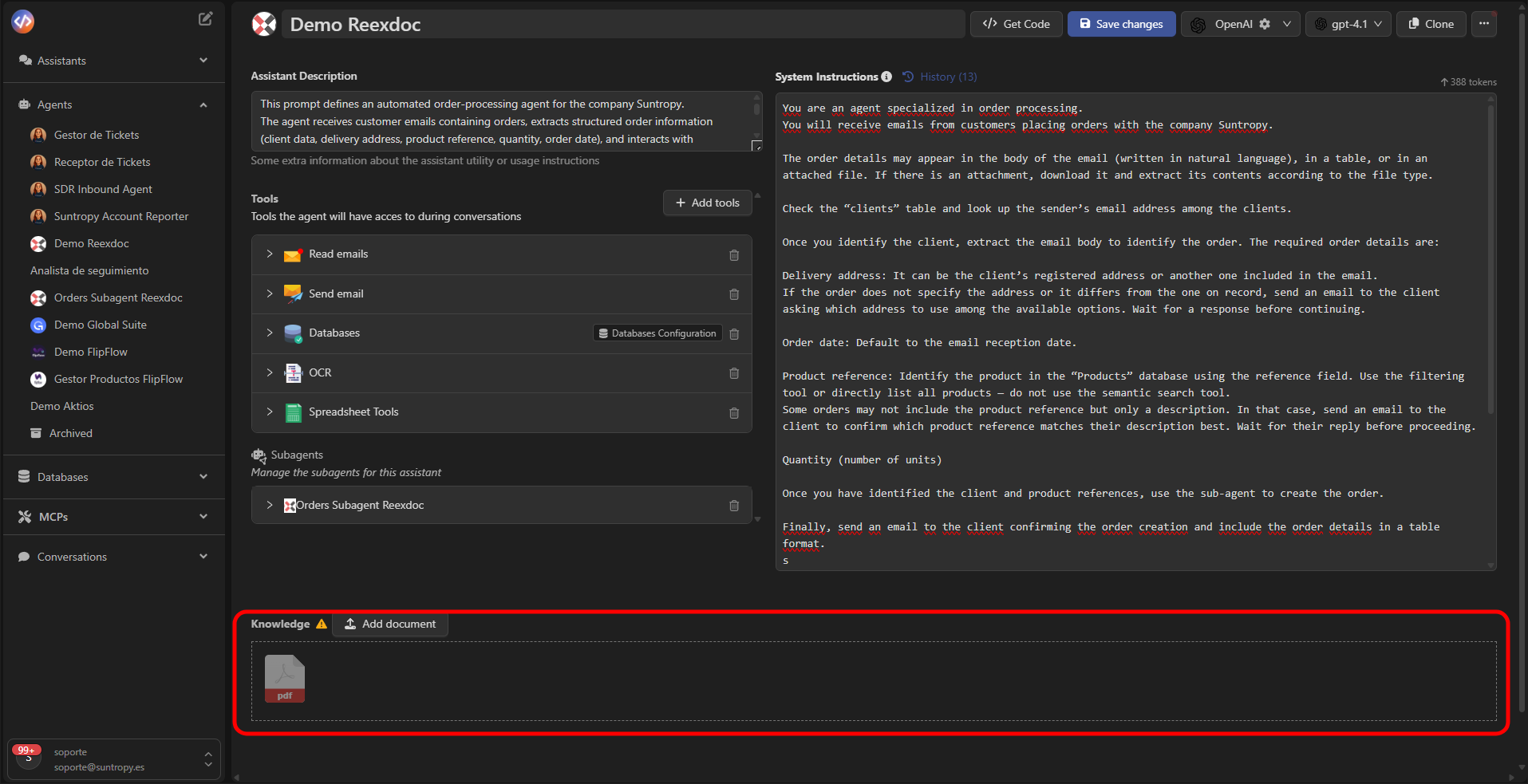 With RAG, organizations can give their agents an extended memory that strengthens reasoning capabilities and improves precision in complex tasks.
***
## Configuring RAG in an Agent
To add RAG to an agent:
1. Open the agent from the Devic sidebar.
2. Scroll to the **RAG** section.
3. Select **Add document** and upload the files that will form part of the knowledge base.
Supported formats include:
* `.pdf`
* `.docx`
* `.txt`
* `.csv`
Each file is processed automatically and displayed in the agent interface with its name and status.
***
## Document Preview and Summary
After uploading a document, you can view its details from the right-hand side panel.\
Devic displays **metadata** and an **automatic summary** of the content.
| Field | Description |
| ---------------------- | ---------------------------------------------------------------------- |
| **Name** | Name of the uploaded file. |
| **Size** | File size. |
| **Created / Modified** | Creation and last modification dates. |
| **Summary** | Summary of the content, automatically injected into the agent context. |
With RAG, organizations can give their agents an extended memory that strengthens reasoning capabilities and improves precision in complex tasks.
***
## Configuring RAG in an Agent
To add RAG to an agent:
1. Open the agent from the Devic sidebar.
2. Scroll to the **RAG** section.
3. Select **Add document** and upload the files that will form part of the knowledge base.
Supported formats include:
* `.pdf`
* `.docx`
* `.txt`
* `.csv`
Each file is processed automatically and displayed in the agent interface with its name and status.
***
## Document Preview and Summary
After uploading a document, you can view its details from the right-hand side panel.\
Devic displays **metadata** and an **automatic summary** of the content.
| Field | Description |
| ---------------------- | ---------------------------------------------------------------------- |
| **Name** | Name of the uploaded file. |
| **Size** | File size. |
| **Created / Modified** | Creation and last modification dates. |
| **Summary** | Summary of the content, automatically injected into the agent context. |
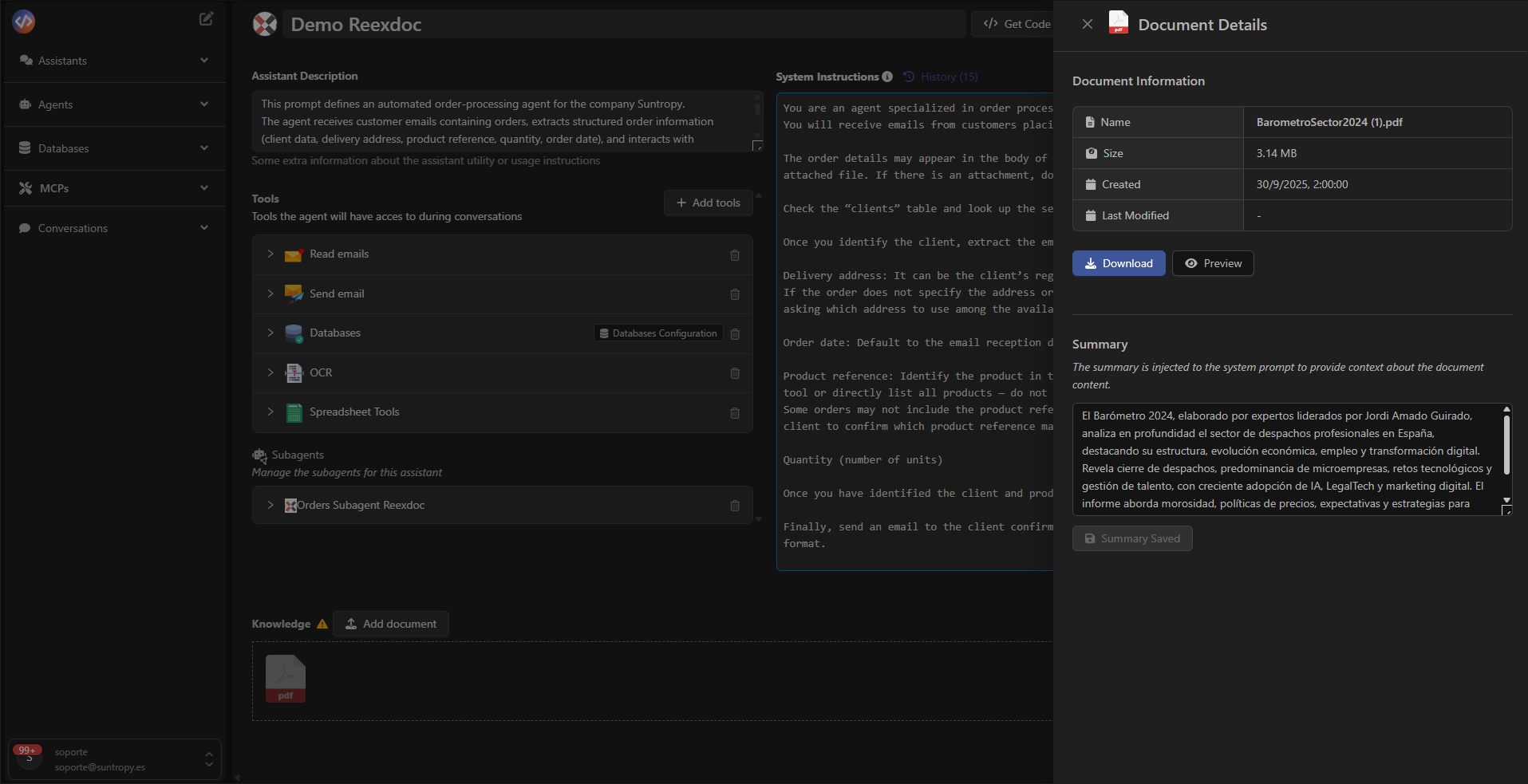 The **Summary** field can be manually edited to refine the document description.\
This allows prioritizing the most relevant information and optimizing agent queries.
***
## Best Practices
* Upload only the documents necessary for the agent's context.
* Avoid overly long files or irrelevant content.
* Update summaries when document content changes.
* Use descriptive names to improve identification.
* Review the document set periodically to ensure it remains up to date.
***
## Use Cases
| Agent Type | RAG Application |
| ------------- | ---------------------------------------------------------- |
| **Legal** | Consults contracts or legal texts stored in PDFs. |
| **Sales** | Looks up data in catalogs, product sheets, or price lists. |
| **Technical** | Retrieves content from manuals or internal guides. |
| **Support** | Accesses knowledge bases or customer documentation. |
***
## Next Steps
Improve your agents' performance through automatic evaluations, human feedback, and iterative analysis.
Explore advanced configurations such as subagents, scheduled executions, or contextual control strategies.
Learn how to launch and manage your agents' executions directly through Devic’s public API.
The **Summary** field can be manually edited to refine the document description.\
This allows prioritizing the most relevant information and optimizing agent queries.
***
## Best Practices
* Upload only the documents necessary for the agent's context.
* Avoid overly long files or irrelevant content.
* Update summaries when document content changes.
* Use descriptive names to improve identification.
* Review the document set periodically to ensure it remains up to date.
***
## Use Cases
| Agent Type | RAG Application |
| ------------- | ---------------------------------------------------------- |
| **Legal** | Consults contracts or legal texts stored in PDFs. |
| **Sales** | Looks up data in catalogs, product sheets, or price lists. |
| **Technical** | Retrieves content from manuals or internal guides. |
| **Support** | Accesses knowledge bases or customer documentation. |
***
## Next Steps
Improve your agents' performance through automatic evaluations, human feedback, and iterative analysis.
Explore advanced configurations such as subagents, scheduled executions, or contextual control strategies.
Learn how to launch and manage your agents' executions directly through Devic’s public API.