> ## Documentation Index
> Fetch the complete documentation index at: https://docs.devic.ai/llms.txt
> Use this file to discover all available pages before exploring further.
# Agent Prompt
> Learn how to design, version, and optimize your agent’s prompt in Devic
The **prompt** is the functional core of every agent in Devic.\
It defines its behavior, the objectives it must achieve, and the rules under which it must operate.\
In other words, the prompt translates user intent into executable instructions for the model.
***
## What the Prompt Is
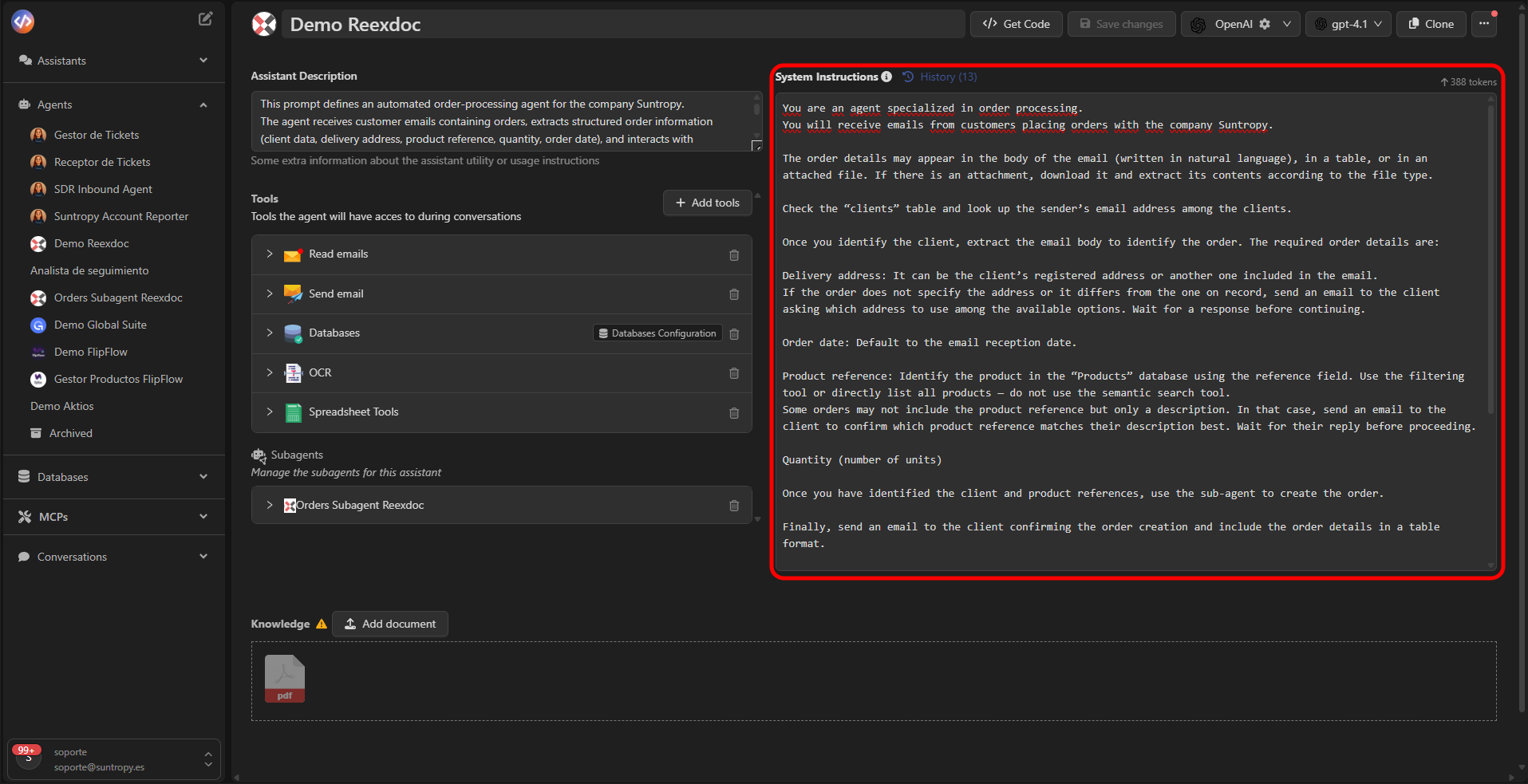
The prompt contains the instructions that the language model (LLM) follows to perform a task.\
It defines how the agent should reason, what steps it must follow, and when a task should be considered successfully completed.
Unlike a simple descriptive text, the prompt in Devic acts as the agent’s cognitive system, combining context, rules, and goals to guide its decisions.
**Example**
You are an agent specialized in processing orders.\
You will receive emails from customers with purchase requests addressed to `{{nombre_empresa}}`.\
Consult the customer table and search for the sender’s email among the records.\
Once the customer is identified, extract the order details:
* Delivery address
* Order date
* Product references
* Number of units
Record the information in the corresponding database.
##  ***
## How to Structure a Good Prompt
A well-designed prompt significantly improves the agent’s accuracy and autonomy.\
Below is a recommended structure for defining it clearly and effectively:
| Section | Description | Example |
| -------------------- | ----------------------------------------------------------- | ------------------------------------------------------------------------------------------- |
| **Role** | Defines who the agent is and what its function is. | You are an agent specialized in customer support. |
| **Context** | Provides information about the environment or constraints. | You work for `{{nombre_empresa}}` and receive inquiries by email. |
| **Goal** | Describes the result the agent must achieve. | Your task is to classify emails into categories and reply automatically. |
| **Actions** | Specifies the concrete steps needed to accomplish the goal. | Extract the information from the email, verify it in the database, and respond accordingly. |
| **Success Criteria** | Defines when the task is considered complete. | The task is complete when the email is correctly classified and the response is sent. |
**Recommendation:** use short, direct, unambiguous sentences.\
Agents perform better with explicit instructions and clear logical structure.
***
## Dynamic Variables
Prompts in Devic can include **dynamic placeholders**, such as `{{nombre_empresa}}` or `{{usuario}}`, which are automatically replaced during the agent’s execution.\
This allows prompts to be reusable and adaptable to different contexts or environments.
***
## History and Versioning
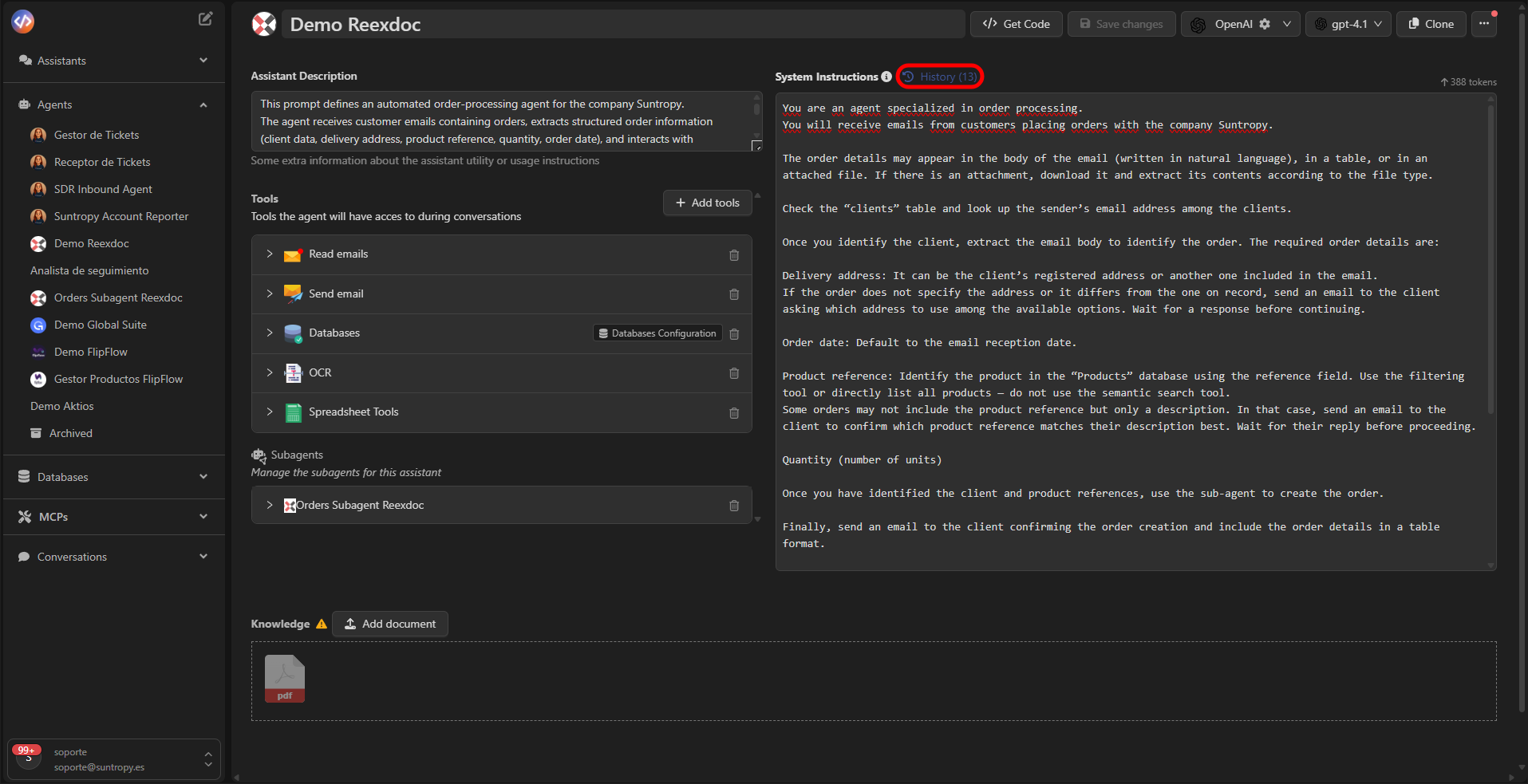
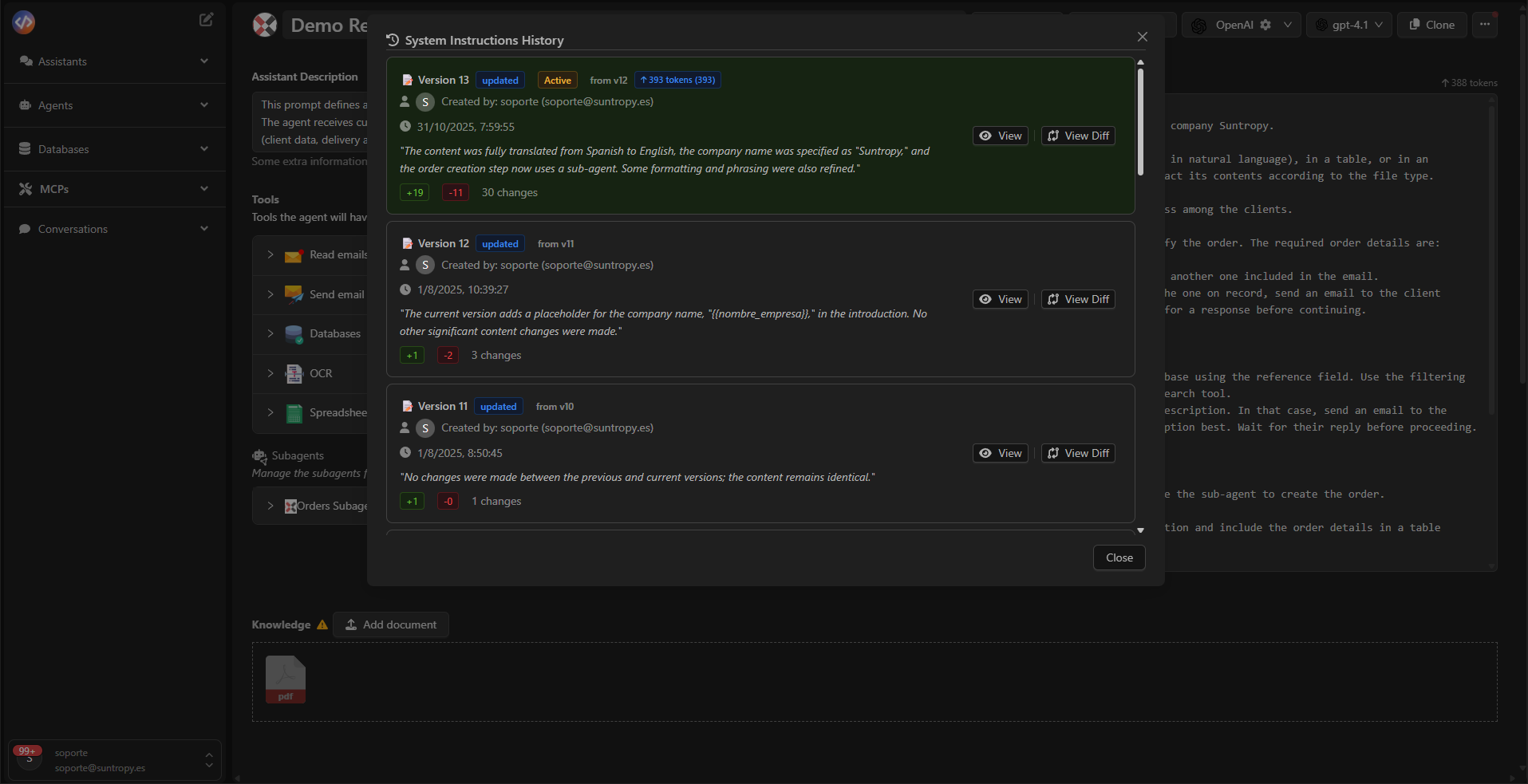
Each modification of the prompt is automatically saved as a **new version**.\
Devic keeps a complete record of all created versions, allowing you to review, compare, or restore any previous version at any time.
The history can be opened from the top of the editor via the **History** option.
***
## How to Structure a Good Prompt
A well-designed prompt significantly improves the agent’s accuracy and autonomy.\
Below is a recommended structure for defining it clearly and effectively:
| Section | Description | Example |
| -------------------- | ----------------------------------------------------------- | ------------------------------------------------------------------------------------------- |
| **Role** | Defines who the agent is and what its function is. | You are an agent specialized in customer support. |
| **Context** | Provides information about the environment or constraints. | You work for `{{nombre_empresa}}` and receive inquiries by email. |
| **Goal** | Describes the result the agent must achieve. | Your task is to classify emails into categories and reply automatically. |
| **Actions** | Specifies the concrete steps needed to accomplish the goal. | Extract the information from the email, verify it in the database, and respond accordingly. |
| **Success Criteria** | Defines when the task is considered complete. | The task is complete when the email is correctly classified and the response is sent. |
**Recommendation:** use short, direct, unambiguous sentences.\
Agents perform better with explicit instructions and clear logical structure.
***
## Dynamic Variables
Prompts in Devic can include **dynamic placeholders**, such as `{{nombre_empresa}}` or `{{usuario}}`, which are automatically replaced during the agent’s execution.\
This allows prompts to be reusable and adaptable to different contexts or environments.
***
## History and Versioning
Each modification of the prompt is automatically saved as a **new version**.\
Devic keeps a complete record of all created versions, allowing you to review, compare, or restore any previous version at any time.
The history can be opened from the top of the editor via the **History** option.
 ***
## Version Comparison
The **Diff** view allows you to compare two prompt versions in detail, line by line.\
Differences are displayed as follows:
* **Green:** added text
* **Red:** removed text
* **No color:** unchanged text
***
## Version Comparison
The **Diff** view allows you to compare two prompt versions in detail, line by line.\
Differences are displayed as follows:
* **Green:** added text
* **Red:** removed text
* **No color:** unchanged text
 ##
##
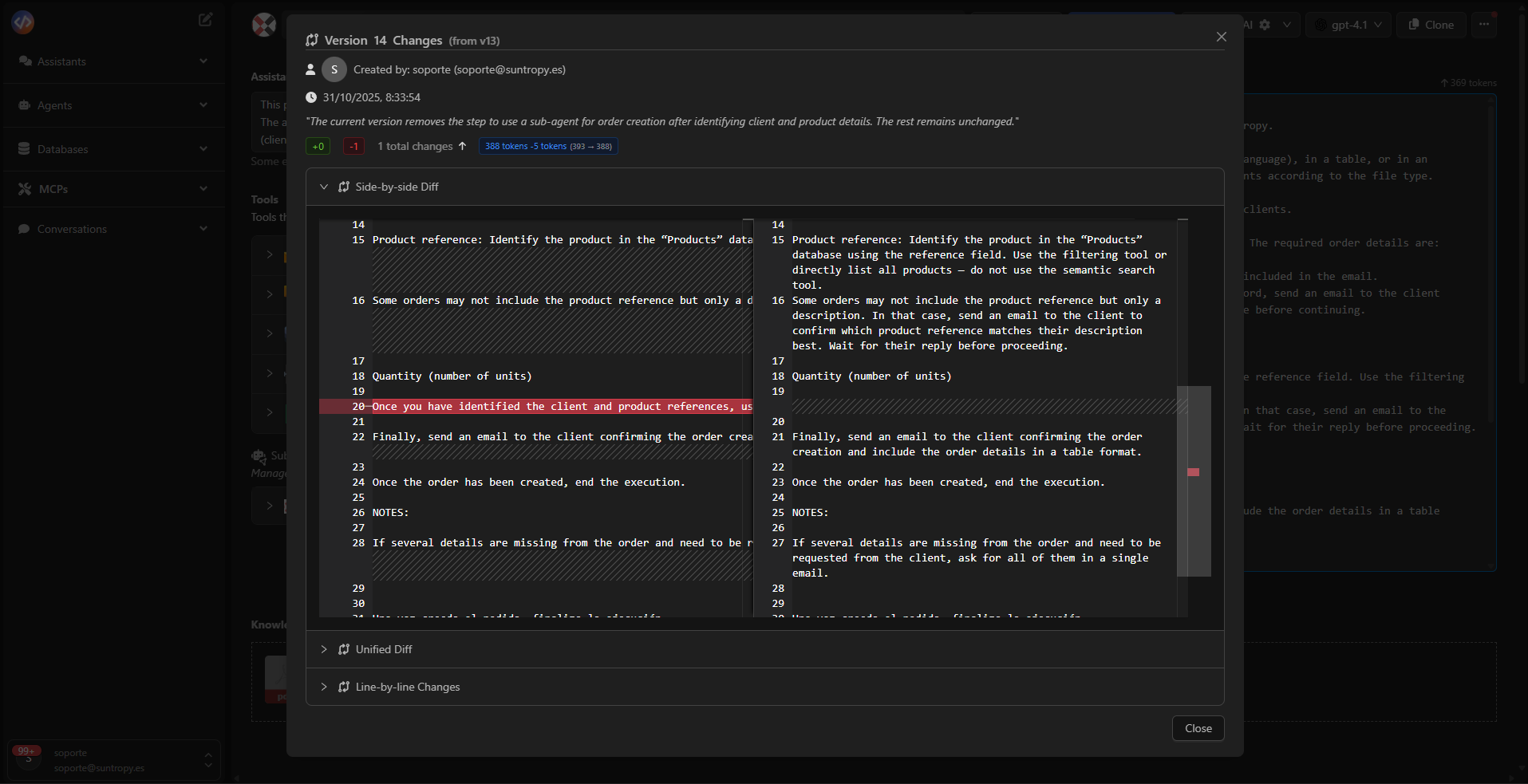 This function is especially useful for auditing changes, reviewing adjustments made by other users, or tracking the evolution of the agent’s behavior.
***
## Best Practices
* Keep the agent’s **role** clear and consistent.
* Use **lists or numbered steps** to structure actions.
* Include **dynamic variables** when needed.
* Avoid ambiguous or contradictory instructions.
* Make incremental changes rather than rewriting the entire prompt.
* Document relevant assumptions or exceptions directly in the prompt.
***
## When to Update the Prompt
You should create a new prompt version when any of the following occurs:
* The agent’s **goal** or **scope** changes.
* **Tools** are added or removed.
* The structure of **data sources** changes.
* You identify **interpretation errors** in execution.
* You aim for greater accuracy or better contextual responses.
***
## Next Steps
Learn about the tools your agents can use to execute actions, query data, or interact with MCPs.
Learn how to integrate knowledge bases and semantic search to enrich your agents’ decisions and responses.
Improve your agents’ performance through automatic evaluation, human feedback, and iterative prompt/tool adjustments.
Explore advanced configurations such as subagents, scheduled executions, or contextual control parameters.
This function is especially useful for auditing changes, reviewing adjustments made by other users, or tracking the evolution of the agent’s behavior.
***
## Best Practices
* Keep the agent’s **role** clear and consistent.
* Use **lists or numbered steps** to structure actions.
* Include **dynamic variables** when needed.
* Avoid ambiguous or contradictory instructions.
* Make incremental changes rather than rewriting the entire prompt.
* Document relevant assumptions or exceptions directly in the prompt.
***
## When to Update the Prompt
You should create a new prompt version when any of the following occurs:
* The agent’s **goal** or **scope** changes.
* **Tools** are added or removed.
* The structure of **data sources** changes.
* You identify **interpretation errors** in execution.
* You aim for greater accuracy or better contextual responses.
***
## Next Steps
Learn about the tools your agents can use to execute actions, query data, or interact with MCPs.
Learn how to integrate knowledge bases and semantic search to enrich your agents’ decisions and responses.
Improve your agents’ performance through automatic evaluation, human feedback, and iterative prompt/tool adjustments.
Explore advanced configurations such as subagents, scheduled executions, or contextual control parameters.