> ## Documentation Index
> Fetch the complete documentation index at: https://docs.devic.ai/llms.txt
> Use this file to discover all available pages before exploring further.
# Environment, memory and subagents
> The settings that turn a single agent into part of a working system — and the safety net underneath them.
An agent configured on its own is fine for one job. These settings are what let several of them share a workplace, remember what happened, and call each other — plus the one that lets you undo a configuration change you regret.
***
## Environment
Connecting an agent to an [environment](/devic/environments/index) gives it that environment's tools, knowledge, variables and sandbox — all at once, and shared with everything else connected to it.
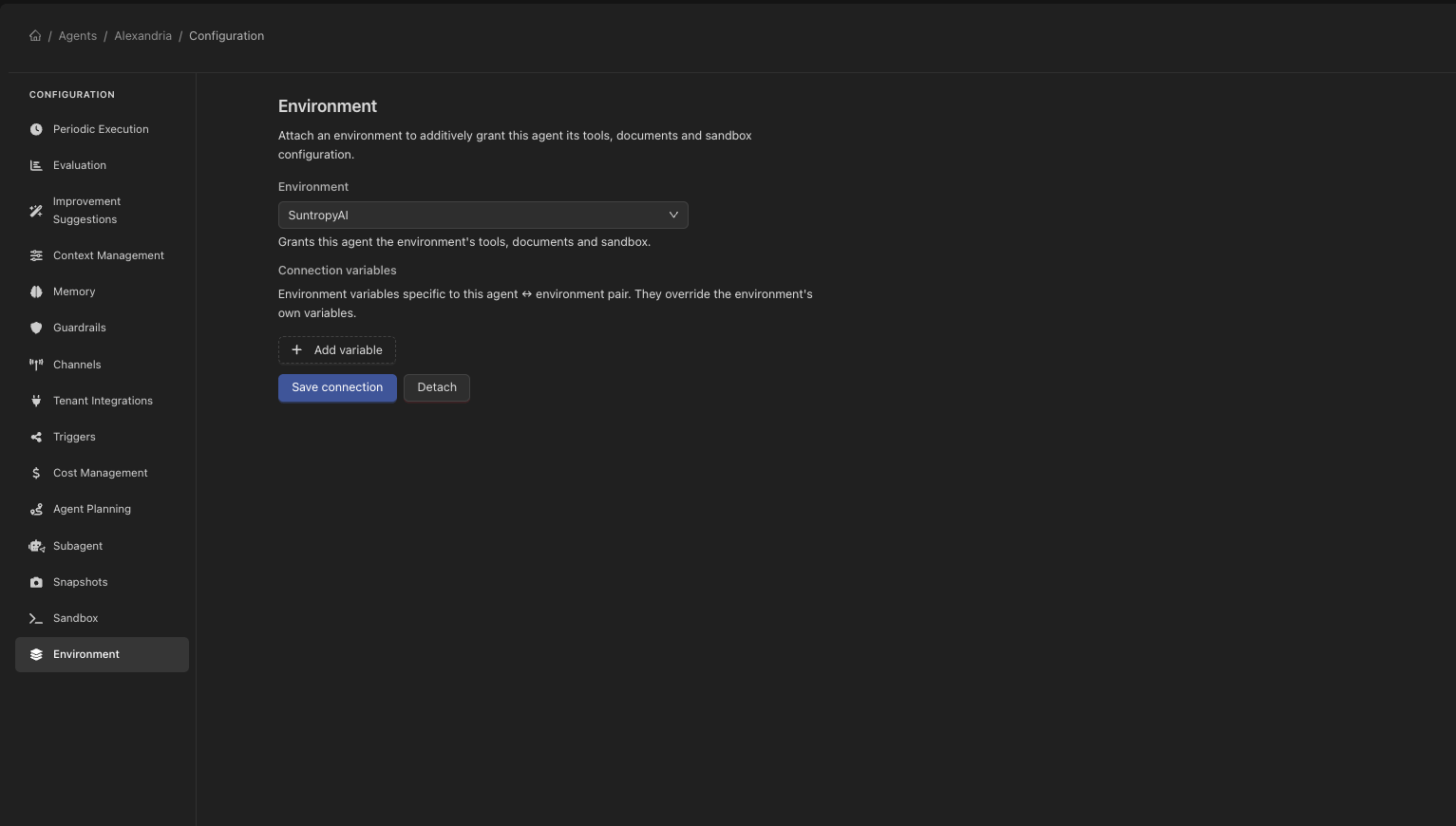 Two agents on the same environment work on the **same machine state**: what one installs, the other finds. That is the difference between a fleet of agents and a set of unrelated ones.
When the environment brings a sandbox, it governs the sandbox completely — the agent's own terminal configuration stops being used. Devic warns you when you connect it, and shows the agent's own form as read-only afterwards.
### Preprovisioning the sandbox
By default the sandbox is created the first time the agent asks for it, inside its own turn — so the model waits for a machine to be created, restored and initialised.
**Preprovisioning** starts that work in the background as soon as a run begins, so the machine is ready by the time it is needed. Worth turning on for any agent that reliably uses the terminal.
***
## Memory
An agent with [memory](/devic/memory/index) enabled carries facts across runs, in the bucket its scope resolves to.
Two agents on the same environment work on the **same machine state**: what one installs, the other finds. That is the difference between a fleet of agents and a set of unrelated ones.
When the environment brings a sandbox, it governs the sandbox completely — the agent's own terminal configuration stops being used. Devic warns you when you connect it, and shows the agent's own form as read-only afterwards.
### Preprovisioning the sandbox
By default the sandbox is created the first time the agent asks for it, inside its own turn — so the model waits for a machine to be created, restored and initialised.
**Preprovisioning** starts that work in the background as soon as a run begins, so the machine is ready by the time it is needed. Worth turning on for any agent that reliably uses the terminal.
***
## Memory
An agent with [memory](/devic/memory/index) enabled carries facts across runs, in the bucket its scope resolves to.
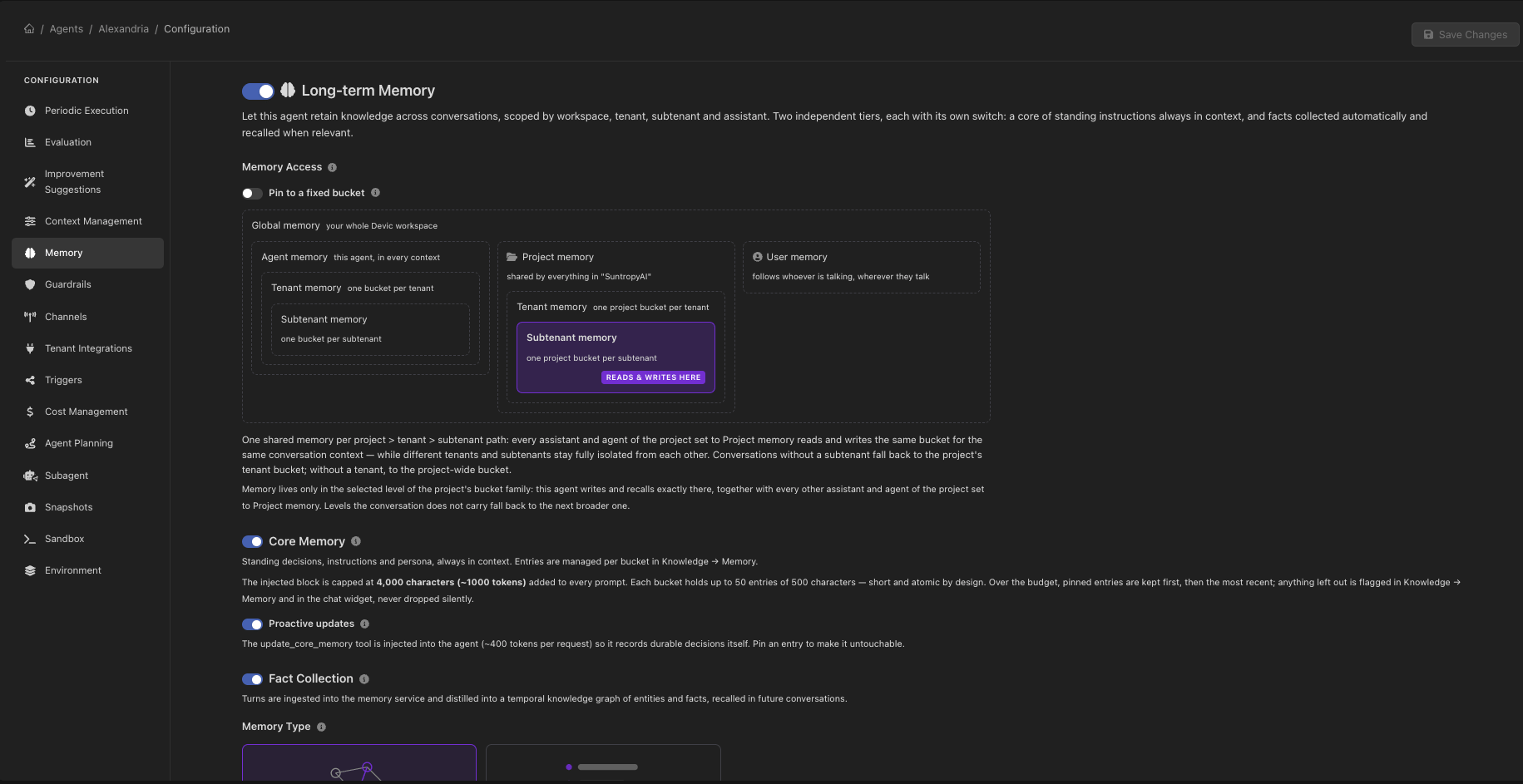 The setting most worth thinking about is `owner`. An agent that runs on a schedule with nobody behind it falls back to its own bucket; an agent working on behalf of a person, on the same account, can share that person's memory with every other entity set to `owner: user`. See [Buckets and scope](/devic/memory/buckets).
***
## Subagents
An agent can be made callable **by another agent**, as if it were a tool.
The setting most worth thinking about is `owner`. An agent that runs on a schedule with nobody behind it falls back to its own bucket; an agent working on behalf of a person, on the same account, can share that person's memory with every other entity set to `owner: user`. See [Buckets and scope](/devic/memory/buckets).
***
## Subagents
An agent can be made callable **by another agent**, as if it were a tool.
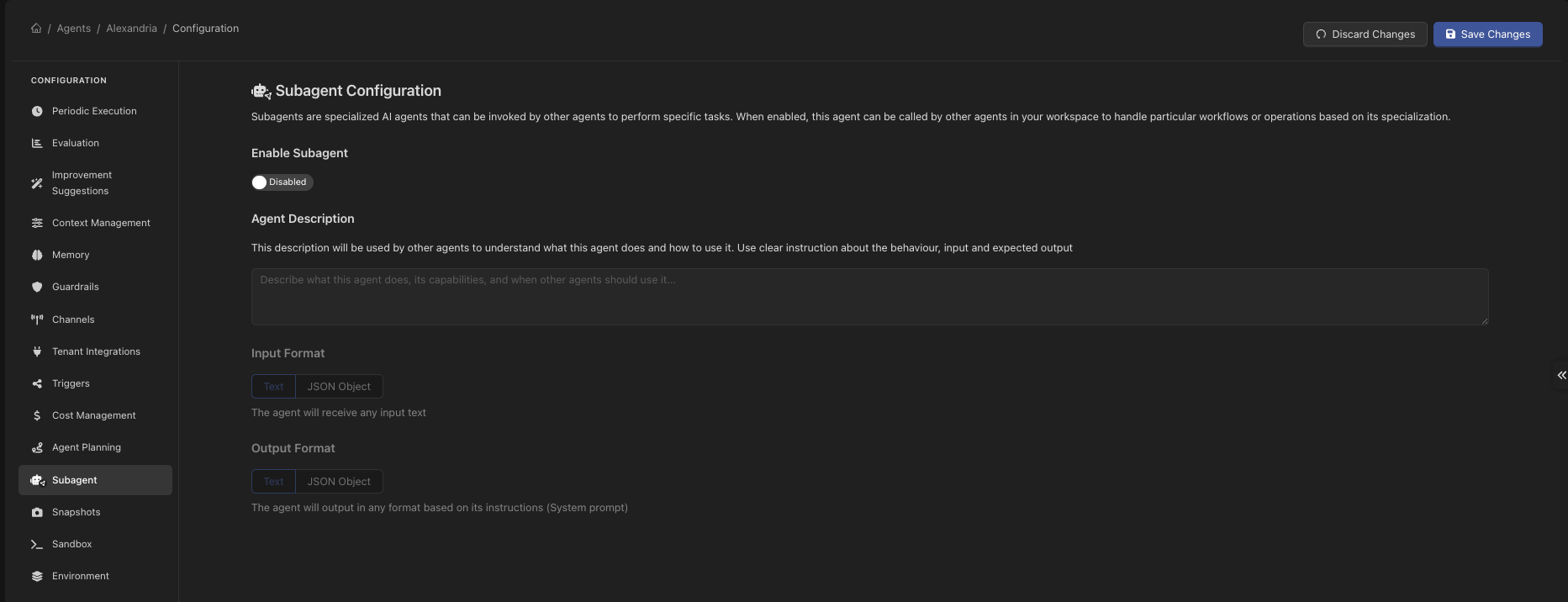 This is how a long process gets decomposed: a coordinator that plans and delegates, and specialists that each do one thing well and hand back a result. Each keeps its own prompt, its own tools and its own model — a cheap model can do the retrieval while an expensive one does the reasoning.
### The description is the interface
A subagent carries a description written **for other agents**: what it does, what it expects and what it gives back. That text is what a calling agent reads when deciding whether to delegate, so it is the difference between a specialist that gets used correctly and one that gets used at the wrong moment or not at all.
### Contracts
A subagent also declares what it takes and what it returns:
| Setting | Options |
| ----------------- | -------------------------------------------- |
| **Input format** | `text`, or `json` with a declared structure. |
| **Output format** | `text`, or `json` with a declared structure. |
Use `json` on both ends for anything a caller will parse. A text answer forces the caller to interpret prose, which is exactly the step that goes wrong at three in the morning.
***
## Configuration snapshots
A **snapshot** saves an agent's or assistant's whole configuration — prompt, model, tools, everything — under a name you give it.
This is how a long process gets decomposed: a coordinator that plans and delegates, and specialists that each do one thing well and hand back a result. Each keeps its own prompt, its own tools and its own model — a cheap model can do the retrieval while an expensive one does the reasoning.
### The description is the interface
A subagent carries a description written **for other agents**: what it does, what it expects and what it gives back. That text is what a calling agent reads when deciding whether to delegate, so it is the difference between a specialist that gets used correctly and one that gets used at the wrong moment or not at all.
### Contracts
A subagent also declares what it takes and what it returns:
| Setting | Options |
| ----------------- | -------------------------------------------- |
| **Input format** | `text`, or `json` with a declared structure. |
| **Output format** | `text`, or `json` with a declared structure. |
Use `json` on both ends for anything a caller will parse. A text answer forces the caller to interpret prose, which is exactly the step that goes wrong at three in the morning.
***
## Configuration snapshots
A **snapshot** saves an agent's or assistant's whole configuration — prompt, model, tools, everything — under a name you give it.
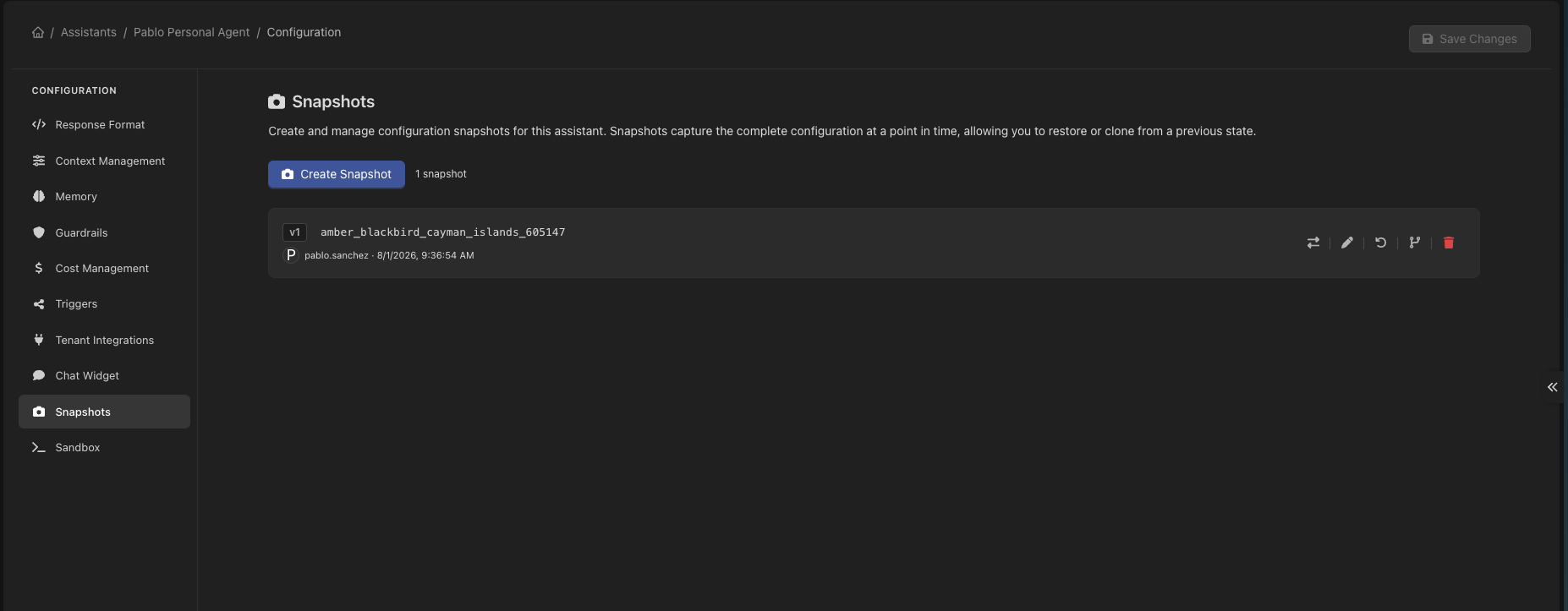 It is the safety net for the thing that actually breaks agents: a prompt edit that seemed like an improvement. Save a snapshot before a round of changes and you can compare, restore, or start a **new** agent from it when the change turns out to be a different agent rather than a better one.
| Action | What it does |
| ----------- | ----------------------------------------------------------------------------------- |
| **Create** | Stores the current configuration as a numbered version, with who saved it and when. |
| **Compare** | Shows what changed between a snapshot and the configuration in place now. |
| **Restore** | Puts the entity back to that configuration. |
| **Fork** | Creates a *new* agent or assistant from the snapshot, leaving the original alone. |
Compare before you restore. A snapshot from three weeks ago also rolls back everything else that changed since — the tool you added on Tuesday included.
This is unrelated to a **sandbox** snapshot, which is a copy of a machine's filesystem and lives on the [environment](/devic/environments/sandbox). Same word, different thing: one versions what the agent *is*, the other what its computer *contains*.
***
## Related
What an environment carries, and how connecting works.
What is remembered, and for whom.
Starting an agent from an event instead of a person.
Pausing a run for approval.
It is the safety net for the thing that actually breaks agents: a prompt edit that seemed like an improvement. Save a snapshot before a round of changes and you can compare, restore, or start a **new** agent from it when the change turns out to be a different agent rather than a better one.
| Action | What it does |
| ----------- | ----------------------------------------------------------------------------------- |
| **Create** | Stores the current configuration as a numbered version, with who saved it and when. |
| **Compare** | Shows what changed between a snapshot and the configuration in place now. |
| **Restore** | Puts the entity back to that configuration. |
| **Fork** | Creates a *new* agent or assistant from the snapshot, leaving the original alone. |
Compare before you restore. A snapshot from three weeks ago also rolls back everything else that changed since — the tool you added on Tuesday included.
This is unrelated to a **sandbox** snapshot, which is a copy of a machine's filesystem and lives on the [environment](/devic/environments/sandbox). Same word, different thing: one versions what the agent *is*, the other what its computer *contains*.
***
## Related
What an environment carries, and how connecting works.
What is remembered, and for whom.
Starting an agent from an event instead of a person.
Pausing a run for approval.