> ## Documentation Index
> Fetch the complete documentation index at: https://docs.devic.ai/llms.txt
> Use this file to discover all available pages before exploring further.
# Tasks
> Analyze the progress, status, and content of the tasks generated by your agents during each execution in Devic.
# Task Tracking and Execution Progress
Each execution of an agent in Devic is composed of a set of **tasks** that represent the individual steps or actions performed during the process.\
This task system allows you to **monitor progress, review partial results, and detect potential issues** in complex workflows.
***
## General Task Overview
From the executions panel, the **Tasks** column shows the number of completed tasks versus the total assigned.\
The circular indicator visually reflects the level of execution progress.
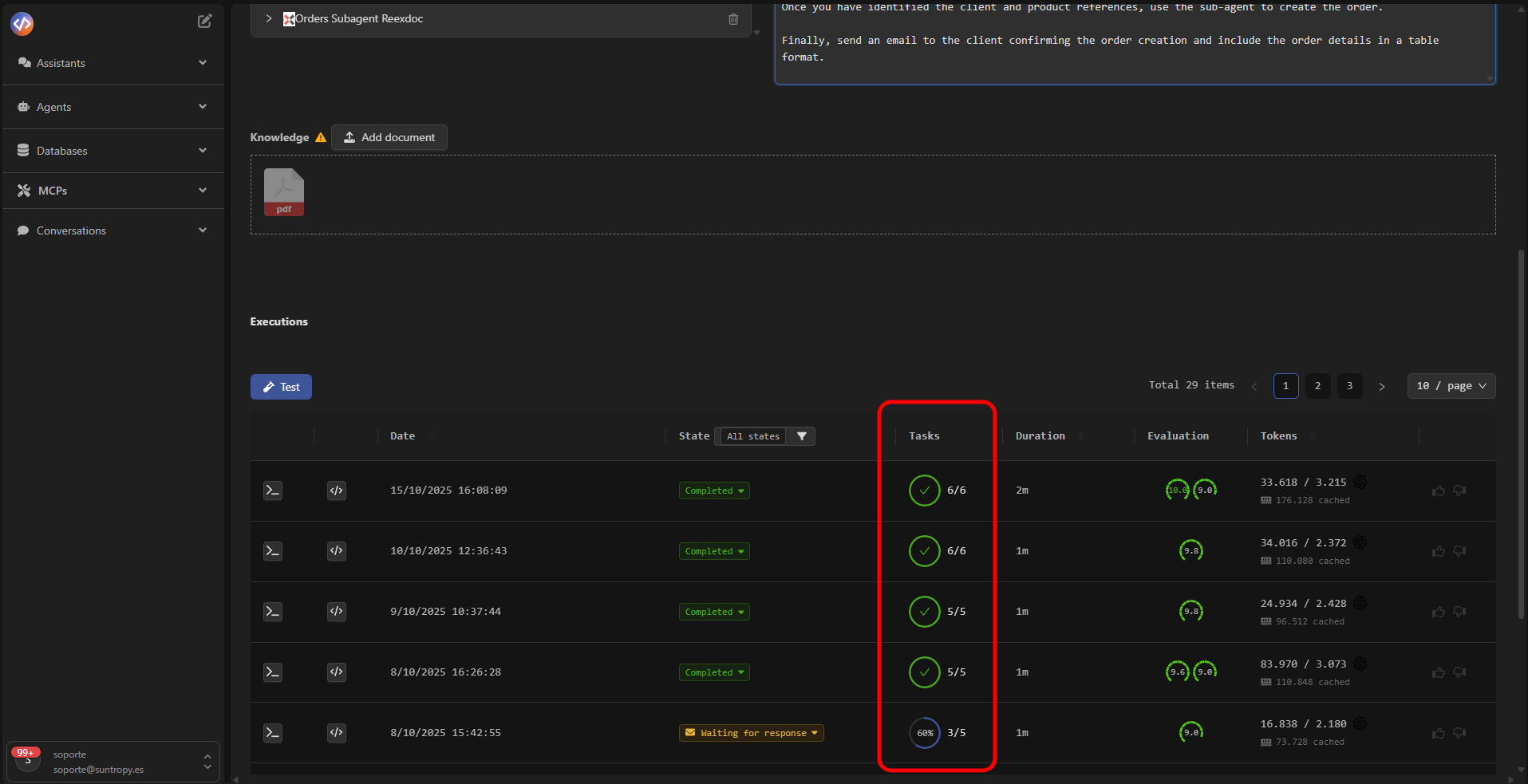 | Indicator | Meaning |
| --------------------------- | ------------------------------------------- |
| 🟢 **Completed (✔)** | All tasks finished successfully. |
| 🔵 **Partial (percentage)** | Some tasks completed, others still pending. |
| ⚫ **Incomplete (0/5)** | Execution stopped before tasks began. |
***
## Thread Tasks
Clicking on an execution opens the **Thread Tasks** panel, which displays the details of each task processed during the flow.\
Each block includes the name, status, and a detailed description of the obtained result.
| Indicator | Meaning |
| --------------------------- | ------------------------------------------- |
| 🟢 **Completed (✔)** | All tasks finished successfully. |
| 🔵 **Partial (percentage)** | Some tasks completed, others still pending. |
| ⚫ **Incomplete (0/5)** | Execution stopped before tasks began. |
***
## Thread Tasks
Clicking on an execution opens the **Thread Tasks** panel, which displays the details of each task processed during the flow.\
Each block includes the name, status, and a detailed description of the obtained result.
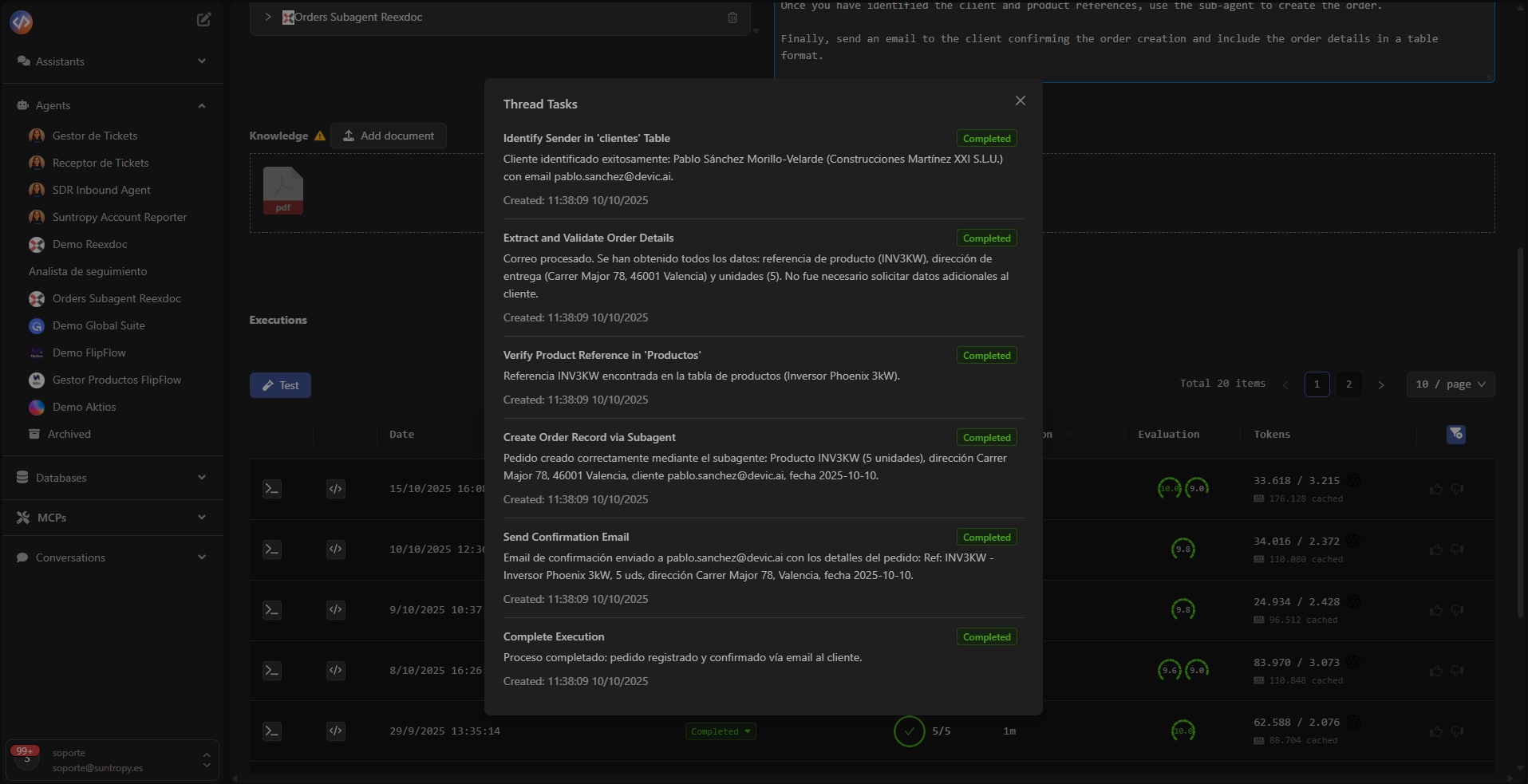 Each task contains:
* **Name:** identifier of the step within the flow (e.g., “BIA report collection”).
* **Description or result:** text generated by the agent with processed or analyzed information.
* **Status:** indicates whether the task was successfully completed or remains pending for review.
* **Timestamp:** date and time of execution for full traceability.
***
## Result Interpretation
The task panel allows you to inspect in detail the steps followed by the agent, facilitating:
* Analysis of content generated by each subprocess.
* Detection of gaps, repetitions, or errors.
* Validation of the logical execution sequence.
* Technical auditing of the model's behavior.
***
## Evaluation and Consistency
When tasks are successfully completed, their results are automatically integrated into the overall evaluation of the execution.\
This enables correlation between **performance, accuracy, and number of tasks completed**, providing reliable performance metrics.
***
Devic’s task system allows you to segment agent logic into auditable steps, ensuring transparency, traceability, and granular control over each execution.
***
## Next Steps
Configure metrics and automatic evaluations to measure your agents’ performance, accuracy, and consistency.
Monitor token consumption, analyze execution costs, and optimize model and resource usage.
Each task contains:
* **Name:** identifier of the step within the flow (e.g., “BIA report collection”).
* **Description or result:** text generated by the agent with processed or analyzed information.
* **Status:** indicates whether the task was successfully completed or remains pending for review.
* **Timestamp:** date and time of execution for full traceability.
***
## Result Interpretation
The task panel allows you to inspect in detail the steps followed by the agent, facilitating:
* Analysis of content generated by each subprocess.
* Detection of gaps, repetitions, or errors.
* Validation of the logical execution sequence.
* Technical auditing of the model's behavior.
***
## Evaluation and Consistency
When tasks are successfully completed, their results are automatically integrated into the overall evaluation of the execution.\
This enables correlation between **performance, accuracy, and number of tasks completed**, providing reliable performance metrics.
***
Devic’s task system allows you to segment agent logic into auditable steps, ensuring transparency, traceability, and granular control over each execution.
***
## Next Steps
Configure metrics and automatic evaluations to measure your agents’ performance, accuracy, and consistency.
Monitor token consumption, analyze execution costs, and optimize model and resource usage.