> ## Documentation Index
> Fetch the complete documentation index at: https://docs.devic.ai/llms.txt
> Use this file to discover all available pages before exploring further.
# Human in the Loop
> Supervise and approve agent decisions before final execution through Devic’s human validation system.
# Human Validation in the Execution Cycle
Devic incorporates a **Human in the Loop (HITL)** system that allows users to be included in the agent’s execution flow when **manual validation, correction, or approval** is required before continuing an automated process.
This functionality ensures that critical tasks can be reviewed and approved by a human responsible, maintaining traceability and control over the agent’s decision-making.
***
## Execution States
When an agent requires human intervention, the execution automatically enters the **“Waiting for Approval”** state.\
From the executions panel, you can view and filter tasks awaiting approval, along with their progress and evaluation.
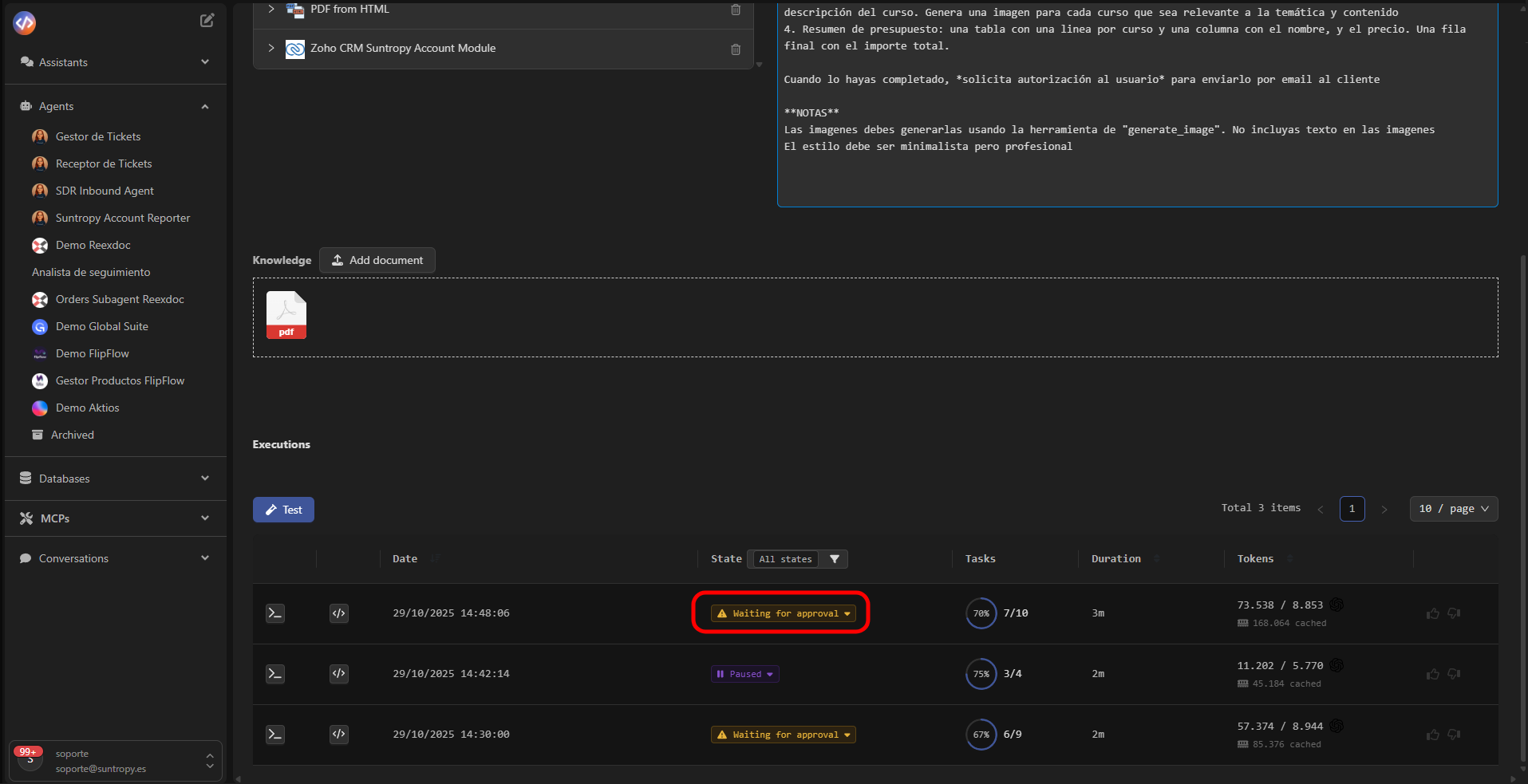 The available states include:
| State | Description |
| ------------------------ | ------------------------------------------------------------------ |
| **Queued** | The execution has been created and is queued to begin. |
| **Processing** | The agent is currently processing the task. |
| **Completed** | Execution finished successfully. |
| **Failed** | The execution failed due to an error or unexpected condition. |
| **Terminated** | The execution was manually stopped or halted by system conditions. |
| **Paused** | Execution temporarily paused until user action is received. |
| **Waiting for Approval** | Requires human review or approval before continuing. |
***
## Approval Process
Clicking on an execution in the **“Waiting for Approval”** state opens the validation window.\
There, the agent presents the **approval request** along with extracted data or the actions it intends to execute.
The available states include:
| State | Description |
| ------------------------ | ------------------------------------------------------------------ |
| **Queued** | The execution has been created and is queued to begin. |
| **Processing** | The agent is currently processing the task. |
| **Completed** | Execution finished successfully. |
| **Failed** | The execution failed due to an error or unexpected condition. |
| **Terminated** | The execution was manually stopped or halted by system conditions. |
| **Paused** | Execution temporarily paused until user action is received. |
| **Waiting for Approval** | Requires human review or approval before continuing. |
***
## Approval Process
Clicking on an execution in the **“Waiting for Approval”** state opens the validation window.\
There, the agent presents the **approval request** along with extracted data or the actions it intends to execute.
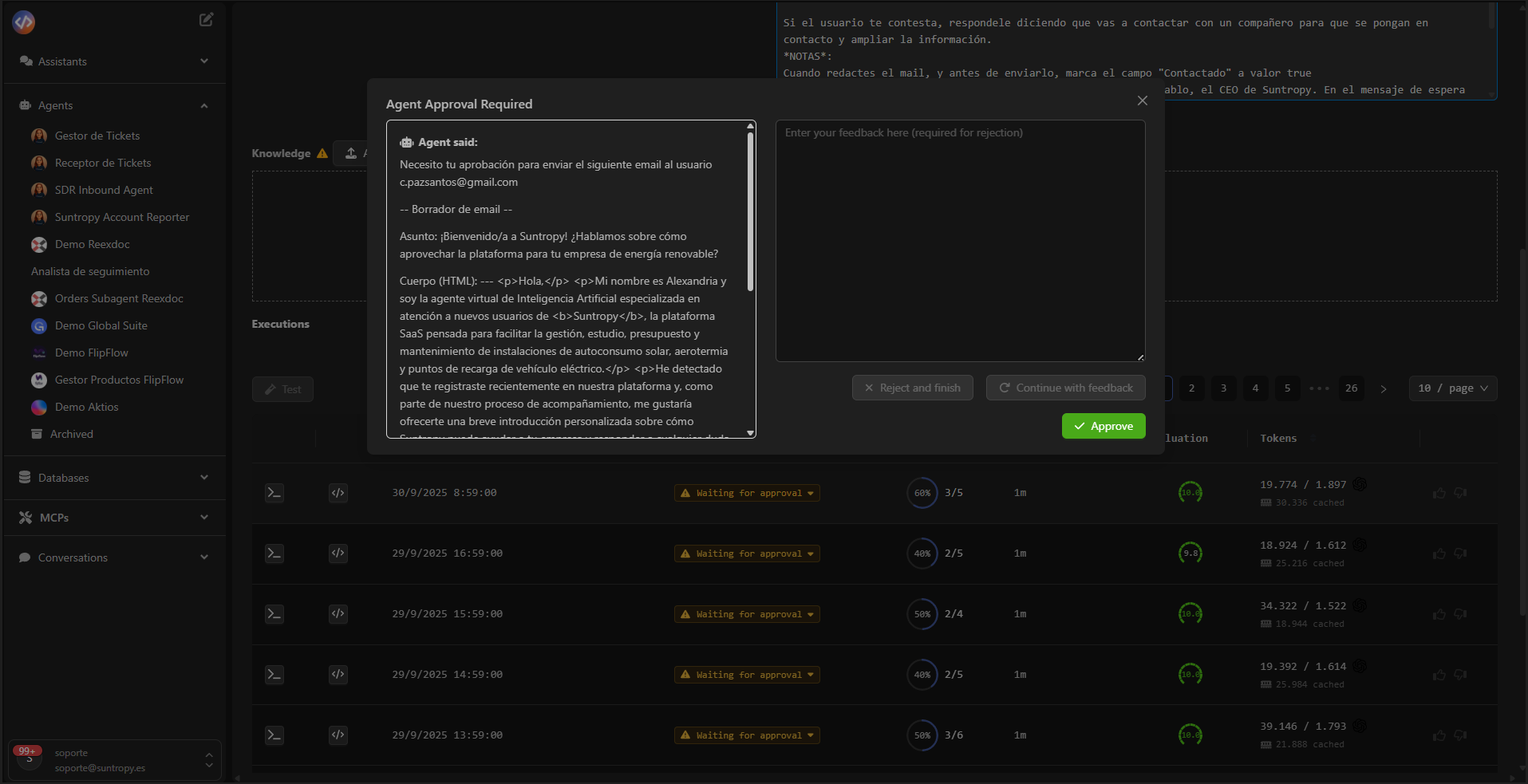 The user can:
* **Approve** the action so the agent can automatically continue the workflow.
* **Reject and finalize** the execution, stopping the process.
* **Continue with feedback**, adding comments or corrections that the agent must incorporate before proceeding.
The approval panel displays all relevant information the agent has gathered up to that point:\
for example, customer data, analyzed documents, or cross-referenced information.\
This allows the user to review results **within their operational context**, without leaving the agent interface.
***
## Benefits of the Human in the Loop Approach
Integrated human validation allows balancing **automation and control**, offering:
* **Safety and accuracy** in sensitive or high-impact tasks.
* **Complete traceability** of human decisions within the automated workflow.
* **Iterative learning**, enabling the agent to incorporate human feedback in future executions.
* **Regulatory compliance**, in processes where human intervention is mandatory.
***
The HITL system turns each approval or rejection into part of the agent’s operational learning, contributing to continuous improvement of its performance and reliability.
***
## Next Steps
Manage tasks generated by agents, monitor their status, and control their progress within each execution.
Configure metrics and automatic evaluations to measure the performance, accuracy, and consistency of your agents.
Monitor token consumption, analyze execution costs, and optimize model and resource usage.
The user can:
* **Approve** the action so the agent can automatically continue the workflow.
* **Reject and finalize** the execution, stopping the process.
* **Continue with feedback**, adding comments or corrections that the agent must incorporate before proceeding.
The approval panel displays all relevant information the agent has gathered up to that point:\
for example, customer data, analyzed documents, or cross-referenced information.\
This allows the user to review results **within their operational context**, without leaving the agent interface.
***
## Benefits of the Human in the Loop Approach
Integrated human validation allows balancing **automation and control**, offering:
* **Safety and accuracy** in sensitive or high-impact tasks.
* **Complete traceability** of human decisions within the automated workflow.
* **Iterative learning**, enabling the agent to incorporate human feedback in future executions.
* **Regulatory compliance**, in processes where human intervention is mandatory.
***
The HITL system turns each approval or rejection into part of the agent’s operational learning, contributing to continuous improvement of its performance and reliability.
***
## Next Steps
Manage tasks generated by agents, monitor their status, and control their progress within each execution.
Configure metrics and automatic evaluations to measure the performance, accuracy, and consistency of your agents.
Monitor token consumption, analyze execution costs, and optimize model and resource usage.