> ## Documentation Index
> Fetch the complete documentation index at: https://docs.devic.ai/llms.txt
> Use this file to discover all available pages before exploring further.
# Overview
> Monitor, evaluate, and improve your agents' performance through Devic’s traceability and metrics system.
Continuous optimization is an essential part of the agents’ lifecycle in Devic.\
The platform not only allows you to **configure and run agents**, but also to **analyze their behavior and operational performance in detail** through a complete traceability system.
***
## Agent Behavior Monitoring
Each agent includes a detailed execution history that allows you to **visualize its performance in real time**.\
This panel provides information about each completed task, its duration, the evaluations obtained, and the associated token consumption.
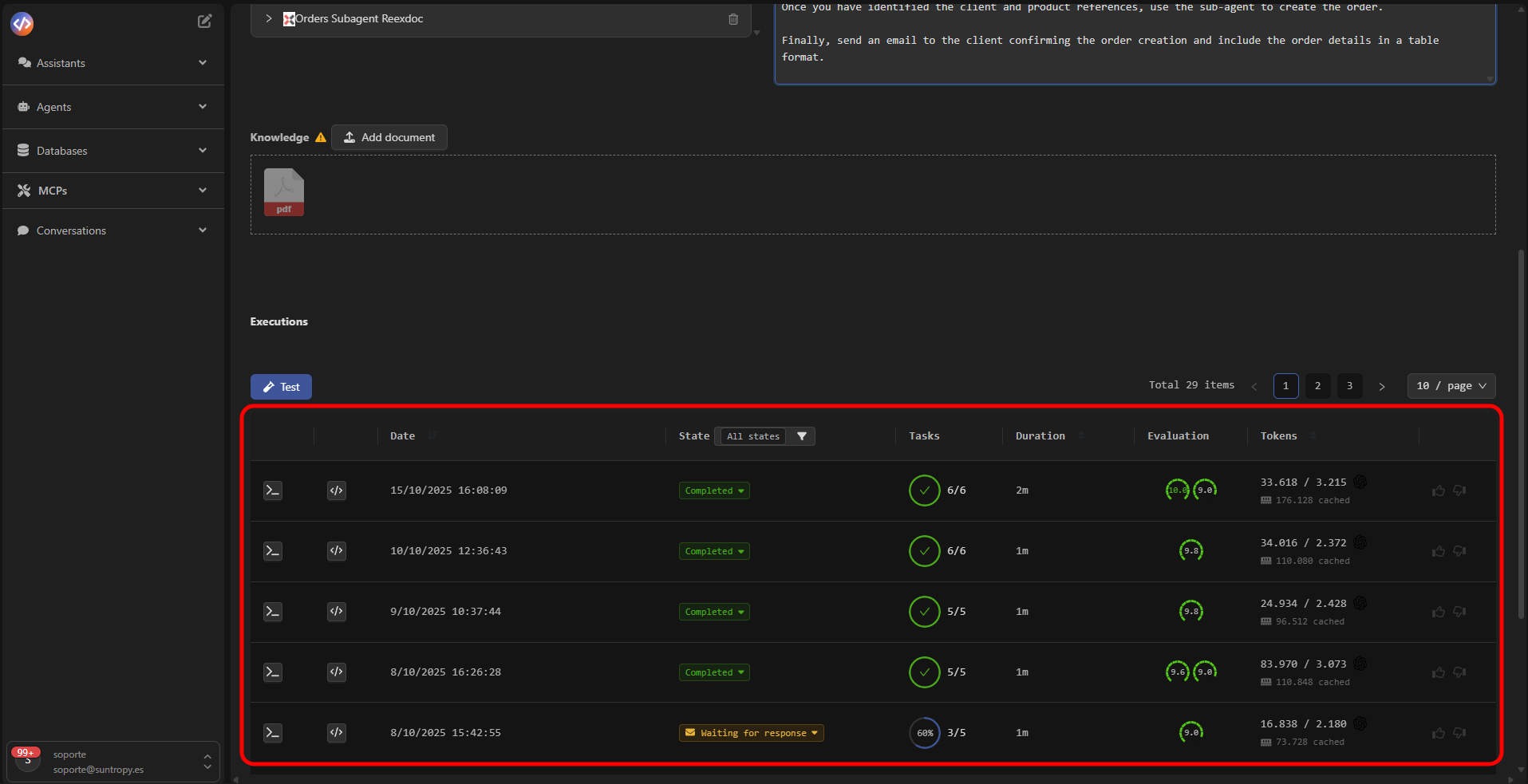 The most relevant indicators include:
| Metric | Description |
| -------------- | -------------------------------------------------------------- |
| **Date** | Date and time of execution. |
| **State** | Final state of the process (Completed, Pending, Failed, etc.). |
| **Tasks** | Number of completed tasks and their success rate. |
| **Duration** | Total time spent on the execution. |
| **Evaluation** | Evaluation score obtained according to defined criteria. |
| **Tokens** | Resources consumed by the model during execution. |
***
## Next Steps
Learn how to access the full log of events, actions, and results generated during your agents’ execution.
Discover how to integrate human validation into your agents’ flow to approve, correct, or enrich decisions before final execution.
Manage tasks generated by the agents, monitor their status, and control their progress within each execution.
Configure metrics and automatic evaluations to measure the performance, accuracy, and consistency of your agents.
The most relevant indicators include:
| Metric | Description |
| -------------- | -------------------------------------------------------------- |
| **Date** | Date and time of execution. |
| **State** | Final state of the process (Completed, Pending, Failed, etc.). |
| **Tasks** | Number of completed tasks and their success rate. |
| **Duration** | Total time spent on the execution. |
| **Evaluation** | Evaluation score obtained according to defined criteria. |
| **Tokens** | Resources consumed by the model during execution. |
***
## Next Steps
Learn how to access the full log of events, actions, and results generated during your agents’ execution.
Discover how to integrate human validation into your agents’ flow to approve, correct, or enrich decisions before final execution.
Manage tasks generated by the agents, monitor their status, and control their progress within each execution.
Configure metrics and automatic evaluations to measure the performance, accuracy, and consistency of your agents.