> ## Documentation Index
> Fetch the complete documentation index at: https://docs.devic.ai/llms.txt
> Use this file to discover all available pages before exploring further.
# Secrets and vaults
> Keep your credentials in your own secret manager, and encrypt the ones you leave with Devic.
Agents need credentials: model provider keys, tool server tokens, environment variables. There are two questions worth separating — *where do they live*, and *how are they protected where they live*.
 ***
## Bring your own vault
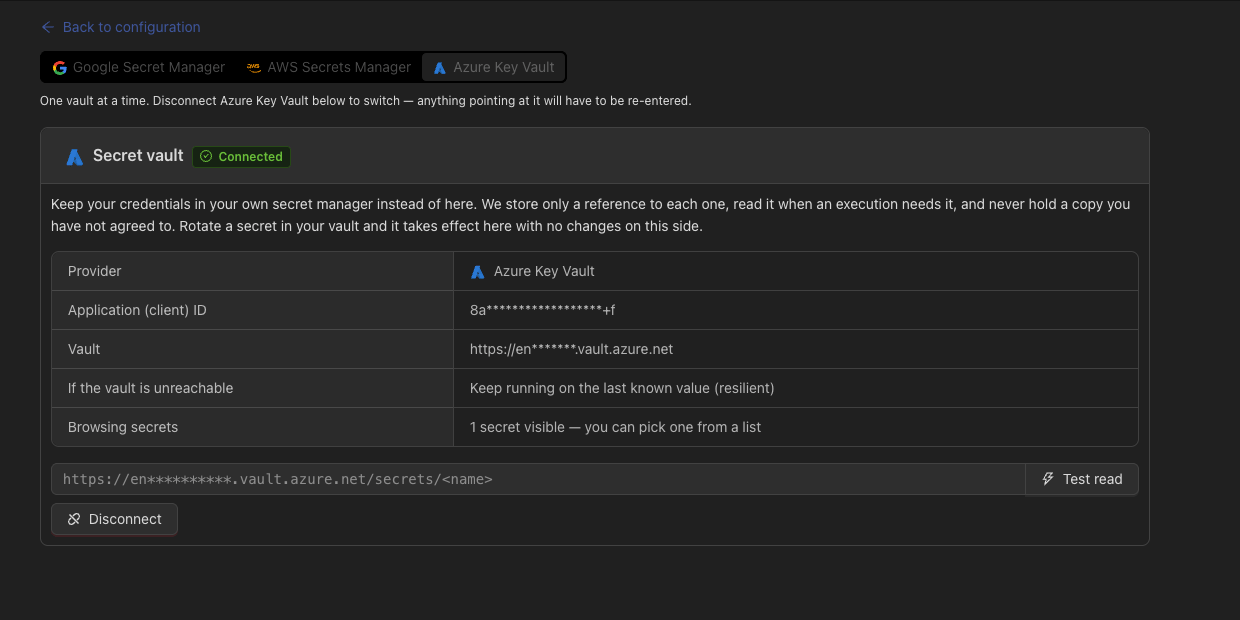
Devic can hold a **reference** instead of a secret. When a run needs the value, Devic reads it from your secret manager, uses it, and never stores it.
What that buys you:
* **You rotate on your side.** Devic reads the current version; nothing has to be updated here.
* **You can cut us off.** Revoke the service account and the reads stop, immediately and unilaterally.
* **Your audit log.** Every read appears in *your* provider's audit trail, not only in ours.
Which is what makes Devic usable in a regulated environment, where handing an API key to a third party is not an option.
### What can be a reference
| Area | Fields |
| ------------------- | --------------------------------------------------------------------------------- |
| **Model providers** | The API key, including custom providers. |
| **Tool servers** | JWT token, Basic password, OAuth2 refresh token and client secret, header values. |
| **Environments** | Environment variables, at all three levels. |
Identifiers are deliberately excluded: a Basic username, a client id, a scope or a header *name* are not secrets, and treating them as such would only make configuration harder to read.
***
## Encryption for what stays
Credentials you do leave with Devic are encrypted at rest with AES-256-GCM and masked whenever they are read back — including through the internal API the console itself uses.
A masked value written back does not overwrite the stored secret. That is what lets you edit one field of a tool server without blanking its token, and it is the behaviour to expect from every form that shows `••••••••`.
***
## Connecting a vault
A Google service account, an AWS IAM principal or an Azure application, with read access to the secrets Devic will need — and nothing else.
In **Configuration → Vault**, choose the provider and provide its credentials.
Devic performs a real read before saving. A vault that is connected but unreachable is worse than one that is not connected.
In any supported field, use the provider's own reference syntax instead of the value.
A reference is an address, not a secret — so it is stored in clear on purpose. If a reference cannot be resolved at runtime, the run fails rather than falling back to a stale value: silently using an old credential would be the worse outcome.
***
## Related
Where most runtime credentials live.
Provider keys and where they are stored.
***
## Bring your own vault
Devic can hold a **reference** instead of a secret. When a run needs the value, Devic reads it from your secret manager, uses it, and never stores it.
What that buys you:
* **You rotate on your side.** Devic reads the current version; nothing has to be updated here.
* **You can cut us off.** Revoke the service account and the reads stop, immediately and unilaterally.
* **Your audit log.** Every read appears in *your* provider's audit trail, not only in ours.
Which is what makes Devic usable in a regulated environment, where handing an API key to a third party is not an option.
### What can be a reference
| Area | Fields |
| ------------------- | --------------------------------------------------------------------------------- |
| **Model providers** | The API key, including custom providers. |
| **Tool servers** | JWT token, Basic password, OAuth2 refresh token and client secret, header values. |
| **Environments** | Environment variables, at all three levels. |
Identifiers are deliberately excluded: a Basic username, a client id, a scope or a header *name* are not secrets, and treating them as such would only make configuration harder to read.
***
## Encryption for what stays
Credentials you do leave with Devic are encrypted at rest with AES-256-GCM and masked whenever they are read back — including through the internal API the console itself uses.
A masked value written back does not overwrite the stored secret. That is what lets you edit one field of a tool server without blanking its token, and it is the behaviour to expect from every form that shows `••••••••`.
***
## Connecting a vault
A Google service account, an AWS IAM principal or an Azure application, with read access to the secrets Devic will need — and nothing else.
In **Configuration → Vault**, choose the provider and provide its credentials.
Devic performs a real read before saving. A vault that is connected but unreachable is worse than one that is not connected.
In any supported field, use the provider's own reference syntax instead of the value.
A reference is an address, not a secret — so it is stored in clear on purpose. If a reference cannot be resolved at runtime, the run fails rather than falling back to a stale value: silently using an old credential would be the worse outcome.
***
## Related
Where most runtime credentials live.
Provider keys and where they are stored.