> ## Documentation Index
> Fetch the complete documentation index at: https://docs.devic.ai/llms.txt
> Use this file to discover all available pages before exploring further.
# Users and roles
> Who can do what in your account: three roles, access per project or per entity, and per-user limits.
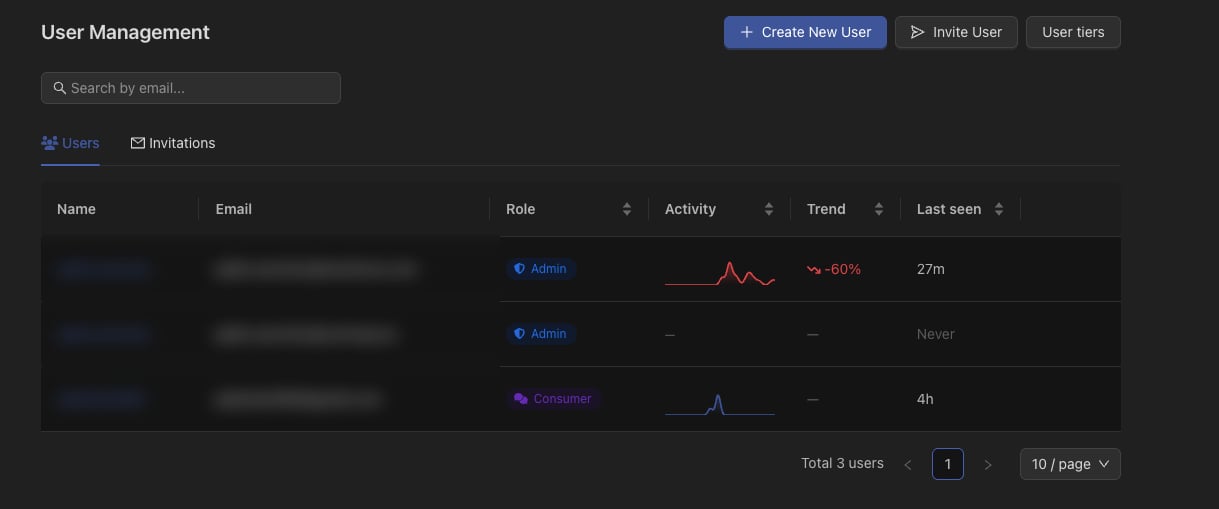
Devic has three roles, and access is granted on top of the role — by project, or entity by entity when a project is too coarse.
 ***
## The three roles
Everything: configuration, users, keys, providers, costs. Sees the whole account regardless of project.
Builds. Creates and configures agents, assistants, tools and knowledge — but only inside what they have been given.
Uses. Chats with the agents and assistants they were granted, follows runs and approves pauses, with no configuration capability at all.
The consumer role exists for the people who *work with* your agents rather than build them: the support team using an assistant all day, the analyst who launches a run and approves it. They get their own panel and see their own activity, not the account's.
***
## Granting access
***
## The three roles
Everything: configuration, users, keys, providers, costs. Sees the whole account regardless of project.
Builds. Creates and configures agents, assistants, tools and knowledge — but only inside what they have been given.
Uses. Chats with the agents and assistants they were granted, follows runs and approves pauses, with no configuration capability at all.
The consumer role exists for the people who *work with* your agents rather than build them: the support team using an assistant all day, the analyst who launches a run and approves it. They get their own panel and see their own activity, not the account's.
***
## Granting access
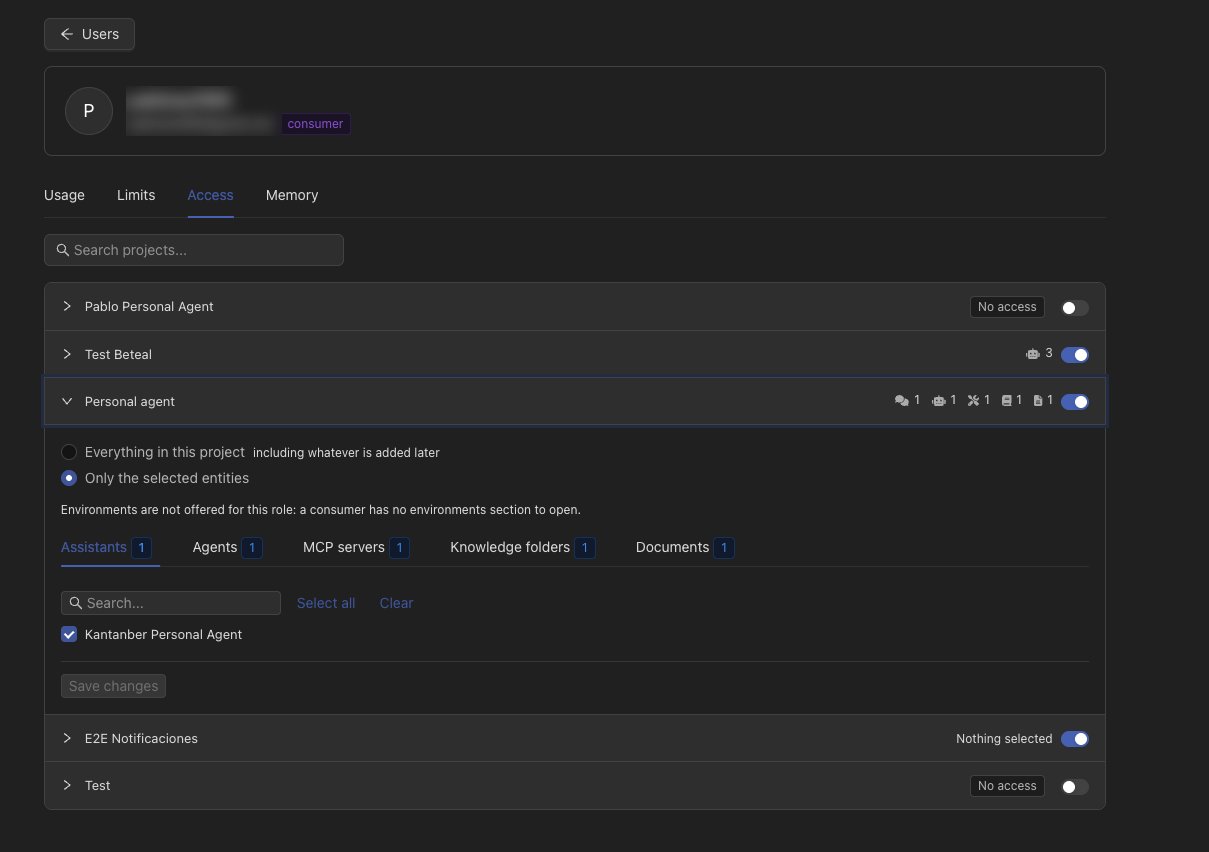 Access is a row per user and project, with two settings:
| Setting | Effect |
| --------------------- | ----------------------------------------------------------------------------------------------------------- |
| **Whole project** | Everything in the project: assistants, agents, tool servers, environments, knowledge folders and documents. |
| **Selected entities** | Only the ones named. The same project can be shared narrowly with one person and fully with another. |
Entity-level access covers assistants, agents, tool servers, environments, knowledge folders and documents, and applies to both `user` and `consumer`. Administrators are unaffected — they see everything by design.
Enforcement is by id, not just by listing. An entity that was not granted cannot be opened by knowing its identifier, which matters because identifiers travel in every URL a person receives.
***
## Entities outside any project
An agent with no project — "All Projects" — is visible account-wide in the console. Through the public API it is deliberately excluded from a non-administrator's listing, so a scoped token cannot pull the whole account by listing without a filter.
***
## Per-user limits
The same limit model that applies to [tenants](/devic/multi-tenant/usage-limits) applies to people: rules by tokens or cost over a window, and reusable **user tiers**.
Access is a row per user and project, with two settings:
| Setting | Effect |
| --------------------- | ----------------------------------------------------------------------------------------------------------- |
| **Whole project** | Everything in the project: assistants, agents, tool servers, environments, knowledge folders and documents. |
| **Selected entities** | Only the ones named. The same project can be shared narrowly with one person and fully with another. |
Entity-level access covers assistants, agents, tool servers, environments, knowledge folders and documents, and applies to both `user` and `consumer`. Administrators are unaffected — they see everything by design.
Enforcement is by id, not just by listing. An entity that was not granted cannot be opened by knowing its identifier, which matters because identifiers travel in every URL a person receives.
***
## Entities outside any project
An agent with no project — "All Projects" — is visible account-wide in the console. Through the public API it is deliberately excluded from a non-administrator's listing, so a scoped token cannot pull the whole account by listing without a filter.
***
## Per-user limits
The same limit model that applies to [tenants](/devic/multi-tenant/usage-limits) applies to people: rules by tokens or cost over a window, and reusable **user tiers**.
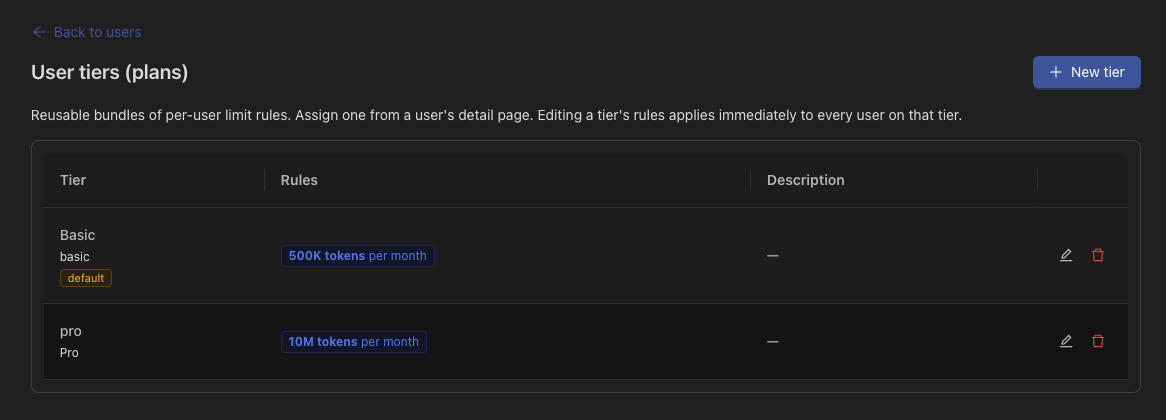 A tier marked as the default applies to users who have no tier of their own. Check what it contains before enabling it — a default meant for one group applies to everyone who was never assigned anything.
Administrators are exempt from user limits.
***
## Inviting people
Invitations are sent by email. The recipient sets their own password and lands with the role and the access you chose, so nobody has to be created by hand and told a password.
***
## Impersonation
An administrator can act as another user to reproduce what they are seeing. The session is bounded and identifiable — it is a support tool, not a way to hold a second identity.
***
## Where this shows up elsewhere
* Guests only see the [environments](/devic/environments/index) and CLIs of their projects.
* A consumer's [memory](/devic/memory/index) view is their own bucket, not the account's.
* Consumers see an agent's system prompt rendered read-only, rather than not at all — they can understand what it does without being able to change it.
A tier marked as the default applies to users who have no tier of their own. Check what it contains before enabling it — a default meant for one group applies to everyone who was never assigned anything.
Administrators are exempt from user limits.
***
## Inviting people
Invitations are sent by email. The recipient sets their own password and lands with the role and the access you chose, so nobody has to be created by hand and told a password.
***
## Impersonation
An administrator can act as another user to reproduce what they are seeing. The session is bounded and identifiable — it is a support tool, not a way to hold a second identity.
***
## Where this shows up elsewhere
* Guests only see the [environments](/devic/environments/index) and CLIs of their projects.
* A consumer's [memory](/devic/memory/index) view is their own bucket, not the account's.
* Consumers see an agent's system prompt rendered read-only, rather than not at all — they can understand what it does without being able to change it.