> ## Documentation Index
> Fetch the complete documentation index at: https://docs.devic.ai/llms.txt
> Use this file to discover all available pages before exploring further.
# Notifications
> What Devic tells you about, in the console and by email.
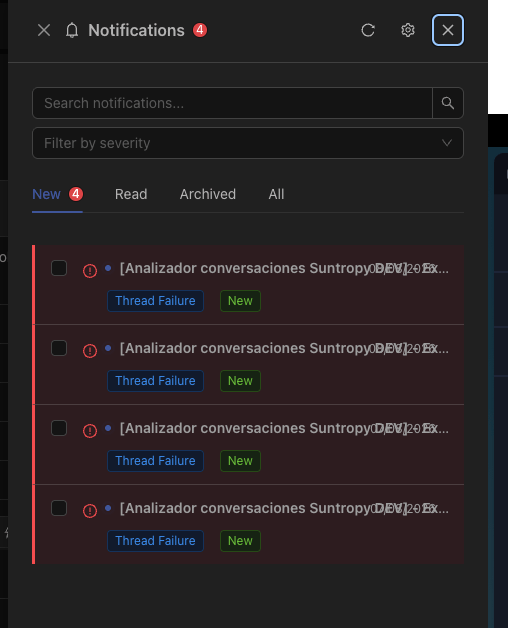
Notifications are how Devic reaches *you*: a run waiting for approval, an execution that failed, a mailbox that needs re-authorising.
 ***
## Two channels
A panel in the header, with unread counts. The default for anything you will see while working.
For what should reach you when you are not looking at Devic — an approval blocking a process, a failure out of hours.
Preferences are per notification type and per channel, so you can keep approvals in your inbox and everything else in the panel.
***
## What generates one
The most common are the ones that block work or cost money:
| Event | Why it is worth knowing |
| ------------------------------ | ------------------------------------------------------------------ |
| **Run waiting for approval** | A human-in-the-loop step stops until someone acts. |
| **Run failed** | Something to look at, whether it was the model, a tool or a limit. |
| **Limit reached** | A tenant or user hit their ceiling and is being refused. |
| **Connection needs attention** | A mailbox or integration whose credentials stopped working. |
***
## Marking as read
Read state is per user, so a notification you have dealt with does not keep nagging your colleagues — and one they dismissed does not disappear for you.
***
## Related
Where approval notifications come from.
Where limit notifications come from.
***
## Two channels
A panel in the header, with unread counts. The default for anything you will see while working.
For what should reach you when you are not looking at Devic — an approval blocking a process, a failure out of hours.
Preferences are per notification type and per channel, so you can keep approvals in your inbox and everything else in the panel.
***
## What generates one
The most common are the ones that block work or cost money:
| Event | Why it is worth knowing |
| ------------------------------ | ------------------------------------------------------------------ |
| **Run waiting for approval** | A human-in-the-loop step stops until someone acts. |
| **Run failed** | Something to look at, whether it was the model, a tool or a limit. |
| **Limit reached** | A tenant or user hit their ceiling and is being refused. |
| **Connection needs attention** | A mailbox or integration whose credentials stopped working. |
***
## Marking as read
Read state is per user, so a notification you have dealt with does not keep nagging your colleagues — and one they dismissed does not disappear for you.
***
## Related
Where approval notifications come from.
Where limit notifications come from.