> ## Documentation Index
> Fetch the complete documentation index at: https://docs.devic.ai/llms.txt
> Use this file to discover all available pages before exploring further.
# Email channels
> Connect a mailbox so agents can send mail — and be started by the mail that arrives.
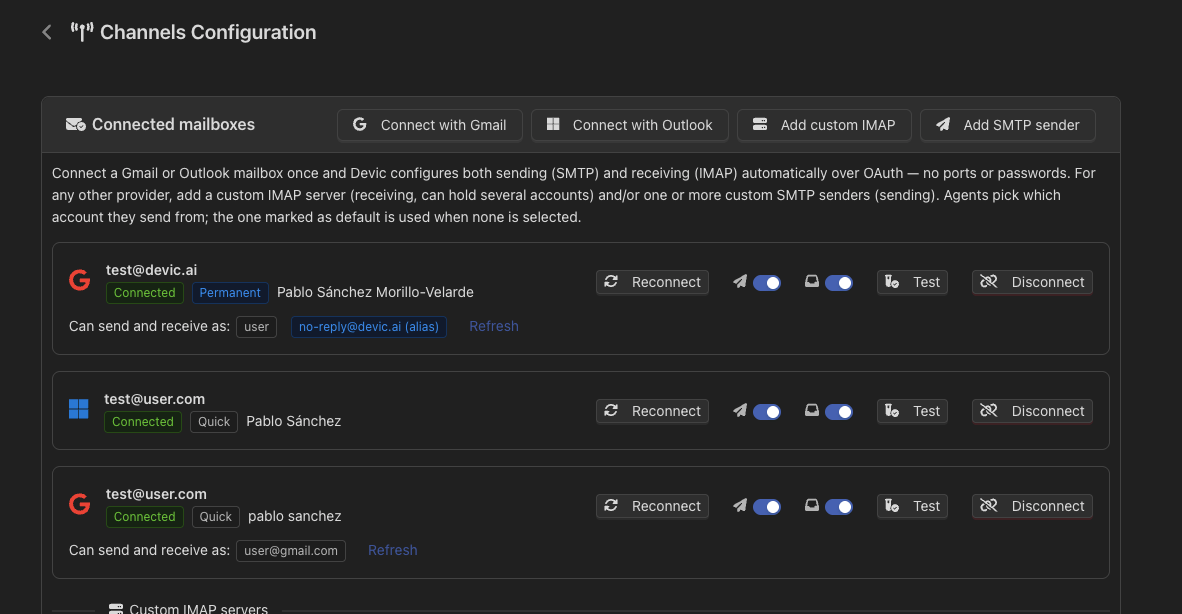
A **channel** is a way in and out of Devic that is not the API. Today that means email: a mailbox an agent can send from, and whose incoming messages can start a run.
 ***
## Connecting a mailbox
One click. Authorise once and both sending and receiving are configured for you, with the right hosts, ports and OAuth.
Configure SMTP and IMAP by hand: host, port, TLS and credentials.
Gmail and Outlook have retired or restricted basic authentication, which is why the guided flow exists. If you are configuring either of them by hand and hitting authentication failures, use the native connection instead.
Devic can use its own registered application, or yours — bring your own OAuth client when your organisation requires the consent to be granted to an app you control.
***
## Aliases
A Gmail account can send as any of its configured aliases, and mail arriving at an alias is picked up as belonging to that mailbox. This is what lets one connected account serve `support@`, `billing@` and `hello@` without three mailboxes.
***
## Incoming mail
An inbound message can start an agent or continue a conversation:
* **Threading** follows the standard mail headers, so a reply lands in the conversation it belongs to rather than opening a new one.
* **The tenant** is resolved from the sender, so a customer writing in is attributed to their own tenant automatically. See [Multi-tenant](/devic/multi-tenant/index).
***
## When a connection breaks
Tokens expire and passwords get changed. A mailbox that can no longer authenticate is marked as needing re-authorisation rather than failing silently, so the fix is one click and not an investigation into why an agent stopped answering.
***
## Related
Starting agents from other apps' events, not just mail.
What Devic sends *you*, as opposed to what your agents send.
***
## Connecting a mailbox
One click. Authorise once and both sending and receiving are configured for you, with the right hosts, ports and OAuth.
Configure SMTP and IMAP by hand: host, port, TLS and credentials.
Gmail and Outlook have retired or restricted basic authentication, which is why the guided flow exists. If you are configuring either of them by hand and hitting authentication failures, use the native connection instead.
Devic can use its own registered application, or yours — bring your own OAuth client when your organisation requires the consent to be granted to an app you control.
***
## Aliases
A Gmail account can send as any of its configured aliases, and mail arriving at an alias is picked up as belonging to that mailbox. This is what lets one connected account serve `support@`, `billing@` and `hello@` without three mailboxes.
***
## Incoming mail
An inbound message can start an agent or continue a conversation:
* **Threading** follows the standard mail headers, so a reply lands in the conversation it belongs to rather than opening a new one.
* **The tenant** is resolved from the sender, so a customer writing in is attributed to their own tenant automatically. See [Multi-tenant](/devic/multi-tenant/index).
***
## When a connection breaks
Tokens expire and passwords get changed. A mailbox that can no longer authenticate is marked as needing re-authorisation rather than failing silently, so the fix is one click and not an investigation into why an agent stopped answering.
***
## Related
Starting agents from other apps' events, not just mail.
What Devic sends *you*, as opposed to what your agents send.