> ## Documentation Index
> Fetch the complete documentation index at: https://docs.devic.ai/llms.txt
> Use this file to discover all available pages before exploring further.
# API keys
> Credentials for the public API, and the three ways to keep one from doing more than it should.
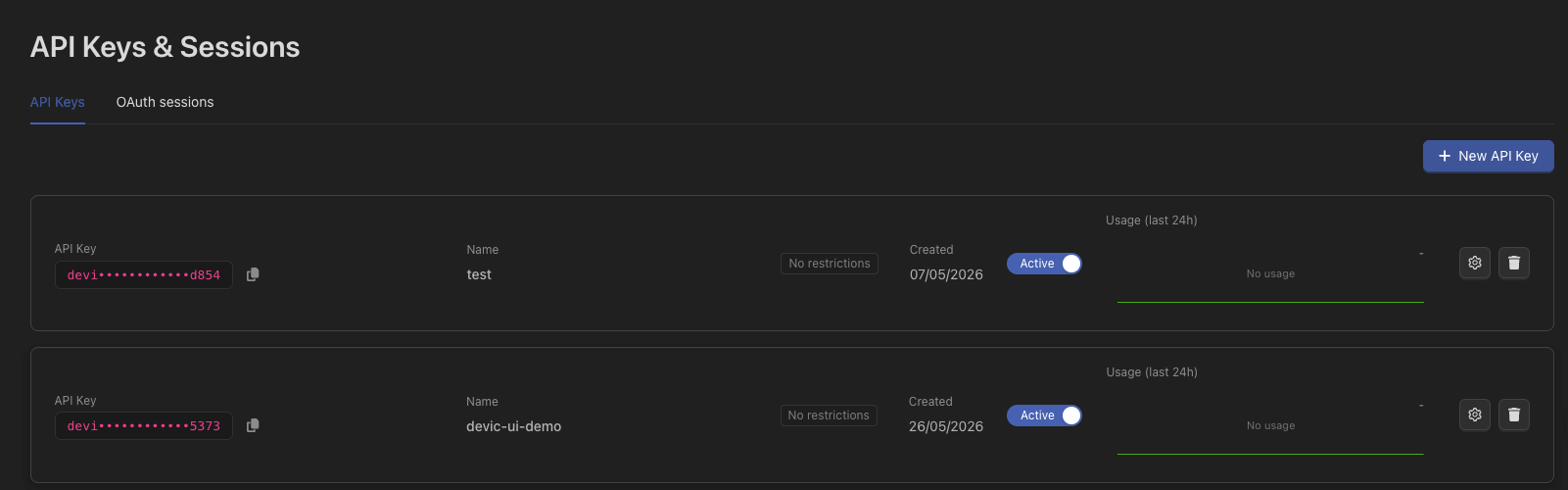
Every call to the Devic public API carries an API key. Keys are created and revoked from **API keys** in the console.
 ```bash theme={null}
curl https://api.devic.ai/v1/assistants \
-H "Authorization: Bearer devic-your-key"
```
***
## Three restrictions worth using
A key with no restrictions can do everything the account can. That is the right shape for a key on your own server and the wrong shape for anything else.
### Endpoints
Grant a key only the groups of endpoints it needs — assistants, agents, documents, memory, per-tenant integrations, and so on.
```bash theme={null}
curl https://api.devic.ai/v1/assistants \
-H "Authorization: Bearer devic-your-key"
```
***
## Three restrictions worth using
A key with no restrictions can do everything the account can. That is the right shape for a key on your own server and the wrong shape for anything else.
### Endpoints
Grant a key only the groups of endpoints it needs — assistants, agents, documents, memory, per-tenant integrations, and so on.
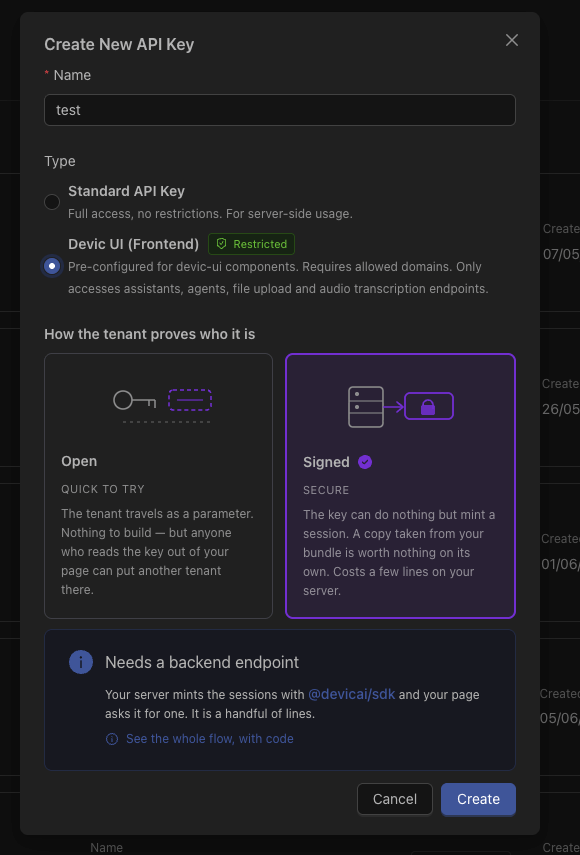 There is a ready-made **devic-ui** selection covering exactly what an embedded widget calls. It deliberately leaves out the privileged surfaces: tenant administration, and the ability to issue tenant sessions.
### Domains
A key can be restricted to the domains it may be used from. Beyond limiting where it works, declaring the domains tells Devic the key is meant for a browser — which is what makes it refuse to mint [tenant sessions](/devic/multi-tenant/tenant-sessions).
### Tenant identity mode
The one that matters most for a multi-customer product:
| Mode | Meaning |
| -------------------- | ----------------------------------------------------------------------------------------------------------------------------------------------------------------- |
| **open** *(default)* | The tenant travels beside the key as a parameter. Whoever holds the key can claim to be any tenant of the account — fine for a key that never leaves your server. |
| **signed** | Only a tenant session is accepted. The key itself can do nothing but mint one, so a copy lifted out of your page's JavaScript is worth nothing. |
Keys created before this setting existed behave as `open`. Tightening them silently would have taken working integrations down, so the change is yours to make.
***
## Which key for which job
Unrestricted, or scoped to what your backend calls. Never shipped to a browser. This is the key that mints tenant sessions.
Endpoint-restricted, domain-restricted, `signed`. It can start a session and nothing else.
A key that has ever been in a bundle is public, whatever you do afterwards. Removing it from the code does not invalidate it — rotate it in the console.
***
## Watching how they are used
There is a ready-made **devic-ui** selection covering exactly what an embedded widget calls. It deliberately leaves out the privileged surfaces: tenant administration, and the ability to issue tenant sessions.
### Domains
A key can be restricted to the domains it may be used from. Beyond limiting where it works, declaring the domains tells Devic the key is meant for a browser — which is what makes it refuse to mint [tenant sessions](/devic/multi-tenant/tenant-sessions).
### Tenant identity mode
The one that matters most for a multi-customer product:
| Mode | Meaning |
| -------------------- | ----------------------------------------------------------------------------------------------------------------------------------------------------------------- |
| **open** *(default)* | The tenant travels beside the key as a parameter. Whoever holds the key can claim to be any tenant of the account — fine for a key that never leaves your server. |
| **signed** | Only a tenant session is accepted. The key itself can do nothing but mint one, so a copy lifted out of your page's JavaScript is worth nothing. |
Keys created before this setting existed behave as `open`. Tightening them silently would have taken working integrations down, so the change is yours to make.
***
## Which key for which job
Unrestricted, or scoped to what your backend calls. Never shipped to a browser. This is the key that mints tenant sessions.
Endpoint-restricted, domain-restricted, `signed`. It can start a session and nothing else.
A key that has ever been in a bundle is public, whatever you do afterwards. Removing it from the code does not invalidate it — rotate it in the console.
***
## Watching how they are used
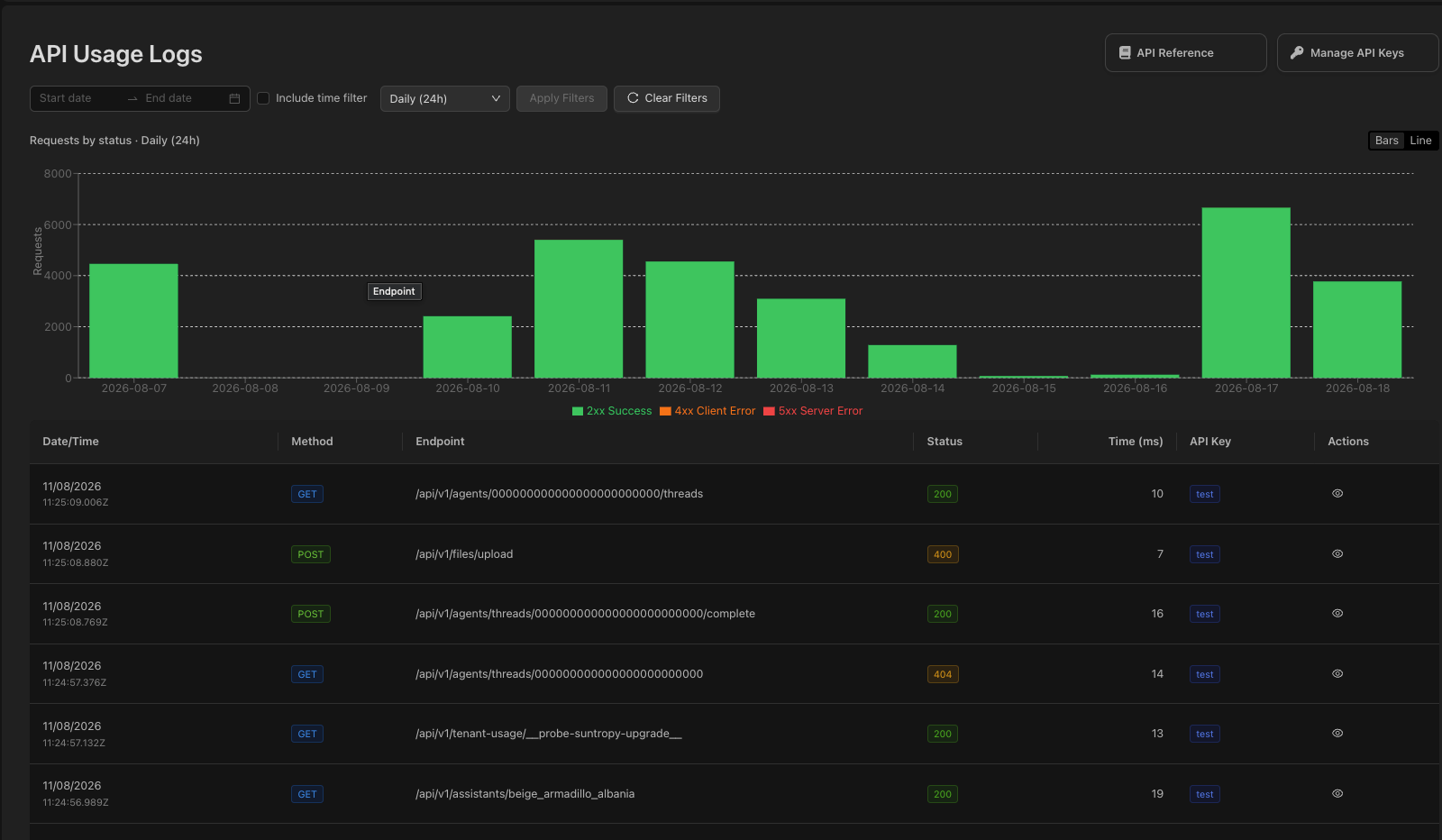 The usage log records calls per key: the endpoint, the response code and when. It answers both the operational question ("what is failing") and the security one ("what is this key actually doing").
Calls made with a tenant session are attributed to the key that issued it, so moving an integration to sessions does not empty the key's metrics.
***
## Related
The credential to use in a browser.
Everything a key can reach.
The usage log records calls per key: the endpoint, the response code and when. It answers both the operational question ("what is failing") and the security one ("what is this key actually doing").
Calls made with a tenant session are attributed to the key that issued it, so moving an integration to sessions does not empty the key's metrics.
***
## Related
The credential to use in a browser.
Everything a key can reach.